The best USB-C display adapter depends on whether you need a simple monitor connection, multiple screens, or a hub that also adds ports and charging. I’d put the Acer 4-in-1 USB-C Hub in the best-overall conversation for its dual-HDMI focus, while the UGREEN 5-in-1 Hub stands out for combining HDMI with 100W power delivery, and the 8K DisplayPort adapter suits high-refresh-rate setups. The main tradeoffs are display compatibility, resolution and refresh-rate support, and extra hub features. A compact cable adapter is simpler to carry, while a hub can reduce desk clutter but may depend more on your laptop’s capabilities. Read on for how the 11 options differ and which type of connection best fits your setup.

Get your home office setup delivered free — and shop member deals
- Fast, free delivery on millions of items
- Access to Prime Big Deal Days deals on October 6–7
- Prime Video, Amazon Music and more included
Complete the kit


Key Takeaways
- Acer’s 4-in-1 hub is the clearest dual-HDMI option in this lineup, while the simple Anker HDMI adapters suit buyers who only need one screen connection.
- UGREEN’s 100W power delivery is the highest stated charging capacity among the listed hub picks; the Anker hubs offer lower stated power delivery alongside different port combinations.
- The DisplayPort 1.4 adapter is the standout for higher refresh rates, with listed support up to 4K at 144Hz; check the source device and display before relying on those modes.
- The BENFEI cable offers a direct DisplayPort connection with a six-foot reach, unlike the compact male-to-female adapter, which is easier to pack but leaves cable length to the monitor cable.
- Two Anker 5-in-1 HDMI splitter listings appear in the lineup; compare their exact included ports and specifications rather than assuming the repeated product name means identical configurations.
| Acer 4-in-1 USB C Hub, Type C to Dual HDMI Adapter 4K@60Hz |  | Best for Dual 4K Displays | Video outputs: 2 × HDMI | Maximum listed display resolution: 4K at 60Hz | Power delivery: Up to 100W | VIEW ON AMAZON | See Our Full Breakdown |
| Anker USB-C Hub, 5-in-1 USB-C to HDMI Splitter with 4K Display | 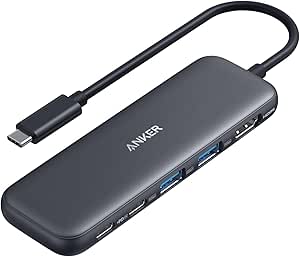 | Best for a Simple Single-Display Setup | Number of ports: 5 | Video output: HDMI, up to 4K | Pass-through charging: Up to 85W | VIEW ON AMAZON | See Our Full Breakdown |
| UGREEN USB C Hub 5 in 1 Multiport USB Adapter 4K HDMI 100W Power Delivery | 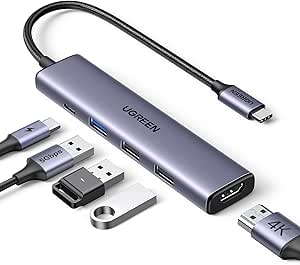 | Best Value for Everyday Connections | Video output: HDMI, up to 4K | Power delivery: Up to 100W | Data transfer rate: Up to 5Gbps | VIEW ON AMAZON | See Our Full Breakdown |
| BENFEI USB-C to DisplayPort Cable (6 Feet, 4K@60Hz, 2K@144Hz), Compatible with Thunderbolt 3/4, MacBook Pro, iPad Pro, XPS, and More | 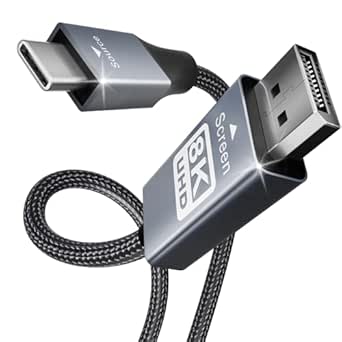 | Best Direct DisplayPort Connection | Connector type: USB Type-C to DisplayPort | Cable length: 6 feet | Maximum listed resolution: 8K at 60Hz or 4K at 144Hz | VIEW ON AMAZON | See Our Full Breakdown |
| Selore USB C Docking Station Dual HDMI Monitor Adapter USB C Hub for 3 Monitors |  | Best for Mixed Display Setups | Video outputs: 2 × HDMI, DisplayPort, VGA | Maximum stated monitor count: Up to 4 | Power delivery: Up to 100W | VIEW ON AMAZON | See Our Full Breakdown |
| Anker USB-C Hub, 5-in-1 Multiport Adapter with 4K HDMI and 90W Power Delivery |  | Best for Charging While Connecting | Host interface: USB Type-C | Number of ports: 5 | USB ports: 3 | VIEW ON AMAZON | See Our Full Breakdown |
| Anker 7-in-1 USB-C Hub with 4K@60Hz HDMI, 85W PD Charging, and SD/TF Card Reader |  | Best for Creators and Frequent File Transfers | Ports: 7: HDMI, 2 × USB-A 3.0, USB-C data, USB-C PD, SD, and TF | Video output: HDMI, up to 4K at 60Hz | Data transfer rate: 5Gbps | VIEW ON AMAZON | See Our Full Breakdown |
| USB C to DisplayPort Adapter, 8K Type-C Male to DisplayPort 1.4 Female, Supports 8K@60Hz, 4K@144Hz, 4K@120Hz Dynamic HDR for Thunderbolt 3/4 Devices |  | Best for High-Resolution and High-Refresh DisplayPort Monitors | Input connector: USB Type-C | Output connector: DisplayPort 1.4 | Resolution support: Up to 8K at 60Hz; also lists 5K and 4K | VIEW ON AMAZON | See Our Full Breakdown |
| Anker USB C to HDMI Adapter (4K@60Hz), USB Type C to HDMI Cable Adapter |  | Best Simple HDMI Pick | Connector: USB-C to HDMI | Video output: Up to 4K at 60Hz | Port count: 1 | VIEW ON AMAZON | See Our Full Breakdown |
| Anker USB-C to DisplayPort Adapter, 4K@60Hz, Mirror or Extend |  | Best for a Straightforward DisplayPort Setup | Input connector: USB Type-C | Display connector: DisplayPort | Video output: Up to 4K at 60Hz | VIEW ON AMAZON | See Our Full Breakdown |
| Anker USB-C Hub, 5-in-1 USB-C to HDMI Splitter with 4K Display |  | Best for Everyday Port Expansion | Connectivity: HDMI, USB-C, USB-A | HDMI output: 4K at 30Hz | USB-C data: 1 port, up to 5 Gbps; no video output | VIEW ON AMAZON | See Our Full Breakdown |
| usb c display adapter | Data transfer rate | Power delivery | Video output | Dimensions |
|---|---|---|---|---|
| Acer 4-in-1 USB C Hub | Up to 5Gbps | Up to 100W | — | — |
| Anker USB-C Hub | Up to 5Gbps | — | HDMI, up to 4K | 4.78 × 1.59 × 0.45 inches |
| UGREEN USB C Hub 5 in 1 Multip | Up to 5Gbps | Up to 100W | HDMI, up to 4K | 4.79 × 1.09 × 0.47 inches |
| BENFEI USB-C to DisplayPort Ca | 5Gbps | — | — | — |
| Selore USB C Docking Station D | 480Mbps | Up to 100W | — | 4.5 × 2 × 0.62 inches |
| Anker USB-C Hub | 5Gbps | Up to 90W pass-through | HDMI, up to 4K at 30Hz | 4.8 × 1.2 × 0.46 inches |
| Anker 7-in-1 USB-C Hub with 4K | 5Gbps | Up to 85W output; input up to 100W | HDMI, up to 4K at 60Hz | 5.17 × 1.46 × 0.47 inches |
| USB C to DisplayPort Adapter | — | — | — | — |
| Anker USB C to HDMI Adapter | — | — | Up to 4K at 60Hz | — |
| Anker USB-C to DisplayPort Ada | — | — | Up to 4K at 60Hz | 1.97 × 0.85 × 0.45 inches |
| Anker USB-C Hub | — | Up to 85W pass-through charging | — | — |
More Details on Our Top Picks
Acer 4-in-1 USB C Hub, Type C to Dual HDMI Adapter 4K@60Hz
For a USB-C display adapter meant to run two monitors, the Acer stands out with dual HDMI outputs rated for 4K at 60Hz, plus a 100W power-delivery port and USB 3.0 data connection. That mix makes it more useful as a compact desk hub than a single-display cable such as the BENFEI USB-C to DisplayPort Cable. The charging pass-through can reduce cable clutter, though the external charger and cable are not included. The key limitation is host-device support: the USB-C port needs DisplayPort Alt Mode, and the listing warns that macOS may mirror displays rather than provide separate extended desktops. I’d choose it for a compatible Windows setup that needs two HDMI screens; buyers with a Mac should check display behavior before relying on it.
Pros:- Two HDMI outputs support up to 4K at 60Hz each
- 100W power-delivery port supports laptop charging through the hub
- USB 3.0 connection supports data transfer up to 5Gbps
- Compact, lightweight design suits travel and small desks
Cons:- Requires a host USB-C port with DisplayPort Alt Mode
- External power adapter and cable are not included
- macOS may mirror the connected displays instead of extending the desktop
Best for: Windows laptop owners with DisplayPort Alt Mode who need two HDMI monitors and a USB-A connection at a compact desk or on the go.
Not ideal for: Mac users who need two independent extended desktops, or anyone whose USB-C port lacks DisplayPort Alt Mode.
- Video outputs:2 × HDMI
- Maximum listed display resolution:4K at 60Hz
- Power delivery:Up to 100W
- Data transfer rate:Up to 5Gbps
- Host requirement:USB-C with DisplayPort Alt Mode
- Operating systems listed:macOS 14 Sonoma, Windows 11
- Enclosure material:Plastic
- Warranty:7 years
Our verdict“Choose the Acer for a compatible Windows laptop when two 4K HDMI displays matter more than broad Mac display support.”
Anker USB-C Hub, 5-in-1 USB-C to HDMI Splitter with 4K Display
The Anker’s appeal is a straightforward combination of 4K HDMI output, USB-A connectivity, and up to 85W pass-through charging. Compared with the Acer 4-in-1, it gives up dual HDMI output and some charging headroom, but its five-port layout suits buyers who want one external screen alongside everyday peripherals. The USB-C port is for power pass-through, not video, so it cannot add another display; that distinction matters if the word “splitter” suggests multiple independent screens. You’ll also need a separate charger to use pass-through charging, and Linux is not supported. I’d rank it as a practical pick for supported Windows or MacBook computers with DP Alt Mode, not as a multi-monitor solution or a universal hub.
Pros:- Provides 4K video output over HDMI
- Up to 85W pass-through charging keeps a compatible laptop powered
- Combines USB-A, USB-C, and HDMI connectivity in a five-port hub
- Lightweight at 1.44 ounces
Cons:- USB-C port does not carry video
- A separate compatible charger is required for pass-through charging
- Not compatible with Linux
Best for: Windows or MacBook users with USB-C DP Alt Mode who want one 4K HDMI display, peripheral ports, and laptop charging through a compact hub.
Not ideal for: Linux users, anyone seeking multiple independent displays, or buyers who need video output from the hub’s USB-C port.
- Number of ports:5
- Video output:HDMI, up to 4K
- Pass-through charging:Up to 85W
- Data transfer rate:Up to 5Gbps
- Host compatibility:USB-C with DP Alt Mode and Power Delivery, USB4, Thunderbolt 3/4/5
- Dimensions:4.78 × 1.59 × 0.45 inches
- Weight:1.44 ounces
- Enclosure material:ABS
Our verdict“Pick this Anker for one external 4K display and useful everyday ports, but choose the Acer if you need dual HDMI screens.”
UGREEN USB C Hub 5 in 1 Multiport USB Adapter 4K HDMI 100W Power Delivery
The UGREEN combines one 4K HDMI output, 100W power delivery, and multiple USB-A ports in a slim aluminum hub. It is a more balanced everyday option than the BENFEI USB-C to DisplayPort Cable if you also need peripherals and charging, while the Acer is the stronger fit for a two-HDMI monitor setup. This UGREEN provides only one HDMI display connection, and its listed features do not include Ethernet or card readers, so it won’t replace a fuller workstation dock. Its 5Gbps data rate is suitable for routine accessory and file-transfer use, but it does not make this a high-bandwidth storage hub. I’d favor it for a MacBook or iPad Pro user who wants one external display and basic expansion without a bulky station.
Pros:- HDMI output supports 4K display connections
- USB-C power-delivery port supports up to 100W
- Multiple USB-A connections expand basic peripheral support
- Aluminum enclosure and slim dimensions suit portable use
Cons:- Provides only one HDMI display output
- No Ethernet or SD card slots are listed
- Requires a USB-C host connection
Best for: MacBook and iPad Pro owners who need one HDMI display, USB-A peripherals, and USB-C power pass-through in a portable hub.
Not ideal for: Users who need dual external displays, Ethernet, card-reader slots, or a broader dock-style set of connections.
- Video output:HDMI, up to 4K
- Power delivery:Up to 100W
- Data transfer rate:Up to 5Gbps
- USB interfaces:USB 2.0 and USB 3.0
- Dimensions:4.79 × 1.09 × 0.47 inches
- Weight:91g
- Enclosure material:Aluminum
- Warranty:24 months
Our verdict“Choose the UGREEN for a portable one-screen setup with charging and basic USB expansion, rather than a multi-monitor workstation.”
BENFEI USB-C to DisplayPort Cable (6 Feet, 4K@60Hz, 2K@144Hz), Compatible with Thunderbolt 3/4, MacBook Pro, iPad Pro, XPS, and More
Unlike the multiport hubs here, the BENFEI is a direct USB-C-to-DisplayPort cable: it connects a compatible computer to one DisplayPort monitor without adding a hub or requiring a separate adapter. Its listed support for up to 8K at 60Hz and 4K at 144Hz makes it the display-focused choice over the UGREEN’s HDMI hub when the monitor has DisplayPort and high refresh rates matter. The tradeoff is narrow utility: it offers no charging or USB ports, and signal direction runs from USB-C source to DisplayPort display only. BENFEI also cautions that some devices may take longer to sync, and the cable is not compatible with KVM switches. I’d pick it for a clean single-monitor connection, not for expanding a laptop’s desk connectivity.
Pros:- Supports listed output up to 8K at 60Hz or 4K at 144Hz
- Six-foot length offers flexibility in monitor placement
- Nylon-braided jacket and aluminum case provide a reinforced build
- Plug-and-play connection requires no driver
Cons:- Carries video in one direction, from USB-C source to DisplayPort display
- Adds no charging or peripheral ports
- Not compatible with KVM switches, and some devices may sync slowly
Best for: Owners of a USB-C or Thunderbolt computer and a DisplayPort monitor who want a direct connection, including users targeting high resolutions or refresh rates.
Not ideal for: Buyers who need HDMI, laptop charging, extra USB ports, bidirectional video, or KVM-switch compatibility.
- Connector type:USB Type-C to DisplayPort
- Cable length:6 feet
- Maximum listed resolution:8K at 60Hz or 4K at 144Hz
- Listed frequency:Up to 240Hz
- Data transfer rate:5Gbps
- Cable and case materials:Nylon-braided jacket, aluminum case
- Compatibility:Selected MacBook, Surface, Samsung Galaxy, Dell XPS, and Chromebook devices
- Signal direction:USB-C source to DisplayPort display
Our verdict“Choose the BENFEI when a direct, high-resolution DisplayPort connection matters more than hub features or HDMI compatibility.”
Selore USB C Docking Station Dual HDMI Monitor Adapter USB C Hub for 3 Monitors
The Selore is the most connector-flexible display hub in this group, pairing two HDMI outputs with DisplayPort and VGA for setups that mix newer and older monitors. That range gives it a different role from the Acer, which focuses on two HDMI screens and lists 4K at 60Hz, while the Selore prioritizes output variety and claims support for up to four monitors. It also includes 100W power delivery and USB ports, but its listed data rate is only 480Mbps, far below the 5Gbps hubs from Anker and UGREEN. Display expansion depends on a full-featured USB-C or Thunderbolt port, and MacBooks may mirror rather than extend screens; VGA may also be limited to 1080p on some devices. I’d choose it for mixed monitor connections, not fast peripheral transfers.
Pros:- Includes dual HDMI, DisplayPort, and VGA video outputs
- Supports up to 100W laptop charging
- Offers a broad range of display connectors for mixed monitor setups
- Compact aluminum body weighs 90g
Cons:- Listed data transfer rate is 480Mbps, lower than the 5Gbps UGREEN and Anker hubs
- Full functionality requires a full-featured USB-C or Thunderbolt port
- MacBooks may mirror displays, and VGA may be limited to 1080p on some devices
Best for: Laptop users with a full-featured USB-C or Thunderbolt port who need to connect a mix of HDMI, DisplayPort, and VGA monitors.
Not ideal for: MacBook owners who require separate extended desktops, or users who prioritize fast USB data transfer and modern-only display connections.
- Video outputs:2 × HDMI, DisplayPort, VGA
- Maximum stated monitor count:Up to 4
- Power delivery:Up to 100W
- Data transfer rate:480Mbps
- Number of ports:8
- Host requirement:Full-featured USB-C or Thunderbolt 3/4
- Dimensions:4.5 × 2 × 0.62 inches
- Weight and material:90g; aluminum enclosure
Our verdict“Choose the Selore for a compatible laptop that must connect to varied monitor ports, but skip it if fast data transfer or reliable Mac extended desktops are priorities.”
Anker USB-C Hub, 5-in-1 Multiport Adapter with 4K HDMI and 90W Power Delivery
I’d choose this hub when a laptop needs a display connection, USB accessories, and power through one compact adapter. Its 90W pass-through charging is higher than the 85W output listed for the Anker 7-in-1, though the laptop still needs its own compatible charger. For display use, it supports 4K at 30Hz, a notable limit beside the 7-in-1’s 4K at 60Hz and the dedicated Anker USB-C to HDMI Adapter’s 4K at 60Hz. That lower refresh rate suits documents, slides, and casual viewing better than fast-motion work. Three USB ports add practical flexibility, but this is not the pick for Linux users, and the host device must support DP Alt Mode and Power Delivery. I’d favor it for everyday desk connections, not high-refresh display work.
Pros:- 90W pass-through charging can power a compatible laptop while the hub is connected.
- HDMI and three USB ports combine display output with accessory connectivity.
- Compact 4.8-inch-long body is easy to pack with a laptop.
- Supports 4K display output for office work and media viewing.
Cons:- 4K output is limited to 30Hz, below the 60Hz support of several dedicated adapters in this roundup.
- Requires a USB-C host with DP Alt Mode and Power Delivery.
- Charger is not included, and Linux is not supported.
Best for: Windows or Chrome OS laptop owners who want HDMI, several USB connections, and pass-through charging in one small hub.
Not ideal for: Linux users and anyone who needs 4K at 60Hz, since this model lists Linux incompatibility and supports 4K at 30Hz.
- Host interface:USB Type-C
- Number of ports:5
- USB ports:3
- Video output:HDMI, up to 4K at 30Hz
- Data transfer rate:5Gbps
- Power Delivery:Up to 90W pass-through
- Operating system compatibility:Chrome OS 134, Windows 10; not compatible with Linux
- Dimensions:4.8 × 1.2 × 0.46 inches
- Enclosure material:Plastic
Our verdict“Choose this hub for a compatible Windows or Chrome OS laptop if charging and multiple ports matter more than 4K at 60Hz.”
Anker 7-in-1 USB-C Hub with 4K@60Hz HDMI, 85W PD Charging, and SD/TF Card Reader
This is the most useful choice here for someone who needs a display adapter that also handles camera cards and everyday peripherals. The 4K at 60Hz HDMI output gives it a smoother display connection than the 5-in-1 Anker hub, which tops out at 4K at 30Hz. Its SD and TF slots also set it apart from the dedicated Anker USB-C to HDMI Adapter, which provides video only. Two USB-A ports and a USB-C data port support accessories at 5Gbps, while the separate USB-C PD input supplies up to 85W to a connected laptop. The tradeoff is that the USB-C data port does not carry video, and charging requires a separate charger. I’d pick it for a compact workstation or card-based photo workflow, not for anyone expecting every USB-C port to be interchangeable.
Pros:- HDMI supports 4K at 60Hz for smoother desktop use than the 5-in-1 Anker hub’s 30Hz output.
- SD and TF card slots make photo and video imports more direct.
- Two USB-A ports and a USB-C data port support multiple accessories at 5Gbps.
- Metal enclosure and compact dimensions suit a portable setup.
Cons:- USB-C data port does not support video output.
- Up to 85W charging requires a separate compatible charger.
- More ports mean a larger adapter than a single-purpose display dongle.
Best for: Laptop users who regularly transfer photos from SD or TF cards and want 4K at 60Hz, peripheral ports, and pass-through charging.
Not ideal for: Buyers who need video through the hub’s USB-C data port or want a simple, lightweight adapter with no extra hub features.
- Ports:7: HDMI, 2 × USB-A 3.0, USB-C data, USB-C PD, SD, and TF
- Video output:HDMI, up to 4K at 60Hz
- Data transfer rate:5Gbps
- Power Delivery:Up to 85W output; input up to 100W
- Compatibility:Windows, macOS 10.12+, USB4, Thunderbolt 3/4/5
- Material:Metal
- Dimensions:5.17 × 1.46 × 0.47 inches
- Weight:67g
Our verdict“Pick this hub if you want a 4K-at-60Hz display connection alongside card readers, USB accessories, and laptop charging.”
USB C to DisplayPort Adapter, 8K Type-C Male to DisplayPort 1.4 Female, Supports 8K@60Hz, 4K@144Hz, 4K@120Hz Dynamic HDR for Thunderbolt 3/4 Devices
For a compatible DisplayPort monitor, this adapter offers the highest stated display ceiling in this group: up to 8K at 60Hz, with listed support for high-refresh 4K modes. That makes it a stronger match for a demanding monitor than the Anker USB-C to DisplayPort Adapter, which is specified for 4K at 60Hz. It also lists multi-stream transport for daisy-chaining monitors, though the host, monitor, and connection setup must support that feature. The focused design keeps the job simple: USB-C video in, DisplayPort out. The cost of that focus is no HDMI, USB ports, or charging, so the Anker 7-in-1 is more useful when desk accessories and card readers matter. I’d select this for a high-resolution or gaming monitor, after checking the source device’s video capabilities.
Pros:- Lists support for up to 8K at 60Hz and high-refresh 4K modes.
- DisplayPort 1.4 output suits compatible monitors with demanding resolution or refresh needs.
- Multi-stream transport support can enable a compatible daisy-chain setup.
- Braided nylon cable and aluminum casing add durability.
Cons:- Works only with USB-C DP Alt Mode or Thunderbolt 3/4 sources that support the requested display mode.
- DisplayPort-only output excludes HDMI, VGA, and DVI displays without another adapter.
- Provides no charging or additional data ports.
Best for: Owners of a compatible USB-C DP Alt Mode or Thunderbolt 3/4 computer who need DisplayPort for a high-resolution or high-refresh monitor.
Not ideal for: Anyone connecting an HDMI, VGA, or DVI display, or anyone who also needs charging and peripheral ports from the adapter.
- Input connector:USB Type-C
- Output connector:DisplayPort 1.4
- Resolution support:Up to 8K at 60Hz; also lists 5K and 4K
- Refresh rates:Lists 4K at 120Hz and 144Hz, and refresh rates up to 240Hz
- Compatibility:USB-C with DP Alt Mode, Thunderbolt 3 and Thunderbolt 4
- Audio support:SACD, DVD-Audio, DTS-HD, and Dolby TrueHD
- Cable material:Braided nylon
- Warranty:1 year
Our verdict“Choose this adapter for a compatible DisplayPort monitor when resolution or refresh rate matters more than hub features.”
Anker USB C to HDMI Adapter (4K@60Hz), USB Type C to HDMI Cable Adapter
I’d recommend this when the only job is connecting a USB-C laptop or tablet to an HDMI screen. The 4K at 60Hz output is a clear step up from the 5-in-1 Anker hub’s 4K-at-30Hz limit, and its direct, plug-and-play design avoids the extra ports and card slots found on the Anker 7-in-1. A braided cable and aluminum casing add protection for a small adapter that may travel between rooms or workstations. Its simplicity is also its main limitation: it cannot charge the source device or connect USB accessories, so a hub is a better fit for a desk where one connection needs to handle several tasks. The host must support DP Alt Mode, USB4, or Thunderbolt video output. I’d skip it if you need more than HDMI.
Pros:- Supports HDMI output up to 4K at 60Hz.
- Plug-and-play setup requires no installation.
- Aluminum casing and reinforced braided cable support regular travel and handling.
- Works with compatible USB-C DP Alt Mode, USB4, and Thunderbolt devices.
Cons:- Does not provide Power Delivery or charge the connected laptop.
- Video-only design has no USB or card-reader ports.
- Requires a host device with supported video output over USB-C.
Best for: People who need a compact, direct USB-C-to-HDMI connection for a 4K monitor or television and do not need extra ports.
Not ideal for: Laptop users who need pass-through charging, USB accessory connections, or DisplayPort rather than HDMI.
- Connector:USB-C to HDMI
- Video output:Up to 4K at 60Hz
- Port count:1
- Compatible devices:Compatible laptops, MacBook Pro, MacBook Air, iPad Pro, Pixelbook, XPS, and Galaxy devices
- Video compatibility:USB-C DP Alt Mode, USB4, and Thunderbolt connections
- Casing finish:Aluminum
- Weight:18.14g
- Warranty:18 months
Our verdict“Choose this Anker adapter for a reliable, single-purpose 4K-at-60Hz HDMI connection without hub features.”
Anker USB-C to DisplayPort Adapter, 4K@60Hz, Mirror or Extend
This Anker adapter is a simple route from a compatible USB-C device to a DisplayPort monitor, with 4K at 60Hz and support for mirror or extend display modes. Compared with the USB C to DisplayPort Adapter listed for 8K and high-refresh 4K, this model has a lower stated performance ceiling; in return, its stated feature set stays focused on routine monitor connection rather than advanced display modes. It also avoids the broader footprint of the Anker 7-in-1 hub, but gives up HDMI, charging, and accessory ports. That makes it a sensible match for a desk already equipped with DisplayPort cabling. I’d confirm that the source device supports video output over USB-C before buying, since the adapter does not add that capability. It is not the right fit for an HDMI-only monitor.
Pros:- Supports DisplayPort output up to 4K at 60Hz.
- Allows mirror or extend display modes.
- Plug-and-play operation does not require additional software.
- Single-purpose design is simpler than a multiport hub such as the Anker 7-in-1.
Cons:- Connects only to DisplayPort displays, not HDMI monitors.
- Supports one display connection and offers no additional ports.
- Does not list the higher-resolution and high-refresh modes of the 8K DisplayPort adapter.
Best for: Laptop or tablet owners with a compatible USB-C video output and a DisplayPort monitor who want a basic 4K-at-60Hz connection.
Not ideal for: People with HDMI-only displays, users who need charging or extra ports, and buyers seeking the higher stated refresh and resolution modes of the 8K adapter.
- Input connector:USB Type-C
- Display connector:DisplayPort
- Video output:Up to 4K at 60Hz
- Display modes:Mirror or extend
- Port count:1
- Compatible devices:Laptop, monitor, and tablet
- Dimensions:1.97 × 0.85 × 0.45 inches
- Weight:18.14g
- Warranty:18 months
Our verdict“Pick this adapter for a straightforward 4K-at-60Hz connection to one compatible DisplayPort monitor.”
Anker USB-C Hub, 5-in-1 USB-C to HDMI Splitter with 4K Display
I’d choose this hub when a USB-C display connection needs to come with useful everyday ports. Its 4K HDMI output at 30Hz suits presentations, streaming, and general desktop work, while two USB-A ports and a USB-C data port let me connect peripherals without adding another adapter. Compared with the Anker 7-in-1 USB-C Hub, this model keeps the setup simpler but lacks a card reader and the higher 4K refresh rate offered by that alternative. It also passes through up to 85W of charging, though a separate charger is required and the hub’s USB-C port handles data, not video. I’d skip it for Linux systems or refresh-rate-sensitive gaming; its value is in consolidating basic connections, not maximizing display performance.
Pros:- 4K HDMI output supports a high-resolution external display for work and streaming.
- Two USB-A ports and a 5 Gbps USB-C data port expand peripheral connectivity.
- Up to 85W pass-through charging can power a compatible laptop while the hub is connected.
- At 1.44 ounces, it adds little weight to a portable laptop setup.
Cons:- HDMI is limited to 4K at 30Hz, below the 4K@60Hz capability of the Anker 7-in-1 hub.
- The USB-C port supports data only, not video output.
- Requires a separate charger for pass-through power and is not compatible with Linux.
Best for: MacBook, Windows, or ChromeOS laptop owners who want one HDMI display connection plus USB-A peripherals and pass-through charging for office or home use.
Not ideal for: Linux users, gamers seeking a higher-refresh 4K display, or anyone who needs video output from the hub’s USB-C port.
- Connectivity:HDMI, USB-C, USB-A
- HDMI output:4K at 30Hz
- USB-C data:1 port, up to 5 Gbps; no video output
- USB-A ports:2 ports, up to 5 Gbps
- Power delivery:Up to 85W pass-through charging
- Compatibility:MacBook, Windows, and ChromeOS; not Linux
- Material:ABS
- Weight:1.44 ounces
Our verdict“Choose this compact hub for a straightforward 4K display connection and everyday ports, but pick a higher-refresh adapter or a Linux-compatible option if those needs come first.”

How We Picked
I ranked these USB-C display adapters by how well their connection type and stated capabilities match real display needs: one-monitor HDMI, DisplayPort, multiple screens, and desk hubs that add charging or card access. I gave weight to clearly specified resolution and refresh-rate support, useful port combinations, and practical details such as cable length or power delivery. A high display specification only helps when the laptop, USB-C port, adapter, and monitor all support the same mode.
The order favors versatility and clearly useful display functionality first, then more specialized or simpler connections. Hubs rank well when they combine display output with ports or charging, but they are not automatically better than direct adapters: extra functions add bulk and can introduce compatibility questions. The product names supplied do not establish every port layout or operating-system limitation, so I avoid treating unspecified features as guaranteed and recommend checking the exact listing and device support before buying.
| usb c display adapter | Power delivery | Video output |
|---|---|---|
| Acer 4-in-1 USB C Hub | Up to 100W | — |
| Anker USB-C Hub | — | HDMI, up to 4K |
| UGREEN USB C Hub 5 in 1 Multip | Up to 100W | HDMI, up to 4K |
| BENFEI USB-C to DisplayPort Ca | — | — |
| Selore USB C Docking Station D | Up to 100W | — |
| Anker USB-C Hub | Up to 90W pass-through | HDMI, up to 4K at 30Hz |
| Anker 7-in-1 USB-C Hub with 4K | Up to 85W output; input up to 100W | HDMI, up to 4K at 60Hz |
| USB C to DisplayPort Adapter | — | — |
| Anker USB C to HDMI Adapter | — | Up to 4K at 60Hz |
| Anker USB-C to DisplayPort Ada | — | Up to 4K at 60Hz |
| Anker USB-C Hub | Up to 85W pass-through charging | — |
Factors to Consider When Choosing Usb C Display Adapters
Before choosing an adapter, match the connection to your complete setup—not just the monitor. I’d start with the laptop’s USB-C capabilities, then decide whether you need one screen or several, and only after that compare charging and extra ports.
Check What Your USB-C Port Can Output
A USB-C-shaped port does not automatically carry video. Your computer needs to support display output through that port, often through DisplayPort Alt Mode or Thunderbolt, for a direct USB-C display adapter to work. Check the laptop’s specifications or port markings before ordering; charging support alone does not confirm video support. Thunderbolt compatibility can broaden the available connection options, but the computer and cable still need to support the display mode you want. This check can prevent a common mistake: buying an adapter with impressive output numbers for a port that sends no video.
Match Resolution and Refresh Rate Across the Whole Chain
Resolution and refresh rate are shared limits, not adapter-only features. The laptop’s graphics hardware, USB-C output, adapter, cable, and monitor all need to support the chosen mode. For office work, a stable 4K connection at 60Hz may matter more than a higher refresh-rate headline; gaming and fast desktop motion can make 120Hz or 144Hz more valuable. Higher modes may depend on the exact DisplayPort or HDMI version and on settings such as color depth or HDR. Check the monitor’s input specifications and the computer’s output limits before paying for capacity your setup cannot use.
Decide Whether You Need One Screen or Multiple
A hub with two HDMI outputs does not guarantee two independent extended desktops. Some computers mirror the same image across outputs, while support for separate external displays can depend on the operating system, graphics hardware, and display protocol. Check both the adapter’s stated display behavior and your computer’s limit for external monitors. If you only connect one screen, a direct HDMI or DisplayPort adapter is usually simpler and easier to pack. For a multi-monitor desk, confirm the exact number of independent displays supported rather than counting sockets alone.
Treat Power Delivery as a System Limit
A hub’s power-delivery rating describes its maximum pass-through capability, not a promise that your laptop will receive that amount at all times. The charger, USB-C cable, hub, and computer each affect delivered power, and some capacity may be used by the hub itself. Compare the adapter’s stated PD support with your laptop’s supplied charger needs. A higher rating can be useful for a power-hungry laptop, but it will not improve display quality. If you already charge through a separate port or use a low-power device, paying extra attention to charging capacity may add little value.
Choose Hub Features Only If They Replace Something You Need
USB-A ports, card readers, and power pass-through can turn a display connection into a useful desk hub, but each addition can mean more bulk and more items to troubleshoot. Think about what you regularly plug in: a keyboard or mouse, removable storage, a camera card, or a charger. A card reader has little value if your workflow never uses memory cards, while extra data ports can help a laptop with few built-in connections. Confirm that the listing specifies the ports you need and their intended use. For a monitor-only setup, a direct adapter avoids paying for functions that will sit unused.
Plan for Cable Reach, Port Shape, and Your Carrying Setup
Choose between a fixed cable and a compact adapter based on where the monitor sits and how often you travel. A longer cable can reach across a desk without adding another cable, while a small female-port adapter lets you use a separate cable that can be replaced or swapped. Check connector orientation and the space around neighboring laptop ports; a wide hub may crowd adjacent connections. For a permanent desk, cable routing and strain relief matter more than pocket size. For travel, fewer separate parts may be convenient, but a short adapter still needs a suitable display cable.
Frequently Asked Questions
Will any USB-C display adapter work with my laptop?
No. Your laptop’s USB-C port must support video output, and the adapter must match the display connection and mode you plan to use. Look up whether the port supports DisplayPort Alt Mode or Thunderbolt, then verify the computer’s limits for resolution, refresh rate, and external screens. A USB-C port used only for charging and data may not send a display signal. Checking the laptop’s technical specifications first is more reliable than judging by the port’s shape.
Can a dual-HDMI adapter run two separate extended displays?
Not automatically. Some adapters mirror one image on both monitors, while independent extended displays depend on the adapter’s design and the computer’s operating system and graphics support. Confirm that the product specifically supports two independent external displays for your device, not just two HDMI connectors. Also check how many external screens your computer can drive at once. If separate desktops are essential, verify this compatibility before selecting a dual-output hub.
Should I choose HDMI or DisplayPort for a high-refresh-rate monitor?
Choose based on the inputs and supported modes of both your computer and monitor, rather than assuming one connector is always faster. The listed DisplayPort 1.4 adapter specifies support up to 4K at 144Hz, which makes it a relevant option for compatible high-refresh setups. That figure is not a guarantee for every laptop, cable, or monitor configuration. Check the device specifications for the exact resolution, refresh rate, HDR, and color settings you plan to use. If your monitor has both inputs, compare their documented capabilities with your computer’s output.
Does a hub’s power-delivery rating mean it replaces my laptop charger?
Only if the hub, charger, and laptop support a suitable power-delivery arrangement. The number on a hub describes a stated maximum, and actual power reaching the laptop can vary based on the charger and what the hub uses. Compare the laptop’s charging requirements with the hub’s specification and use a compatible USB-C charger. A hub can simplify a desk by combining charging and display connections, but it may not be the right charging replacement for every computer. Keep the original charger available until compatibility is confirmed.
When is a direct adapter a better choice than a USB-C hub?
A direct adapter makes more sense when you need only one display connection, want fewer parts, or prefer a compact travel setup. It avoids carrying hub ports you may never use and can make troubleshooting simpler. A hub is a better fit when you also need charging, USB ports, or card access at the same desk. Compare the total setup, including any separate display cable required by a small adapter. The right choice is the one that covers your connections without adding unused bulk.
Conclusion
For the broadest mix of display flexibility, I’d start with the Acer 4-in-1 USB-C Hub as the best overall candidate, especially if dual HDMI is useful; confirm independent-display support for your computer before buying. The UGREEN 5-in-1 Hub is my best value-style pick for shoppers who want HDMI and up to 100W stated power delivery in one adapter, while the 8K DisplayPort 1.4 adapter is the best premium-style choice for a compatible high-refresh-rate monitor. Beginners who need a straightforward single-screen connection can start with the Anker USB-C to HDMI Adapter, after checking USB-C video support on their laptop. For a longer direct DisplayPort run, consider the six-foot BENFEI cable; for added card and USB connections, compare the Anker 7-in-1 hub. Choose by your computer’s display limits first, then narrow the options by the ports and charging you will actually use.
Halloween Picks
halloween
As an affiliate, we earn on qualifying purchases.