
For most projector hush boxes, my best overall pick is the Dual 120mm 5V USB Cooling Fan with Speed Controller and Dual Ball Bearings, which pairs a practical two-fan layout with adjustable speed. The 2-Pack 140mm Variable Speed Cooling Fans stand out when a larger enclosure needs broad airflow, while the Cabinet Cooling Fan suits buyers who want a slim, no-drill installation. The main tradeoff is between moving enough air to manage projector heat and keeping fan noise from undermining the hush box. Power source, vent layout, fan size, and whether the stated airflow can circulate through your enclosure all affect the result. Read on for my full comparison and guidance on matching a fan setup to your projector and box.

Get business pricing on your home office setup
- Business-only prices and quantity discounts
- Tax-exempt purchasing
- Multiple users, one account, clear invoices
Complete the kit


Key Takeaways
- The dual 120mm USB fan is my best overall choice because its speed controller lets buyers balance airflow and noise rather than committing to one fixed setting.
- The 140mm AC-powered pair is the standout for larger boxes, but buyers need space for larger fans and a suitable AC-powered installation.
- USB models dominate the compact, simple-to-power options, while AC and 12V products call for closer attention to wiring, outlets, and compatibility.
- Fan size alone does not determine cooling performance: vent placement and an unobstructed path through the hush box matter just as much.
- The 260mm USB fan and the dual 80mm or 92mm pairs serve different layouts; a large single fan favors broad coverage, while smaller pairs can fit tighter mounting areas.





| cooling fans for projector hush boxe | Noise level | Airflow | Voltage | Fan size |
|---|---|---|---|---|
| Dual 120mm 5V USB Cooling Fan | 31 dB | — | 5 V | — |
| AC 110V-120V 120mm Computer Co | 44 dB | 100 cubic centimeters per minute (as listed) | 110–120 V | 120 × 25 mm |
| X1 USB Cooling Fan | 18 dB | 55.8 CFM | 5 V | — |
| 2-Pack 140mm Variable Speed Co | 20 dB | 88 CFM | 120 V | 140 mm |
| 2-Pack Quiet 120mm USB Fan wit | 19 dBA | — | — | 120 mm |
| Cabinet Cooling Fan | 35.2 dB | — | 5 V | — |
| ELUTENG Dual 80mm USB Cooling | 32.5 dB | 23.9 / 27.9 / 31.98 CFM | — | Dual 80 mm |
| High Airflow Cooling Fan 260mm | 14.4 dB | 56 CFM | 5 V | — |
| Wathai Cooling Case Fan for Re | 23 dBA | 56.7 CFM | 5 V | — |
| 2 Pack Wathai 92mm x 25mm 5V U | 27 dBA | 86.8 CFM (product listing does not specify per-fan or combined) | — | — |
| 240mm USB Router Cooling Fan w | 13.6 dB | — | — | — |
| Computer Fan with AC Plug | <41 dB | 95.8 CFM | — | 120 x 120 x 25 mm |
| 60mm Small 12V DC 2Pin Car Aud | 38 dB | 22.1 CFM per fan | 12V DC | 60 x 60 x 25 mm |
| AmRunJe USB Cooling Fan 120mm | 32 dBA | 77 CFM per fan | — | 120 x 120 x 25 mm |
More Details on Our Top Picks
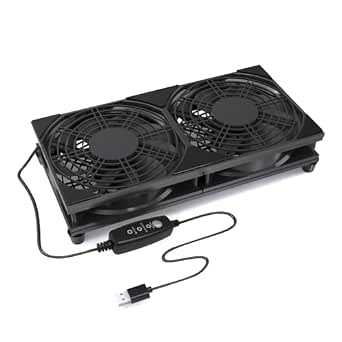
Dual 120mm 5V USB Cooling Fan with Speed Controller and Dual Ball Bearings
Three speed settings make this a flexible choice when a projector hush box needs different airflow during setup or changing room conditions. Its stated 31 dB noise level is higher than the X1 USB Cooling Fan’s 18 dB, so it suits buyers who value control and straightforward USB power over the quietest stated operation. The dual-fan format may help move air across a wider area than a single 120mm fan, though its 9.45-by-4.72-inch footprint needs room inside the enclosure. Tool-free installation and stainless steel feet simplify placement, but the product data does not specify airflow, making it harder to predict cooling capacity for a heat-heavy projector. I’d choose it for a moderate-heat setup where speed adjustment matters, not a tightly packed box with little clearance.
Pros:- Three speed settings allow airflow to be adjusted to the enclosure.
- Dual ball bearings are specified for long service life.
- USB power avoids a dedicated AC fan connection.
- Tool-free installation and stainless steel feet simplify placement.
Cons:- Listed noise of 31 dB is higher than the X1 USB Cooling Fan’s 18 dB.
- Airflow capacity is not provided, limiting cooling-performance comparisons.
- The wide dual-fan footprint may not fit smaller hush boxes.
Best for: Projector owners with a roomy hush box who want USB power and three selectable fan speeds.
Not ideal for: Buyers building a very quiet or compact enclosure, since the listed noise is higher than the X1 and the dual-fan body needs space.
- Size:9.45 × 4.72 × 2.36 in
- Voltage:5 V
- Current:0.29 A
- Power:1.75 W
- Speed:1640 rpm
- Noise level:31 dB
- Cable length:1 m / 39 in
- Features:Three-speed adjustment; dual ball bearings
Our verdict“Choose this dual-fan unit when you want adjustable USB cooling and have enough enclosure space for its wider frame.”
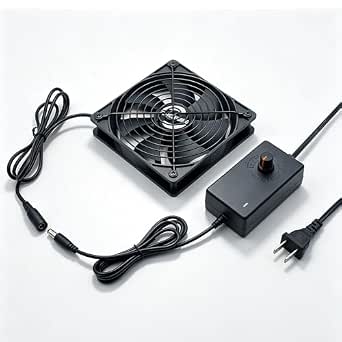
AC 110V-120V 120mm Computer Cooling Fan with Speed Control and Waterproof Exhaust
Direct wall-outlet power makes this fan a practical option when the hush-box design already accommodates an AC connection and USB-powered models are not a fit. The adjustable speed control offers some flexibility, but the stated 44 dB noise level is much higher than the X1 USB Cooling Fan’s 18 dB and could be conspicuous beside a quiet projector. Its IP54 motor is described as suitable for humid settings, a benefit that is less relevant in most indoor theater installations. Compared with the Dual 120mm 5V USB Cooling Fan, this model uses a conventional AC supply rather than USB, but provides no listed airflow figure to help size it for a projector’s heat output. I’d favor it for a ventilated enclosure near an outlet, and skip it when acoustic isolation is the main goal.
Pros:- Runs from standard 110–120 V AC power.
- Built-in speed control allows airflow adjustment.
- IP54 motor is specified for humid environments.
- Compact 120mm frame can suit smaller mounting openings.
Cons:- Listed 44 dB noise is substantially higher than the X1 USB Cooling Fan’s 18 dB.
- Airflow capacity is not stated, making projector cooling needs harder to judge.
- AC power and external mounting may complicate hush-box installation.
Best for: DIY builders with an AC outlet near the hush box who need an adjustable 120mm fan and value a moisture-resistant motor.
Not ideal for: Quiet-theater owners or anyone relying on USB power, because the listed noise is comparatively high and the fan needs AC.
- Voltage:110–120 V
- Wattage:6 W
- Fan size:120 × 25 mm
- Noise level:44 dB
- Maximum speed:2800 rpm
- Airflow:100 cubic centimeters per minute (as listed)
- Power connector:2-pin
- Protection:IP54 motor
Our verdict“Pick this fan for an AC-powered enclosure in a damp or utility setting, but not for a hush box where low noise is the priority.”
X1 USB Cooling Fan, 18dB Ultra Quiet 120mm Computer Fan with Built-in Cable, Portable Fast Cooling for Router, Receiver, Amplifier, DVR, PlayStation, Xbox, and Computer Cabinets
For a hush box near the seating area, the X1’s clearest advantage is its stated 18 dB noise level, the lowest among these five options. It also lists 55.8 CFM airflow, giving buyers a concrete cooling figure that the Dual 120mm 5V USB Cooling Fan and the AC 110V-120V 120mm Fan do not provide. The tradeoff is a fixed-speed design: its 935 rpm maximum does not offer the tuning available from the three-speed USB models or the 2-Pack 140mm Variable Speed Cooling Fans. USB power and a built-in cable keep the setup simple, while the compact body helps with restricted mounting space. I’d shortlist it for a quiet, moderate-heat projector enclosure, but check its fixed output against the projector’s ventilation needs before sealing the box.
Pros:- Listed 18 dB noise level is the quietest among these five products.
- 55.8 CFM airflow is specified, unlike several competing models here.
- USB power and a built-in cable keep connections simple.
- Compact, lightweight housing can suit space-limited installations.
Cons:- No adjustable speed control for balancing cooling against noise.
- USB power limits placement to setups with a suitable USB source.
- Its listed airflow may not suit every high-heat projector or enclosure layout.
Best for: Home-theater builders prioritizing low fan noise, USB power, and a stated airflow figure for a moderate-heat projector.
Not ideal for: Owners who need adjustable speed or substantial airflow control for a high-heat projector enclosure.
- Power connector:USB
- Voltage:5 V
- Noise level:18 dB
- Maximum speed:935 rpm
- Airflow:55.8 CFM
- Dimensions:5.12 × 5.24 × 1.91 in
- Material:ABS
- Weight:5.44 oz
Our verdict“Choose the X1 when quiet operation and a known airflow rating matter more than adjustable fan speed.”
2-Pack 140mm Variable Speed Cooling Fans with AC Power Adapter
When a projector enclosure needs more cooling headroom, this two-fan set stands apart with 140mm fans and a stated maximum airflow of 88 CFM. The stepless control lets builders raise airflow when heat builds or reduce it when quieter operation matters, unlike the fixed-speed X1 USB Cooling Fan. Two fans also allow a deliberate intake-and-exhaust layout, though that requires suitable openings and careful placement rather than simply mounting one fan. The listed 20 dB noise figure is low on paper, but actual hush-box sound will depend on speed, mounting, and airflow restrictions. AC adapters mean it does not share the USB simplicity of the Dual 120mm 5V USB Cooling Fan, and its larger format may be excessive for a small enclosure. I’d choose it for a spacious, higher-heat DIY build where speed control matters.
Pros:- Two 140mm fans support separate intake and exhaust positions.
- Stepless speed adjustment gives more tuning range than preset-speed models.
- Listed airflow reaches 88 CFM.
- AC adapters allow operation without a motherboard connection.
Cons:- Larger fans may not fit compact hush-box openings.
- AC adapters add power and cable requirements compared with USB models.
- The listed 20 dB noise figure does not describe noise at each adjustable speed.
Best for: DIY theater builders with a roomy hush box who need two larger fans, adjustable speed, and a stated high airflow capacity.
Not ideal for: Small enclosures or USB-only installations, since the 140mm fans take more space and need AC adapters.
- Quantity:2 fans
- Fan size:140 mm
- Voltage:120 V
- Wattage:8 W
- Noise level:20 dB
- Maximum speed:2500 rpm
- Airflow:88 CFM
- Speed control:Stepless variable speed
Our verdict“Choose this set for a spacious, higher-heat hush box that benefits from two large, speed-adjustable fans.”
2-Pack Quiet 120mm USB Fan with Dual-Ball Bearings and Speed Controller
This two-pack is a straightforward choice for builders who want to place one fan at the intake and another at the exhaust without adding AC wiring. Its three preset speeds allow basic adjustment, while the stated 19 dBA noise level is close to the X1 USB Cooling Fan’s 18 dB. Unlike the X1, this set includes dual-ball bearings and two fans, but it does not list airflow, so I can’t compare its cooling capacity directly with the X1’s 55.8 CFM. The included splitter also makes sharing one USB source easier, though power availability and cable routing still matter in a finished enclosure. Compared with the Dual 120mm 5V USB Cooling Fan, this option offers two separate fans and a longer stated lifespan, but provides only low, medium, and high settings. It suits moderate cooling needs better than a tightly specified, high-heat build.
Pros:- Two fans can support separate intake and exhaust positions.
- Three preset speed levels allow basic airflow adjustment.
- Dual-ball bearings and a stated 60,000-hour lifespan support long-term use.
- A 2-in-1 USB splitter cable is included.
Cons:- Airflow capacity is not stated, unlike the X1 USB Cooling Fan’s 55.8 CFM rating.
- Three preset levels offer less control than stepless adjustment.
- USB power may limit placement or require a suitable powered source.
Best for: Projector owners who want two USB-powered 120mm fans for intake and exhaust, with simple three-step speed control.
Not ideal for: Buyers who need a verified airflow figure or more granular speed adjustment for a heat-heavy projector.
- Quantity:2 fans
- Fan size:120 mm
- Power:5 V USB
- Bearing type:Dual ball bearings
- Stated lifespan:60,000 hours
- Noise level:19 dBA
- Blades:9 per fan
- Speed control:Low / medium / high
Our verdict“Choose this pair for simple USB intake-and-exhaust cooling when preset speeds are enough and a published airflow figure is not essential.”
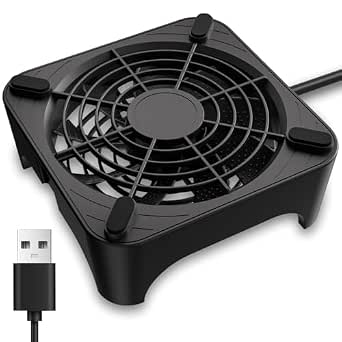
Cabinet Cooling Fan – No Drilling Required, Quiet Slim Fan for Home Theater AV Cabinets, Electronics Enclosures, Server Racks, and Ventilated Doors
For a projector hush box where cutting or drilling the enclosure is off the table, this slim fan has a distinct advantage: it can sit against a cabinet door using an existing gap. Its tool-free fit is simpler than the ELUTENG Dual 80mm USB Cooling Fan, which may need a separate plan for securing it in place. The listed 77.12 CFM airflow is promising for a small enclosure, though the product data does not explain how that figure relates to its 5V USB power. At 35.2 dB, it is not the quietest option here, and its single USB power limit makes it a weaker choice for a heat-heavy projector or a tightly sealed box. I would choose it for a modest setup that needs easy placement more than adjustable airflow.
Pros:- Can fit against a door using an existing gap, avoiding new holes
- Slim profile suits enclosures with limited clearance
- USB power works with common 5V sources
- Listed airflow capacity is substantial for a compact fan
Cons:- 35.2 dB noise may be noticeable in a quiet theater
- USB-only power limits options for a demanding cooling load
- No speed control is listed
Best for: Projector owners adapting an existing cabinet or hush box who cannot drill mounting holes and need a slim USB-powered fan.
Not ideal for: Owners of high-heat projectors or large sealed hush boxes that need stronger, controllable ventilation or a quieter fan.
- Power connector:USB
- Voltage:5 V
- Wattage:1.75 W
- Airflow capacity:77.12 CFM
- Noise level:35.2 dB
- Maximum rotational speed:2,100 RPM
- Dimensions:7.7 × 2.18 × 8.9 in
- Weight:0.35 kg
Our verdict“Choose this fan when avoiding drilling matters more than having adjustable, especially quiet cooling.”
ELUTENG Dual 80mm USB Cooling Fan with 3 Adjustable Speeds
The ELUTENG’s strongest case is its three speed settings: a hush-box builder can start low to limit fan noise, then raise airflow if the projector runs hot. Its two 80mm fans offer more flexibility in placement than the Wathai 120mm single fan, but the listed airflow tops out at 31.98 CFM, so this is not the higher-capacity choice on paper. Noise is listed at 32.5 dB, which may still be audible during quiet scenes, especially at higher speed. The 3-foot USB cable helps when the power source is outside the enclosure, but there is no mounting hardware for a fixed installation. I’d favor it for a smaller box where speed control and adaptable orientation matter more than maximum airflow.
Pros:- Three speed settings let users balance cooling and fan noise
- Two fans can be positioned horizontally or vertically
- USB power simplifies connection to common 5V sources
- Three-foot cable offers placement flexibility
Cons:- No mounting hardware is included for fixed installation
- Maximum listed airflow is lower than the Wathai 120mm fan’s
- USB-only power may not suit a demanding enclosure
Best for: Owners of compact projector enclosures who want to tune fan speed and position two small fans around airflow obstructions.
Not ideal for: Builders seeking a ready-to-bolt-in fan or high airflow for a large, heat-intensive hush box.
- Fan size:Dual 80 mm
- Power:5 V USB
- Wattage:5 W
- Speed settings:Low, medium, high
- Rotational speed:2,050 / 2,400 / 2,750 RPM
- Airflow:23.9 / 27.9 / 31.98 CFM
- Noise level:32.5 dB
- Cable length:3 ft
Our verdict“Pick the ELUTENG for a compact hush box where adjustable airflow is more useful than maximum capacity.”
High Airflow Cooling Fan 260mm 5V USB Fan for Computer Cooler TV Small Box and Other Electronics
This 260mm bar-style unit is suited to a hush box that needs airflow spread across a long opening rather than concentrated at one point. It lists 56 CFM airflow and a notably low 14.4 dB noise level, making it a quieter paper spec than the ELUTENG Dual 80mm USB Cooling Fan. Its narrow 2.16-inch width also helps where depth is limited, while the metal construction is a sturdier alternative to the plastic Wathai fans. The tradeoff is its fixed 5V USB setup: there is no speed control listed, and the description flags possible blade noise when starting voltage is insufficient. Since it is not waterproof, placement and protection from spills or condensation matter. I’d choose it for broad coverage in a dry enclosure with a reliable USB supply.
Pros:- Long 260mm format spreads airflow across a wider opening
- Listed 56 CFM airflow suits moderate cooling needs
- 14.4 dB listed noise level is lower than the other USB models here
- Aluminum alloy construction offers a metal alternative to plastic fans
Cons:- No speed adjustment is listed
- May make blade noise if starting voltage is insufficient
- Not waterproof and needs a dry, protected position
Best for: Projector owners with a long, shallow ventilation opening who want broad airflow coverage and a low listed noise level.
Not ideal for: Users who need speed adjustment, weather or moisture resistance, or a fan that can be mounted without checking fit and starting voltage.
- Fan length:260 mm
- Dimensions:10.62 × 2.16 × 1.16 in
- Voltage:5 V
- Wattage:5 W
- Airflow:56 CFM
- Speed:1,900 RPM
- Noise level:14.4 dB
- Material:Metal
Our verdict“Choose this model for a dry, shallow hush box where broad coverage and low listed noise matter more than speed control.”
Wathai Cooling Case Fan for Receiver, Xbox, TV Box, Router 120mm x 25mm 5V USB
The Wathai’s standard 120 × 120 × 25mm format makes it a straightforward candidate when a hush box already has a matching fan opening. It lists 56.7 CFM airflow at 1,500 RPM, giving it a stronger airflow specification than the ELUTENG Dual 80mm USB Cooling Fan, though the ELUTENG adds speed control that this model lacks. At 23 dBA, its listed noise is lower than the 35.2 dB cabinet fan, but actual sound inside a box will also depend on mounting, vibration, and airflow restrictions. The 5V USB connection keeps wiring simple, yet it limits power choices, and the sleeve bearing and plastic body may be less appealing for a long-term installation than metal-bodied alternatives. I’d pick it for a single standard cutout and a simple, fixed-speed setup.
Pros:- Standard 120mm size can suit existing fan openings
- 56.7 CFM listed airflow supports moderate enclosure cooling
- USB connection avoids a separate power adapter
- 23 dBA listed noise level is lower than the cabinet fan’s stated level
Cons:- No adjustable speed setting is listed
- 5V USB power limits connection options
- Plastic construction and sleeve bearing may be less suited to a demanding long-term installation
Best for: Hush-box builders with a standard 120mm opening who want a single USB fan with a straightforward fixed-speed setup.
Not ideal for: Buyers who need speed control, a particularly rugged build, or a fan sized for a nonstandard opening.
- Dimensions:120 × 120 × 25 mm
- Voltage:5 V
- Current:0.2 A
- Speed:1,500 RPM
- Airflow:56.7 CFM
- Noise level:23 dBA
- Cable length:55 cm
- Bearing type:Sleeve
Our verdict“Choose the Wathai when your hush box has a standard 120mm cutout and fixed-speed USB cooling is enough.”
2 Pack Wathai 92mm x 25mm 5V USB Fans for Receiver AV Cabinet Console
Two 92mm fans give this Wathai set a useful advantage when a projector enclosure needs separate intake and exhaust positions, or when one fan cannot cover the airflow path. The pair can be more adaptable than the single 120mm Wathai, but each fan’s 92mm frame needs a smaller opening and careful spacing. At a listed 27 dBA and 2,000 RPM, these are not the quietest figures in this group; the 260mm USB fan has a much lower stated noise level. The set includes screws and a grill, which makes fixed installation easier than with the ELUTENG, though there is no speed control to reduce noise when full airflow is unnecessary. The listed 86.8 CFM airflow should be checked against whether it describes the pair or each fan before planning the enclosure.
Pros:- Two fans support separate intake and exhaust placements
- Included screws and grill help with fixed installation
- USB power keeps the setup simple
- 92mm frames suit openings smaller than standard 120mm cutouts
Cons:- No speed control is listed
- 27 dBA noise level is higher than the 260mm USB fan’s stated level
- The listed 86.8 CFM does not specify whether it applies to one fan or the pair
Best for: Builders designing separate intake and exhaust points in a projector hush box and able to fit two 92mm fans.
Not ideal for: Buyers with only one standard 120mm opening, a strict noise target, or a need to adjust fan speed.
- Quantity:2 fans
- Fan dimensions:92 × 92 × 25 mm
- Airflow:86.8 CFM (product listing does not specify per-fan or combined)
- Noise level:27 dBA
- Speed:2,000 RPM
- Cable length:50 cm
- Material:Plastic
- Compatible devices:Desktop, laptop, TV box, router, game console
Our verdict“Choose this pair when your enclosure has room for two 92mm mounts and you want dedicated intake and exhaust fans.”
240mm USB Router Cooling Fan with Adjustable Speeds
For a hush box with modest heat output, the dual 120mm layout and three speed settings offer a straightforward way to move air without adding a complicated power setup. Its stated 13.6 dB noise level makes it a quieter-sounding candidate on paper than the 60mm 12V pair, which is listed at 38 dB. USB power also keeps installation simple if the box sits near a USB source, though I would check the projector’s heat load before relying on a fan intended for small electronics. Unlike the AmRunJe USB pair, this model’s description does not specify airflow, so it is harder to judge how much ventilation it can deliver. The raised base supports airflow beneath devices, but a hush-box build may need a separate mounting plan.
Pros:- Two 120mm fans provide a broad footprint for moving air across a small enclosure.
- Three speed settings let buyers trade airflow for less fan noise.
- USB plug-and-play power avoids a separate AC adapter.
- Raised base is designed to leave space for airflow beneath the supported device.
Cons:- No airflow rating is provided, making cooling capacity difficult to match to a projector.
- USB power limits placement to setups with a convenient USB source.
- Long-term durability details are not specified.
Best for: Projector owners building a compact hush box for a lower-heat setup who want USB power and adjustable fan speeds.
Not ideal for: Owners of hot projectors or tightly sealed enclosures who need a stated airflow rating and predictable ventilation capacity.
- Fan arrangement:Dual 120mm fans
- Cooling method:Air
- Noise level:13.6 dB
- Maximum rotational speed:1800 rpm
- Speed settings:Three adjustable speeds
- Power connection:USB
- Model:U3UK1
Our verdict“Choose this for an easy USB-powered hush-box setup where quiet operation matters more than having a documented airflow figure.”
Computer Fan with AC Plug, 120mm Variable Speed Axial Fan with Controller, 120V/110V/220V, Small 12V Case Cooling for PC, Server, DVR, TV, Router, Xbox, Greenhouse
When a projector enclosure needs more airflow than a USB fan can plausibly provide, this 120mm AC-powered axial fan has a useful stated ceiling of 95.8 CFM. Its controller spans 700 to 2800 rpm, giving buyers room to set a lower speed for quieter use or raise output when heat removal takes priority. That range makes it more adaptable to a demanding hush box than the 240mm USB Router Cooling Fan, whose airflow is not specified. The tradeoff is acoustic: the listed noise level can reach under 41 dB, which may be conspicuous beside a projector during quiet scenes. It also needs an AC outlet and a suitable 120mm opening, so it fits planned installations better than portable USB setups.
Pros:- Rated airflow of 95.8 CFM provides a useful reference for planning enclosure ventilation.
- Variable 700–2800 rpm control supports tuning between airflow and noise.
- Dual-ball bearings are specified, with a stated lifespan of 50,000 hours.
- AC plug simplifies power access where an outlet is available.
Cons:- Noise can reach under 41 dB at the upper end, a concern in a listening room.
- Requires AC power rather than a USB source.
- The 120mm frame may not fit an existing hush-box cutout.
Best for: DIY builders with an AC outlet and a 120mm mounting point who need a stated high airflow ceiling for a warmer projector enclosure.
Not ideal for: Viewers prioritizing near-silent operation, or anyone whose hush box has no AC access or space for a 120mm fan.
- Fan size:120 x 120 x 25 mm
- Airflow:95.8 CFM
- Speed range:700–2800 rpm
- Noise level:<41 dB
- Bearings:Dual ball
- Power:3.3 W
- Power connection:AC plug
- Material:Metal, plastic
Our verdict“Pick this for a higher-heat projector enclosure when airflow capacity matters more than USB convenience or the lowest noise.”
60mm Small 12V DC 2Pin Car Audio Vent Cooling Fan 5600RPM 2-Pack
These two 60mm fans suit a hush box where a standard 120mm opening simply will not fit, and their stated 22.1 CFM per fan gives a clearer airflow reference than the 240mm USB Router Cooling Fan provides. The compact size is the main reason to choose them, not quietness: at 38 dB and 5600 rpm, they may be noticeable in a home theater, especially if mounted directly to a resonant panel. Their fixed speed also removes the tuning flexibility offered by the AC 120mm Variable Speed Axial Fan. Buyers need a 12V supply and must handle the 2-pin connection, so installation takes more planning than a USB fan. I would reserve this pair for constrained layouts where small dimensions outweigh noise and wiring simplicity.
Pros:- Two compact 60mm fans can fit spaces that cannot accept a 120mm fan.
- Stated 22.1 CFM airflow per fan helps with ventilation planning.
- 12V DC and 2-pin connector suit compatible low-voltage installations.
- Two fans allow separate intake and exhaust placement in a small enclosure.
Cons:- Listed 38 dB noise may be noticeable in a quiet theater.
- Fixed 5600 rpm offers no built-in speed adjustment.
- Requires a 12V source and compatible 2-pin wiring.
Best for: Hush-box builders with limited mounting area who can provide 12V power and need two compact fans rather than one larger unit.
Not ideal for: Viewers seeking a quiet listening room, or beginners who want USB power and adjustable speed without wiring work.
- Quantity:2 fans
- Fan size:60 x 60 x 25 mm
- Voltage:12V DC
- Airflow:22.1 CFM per fan
- Speed:5600 rpm
- Noise level:38 dB
- Power:3 W
- Connector:2-pin XH 2.54
Our verdict“Choose this pair only when mounting space is scarce and you can accommodate fixed-speed noise and 12V wiring.”
AmRunJe USB Cooling Fan 120mm 5V Brushless with Speed Controller (2 Pack)
The AmRunJe set is a more measurable USB option for a hush box than the 240mm USB Router Cooling Fan: it specifies 77 CFM per fan, includes two 120mm units, and provides a controller with low, medium, and high settings. That combination gives a builder more flexibility to arrange intake and exhaust while dialing back speed when fan noise is distracting. At a stated 32 dBA, it is not silent, and the 5V USB supply may not suit a projector that produces substantial heat. The included metal shields and mounting hardware are practical for exposed fan faces, though the plastic housing is less substantial than the metal-and-plastic construction listed for the AC 120mm fan. I would favor this pair for moderate loads and USB-first installations, not a high-heat enclosure.
Pros:- Two 120mm fans support separate intake and exhaust positions.
- 77 CFM per fan is a clear airflow figure for comparing enclosure needs.
- USB controller offers low, medium, and high speed settings.
- Metal shields and mounting hardware are included.
Cons:- 5V USB power may be insufficient for a high-heat projector enclosure.
- Listed 32 dBA noise is not silent in a quiet viewing room.
- Plastic fan housing may feel less robust than a metal-bodied alternative.
Best for: Projector owners building a moderate-heat hush box who want two USB-powered fans, stated airflow, and simple speed control.
Not ideal for: Owners of high-heat projectors who need more robust power options or buyers seeking the quietest possible fan.
- Quantity:2 fans
- Fan size:120 x 120 x 25 mm
- Power:5V USB
- Airflow:77 CFM per fan
- Maximum speed:2000 rpm
- Noise level:32 dBA
- Power consumption:1.3 W
- Included items:2 fans, USB speed controller cable, metal shield, screws and nuts
Our verdict“Pick this USB pair for a moderate-heat hush box when adjustable, documented airflow matters more than higher-power operation.”

How We Picked
I ranked these cooling fans for projector hush boxes by how clearly their stated design fits enclosure cooling: fan size and count, adjustable speed, power arrangement, and mounting practicality. I gave extra weight to control over fan speed because hush boxes need a workable balance between heat removal and the noise that reaches the viewing area. I also looked at whether a product’s format seems suited to a compact box, a larger enclosure, or a retrofit where cutting or drilling may be difficult.
The ranking reflects fit and flexibility, not a claim of measured cooling performance. Product names and listed features do not establish airflow under a particular enclosure’s restrictions, so buyers should check dimensions, power requirements, and the projector manufacturer’s ventilation guidance. The dual 120mm USB controller model ranks first for its adaptable, practical format; larger AC-powered options rank well for buyers who can support their installation, while fixed-size or specialized fans rank lower when their fit is narrower. I also account for tradeoffs such as mounting work, fan count, and the limits of choosing by size alone.
Factors to Consider When Choosing Cooling Fans For Projector Hush Boxes
Choosing a fan for a hush box is a system decision: the fan, openings, projector exhaust direction, and box dimensions work together. I would settle the enclosure layout before choosing a model, then match the fan’s size, power, and controls to that plan.
Plan Air Inlets and Outlets Before Choosing a Fan
A fan cannot remove heat effectively if air has no clear route through the enclosure. Map the projector’s intake and exhaust locations, then plan openings so incoming air reaches the intake and warm air can leave without looping straight back around. A powerful fan mounted beside a blocked vent may perform worse than a more modest fan with a clean airflow path. Avoid placing the intake where it draws warm exhaust back into the box. If the hush box needs bends or sound baffles, account for their added airflow resistance before settling on fan count or size. Keep the projector’s own ventilation clear and follow its specified clearance requirements.
Match Fan Size to the Box and Its Cutouts
Measure the available mounting surface, not just the enclosure’s outside dimensions. Larger fans such as 140mm or 260mm models may cover more area, but they need matching openings and room for their frames, cables, and guards. Smaller 80mm, 92mm, or 120mm fans can fit narrow spaces, though a small fan may need to run faster to move enough air. Multiple fans can support separate intake and exhaust positions, but they also add wiring and mounting work. Check whether the listed measurement refers to the fan frame and confirm depth before cutting. A size mismatch can turn a promising purchase into a complicated retrofit.
Treat Speed Control as a Noise and Heat Tuning Tool
Adjustable speed gives you room to tune the enclosure after installation; it does not guarantee quiet operation or adequate cooling at every setting. Start with the projector’s ventilation requirements, then use the lowest fan setting that maintains suitable airflow during a normal viewing session. A hush box can muffle some sound, but fan vibration may travel through its panels and into nearby furniture. Use secure mounting and consider vibration-isolating material where it does not obstruct the fan. Fixed-speed models can be simpler, but they offer less flexibility if the room or projector load changes. Do not trade away required cooling just to reduce audible fan noise.
Choose a Power Setup You Can Install Safely
USB fans can be convenient when a suitable USB power source is available near the box, while AC-powered models may suit a permanent installation with an accessible outlet. A 12V DC fan needs a compatible supply; do not assume that a connector or product label means it can plug directly into your equipment. Check voltage, current requirements, plug type, and cable length before ordering. Keep power supplies outside the hottest, most enclosed part of the box when the design allows, and route cables so they do not block vents. If a setup requires exposed wiring or electrical modifications, use an appropriately qualified installer rather than improvising.
Think About Noise Paths, Not Only Fan Noise
Noise reaches the room through more than the fan motor: air openings, panel vibration, and direct sound paths all contribute. Sound baffles can reduce a straight path from the projector and fan to the listener, but tight bends and narrow channels also restrict airflow. Larger openings can help ventilation while making acoustic control harder, so the box design needs to balance both jobs. Avoid placing a fan directly against a thin, resonant panel if vibration can pass into the room. A quieter fan is not a substitute for adequate cooling, and a quiet enclosure can still overheat if its vents are undersized. Plan for both airflow and sound before sealing the box.
Check Maintenance Access and Dust Management
Projector cooling setups need access for cleaning because dust can build up on fan blades, filters, and the projector’s own intake. A filter can reduce dust entry, but it also adds resistance and needs regular cleaning to keep air moving. Make sure the fan can be reached without dismantling the entire hush box. Leave enough room to inspect cables and mounting points as well as clean the openings. If the projector is used for long sessions, check the enclosure for heat buildup during realistic operating conditions after installation. A setup that is easy to inspect is more practical than one that looks tidy but hides clogged vents.
Frequently Asked Questions
Should I use one fan or two in a projector hush box?
That depends on the box layout and the projector’s intake and exhaust positions, not simply on a preference for more fans. A two-fan setup can support separate intake and exhaust points, which may help create a clear route through the enclosure. One fan may be easier to mount and wire in a compact box, but it still needs a suitable passive opening for air to enter or leave. Check that two fans will not push air against each other or recirculate warm exhaust. Follow the projector’s ventilation guidance and confirm airflow after installation.
Are USB fans powerful enough for a projector hush box?
A USB connection describes the power arrangement, not whether a fan can cool a particular enclosure. Suitability depends on the fan’s airflow, the box’s openings, projector heat output, and restrictions from baffles or filters. USB models in this roundup offer convenient power and include options with speed control, but a convenient plug does not make an undersized setup adequate. Compare the fan’s stated requirements with the available USB source and check that the cable can reach safely. If the projector’s heat load or enclosure resistance is high, seek a fan setup with specifications that match those demands rather than choosing by connector alone.
Can I run a projector hush-box fan more slowly to make it quieter?
Often, adjustable-speed fans let you reduce noise, but the lower setting must still provide enough cooling for the projector and enclosure. The right setting depends on room temperature, projector use, vent design, and how restrictive any acoustic baffles are. Do not assume the lowest setting is safe for extended viewing sessions. Check the projector’s temperature or warning indicators and follow its manual, then monitor the box during a typical period of use. If reducing speed leads to heat warnings or excessive enclosure warmth, improve the airflow path or use a more suitable fan rather than accepting inadequate cooling.
Do I need a fan controller if my fan already has a fixed speed?
A controller is useful when you need to adjust airflow and sound after installation, especially because hush-box designs vary in how much they restrict air. A fixed-speed fan can be a simpler choice if its airflow suits the enclosure and its noise level is acceptable where the box will sit. Without speed control, you have fewer ways to adapt if a filter becomes dusty, a vent is more restrictive than expected, or room conditions change. A controller also cannot make an unsuitable fan safe at a low setting. Choose controls for the tuning flexibility you need, and base cooling decisions on the projector’s requirements.
How can I tell whether my hush box is restricting airflow too much?
Start by checking whether the enclosure follows the projector manufacturer’s clearance and ventilation requirements and whether its intake and exhaust remain unobstructed. Watch for projector temperature warnings, unexpected shutdowns, or unusually hot air trapped in the box during normal use. Compare the airflow path with the design: narrow openings, clogged filters, tight baffles, and exhaust directed back toward the intake can all limit circulation. A fan’s label alone cannot confirm that the complete enclosure moves enough air. If signs of overheating persist, stop relying on the setup until you improve ventilation or obtain qualified advice.
Conclusion
For most buyers, I would start with the Dual 120mm 5V USB Cooling Fan with Speed Controller and Dual Ball Bearings as the best overall balance of two-fan coverage and adjustable speed. The best value for a simple retrofit is the X1 USB Cooling Fan if its single 120mm format suits your enclosure and you do not need a two-fan layout. For a larger box with room for the hardware and an appropriate outlet, my best premium-style pick is the 2-Pack 140mm Variable Speed Cooling Fans. Beginners who want a straightforward cabinet installation should look at the no-drill Cabinet Cooling Fan, while buyers with very limited mounting space can compare the dual 80mm and dual 92mm options. Choose the 260mm USB fan for a broad single-fan layout, and consider the 12V 60mm pair only for a compact, compatible installation; whichever you select, make the airflow path and projector requirements the deciding factors.