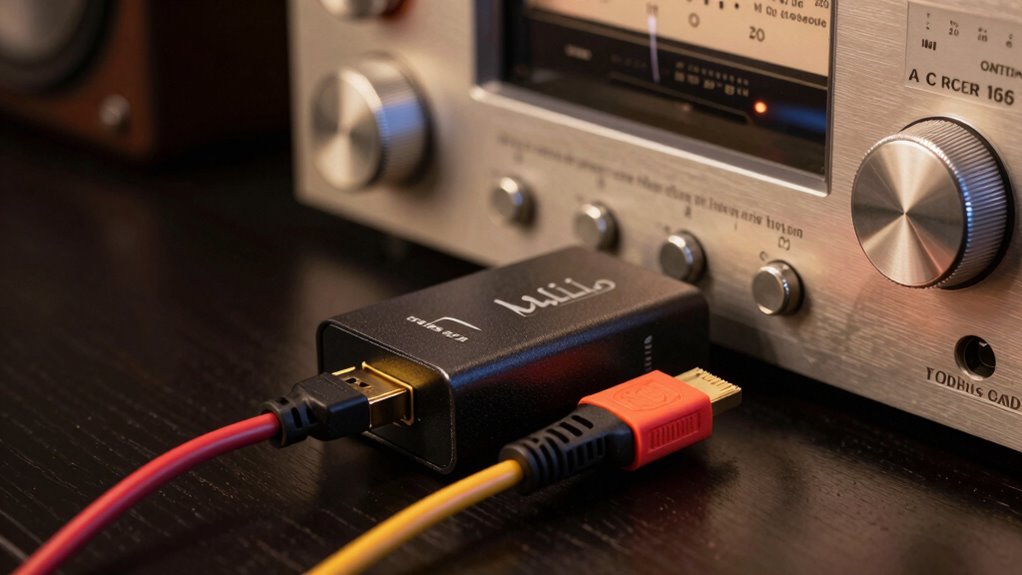

If you’re using an older AV receiver that lacks HDMI input options, an HDMI audio extractor can bridge the gap, allowing you to enjoy modern HDMI sources with your vintage setup. The best overall pick is the J-Tech Digital 4K 60Hz HDMI Audio Extractor for its reliable performance and support for Dolby Atmos and HDR. The OREI HDMI ARC/eARC to Analog Audio Extractor stands out as a flexible choice for simpler setups, while the VPEFET HDMI Audio Extractor offers excellent digital audio options at a competitive price. These options highlight the core tradeoff: balancing features, ease of use, and compatibility. Keep reading for a detailed breakdown to find the right fit for your setup.

Get business pricing on your home office setup
- Business-only prices and quantity discounts
- Tax-exempt purchasing
- Multiple users, one account, clear invoices
Complete the kit



Key Takeaways
- The top-ranked products excel in supporting latest audio formats like Dolby Atmos and DTS:X, which are often missing in older receivers.
- Compatibility with HDMI 2.0 and HDCP 2.2 is critical for future-proofing, but many budget options still support HDMI 1.4, suitable for less demanding setups.
- Ease of installation and user interface vary widely; simpler models reduce setup headaches but might lack advanced features.
- Price often correlates with support for high-end formats and higher resolutions; balance your needs against your budget.
- The best choices support a variety of outputs (optical, coaxial, analog) to maximize flexibility with older equipment.
| Avedio Links HDMI Audio Extractor 4K@30Hz Optical & 3.5mm Output, HDCP 1.4 |  | Best Overall for Versatile 4K Pass-Through | Resolution: 4K@30Hz | HDMI Version: 1.4b | HDCP: 1.4 | VIEW ON AMAZON | See Our Full Breakdown |
| eSynic Professional 192KHz eARC & ARC Audio Extractor – 3.5mm AUX and L/R Out | 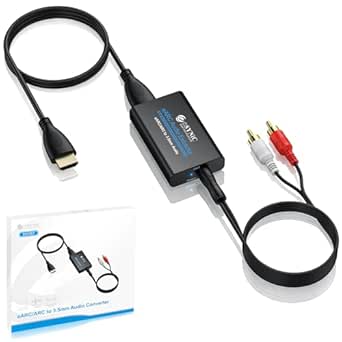 | Best for eARC/ARC High-Quality Audio from HDTVs | Sampling Rate: 192KHz | Audio Formats Supported: PCM & PCM 2.0 | Power Supply: USB | VIEW ON AMAZON | See Our Full Breakdown |
| 4K 60Hz HDMI Audio Extractor Converter SPDIF + 3.5MM Output Supports HDMI 2.0, HDCP 2.2, 1080P@120Hz, 1080P@144Hz, Dolby Digital/DTS Passthrough by J-Tech Digital |  | Best for 4K 60Hz Gaming and High-Resolution Content | Resolution: 4K@60Hz | HDR Support: HDR10 | HDCP Version: 2.2 | VIEW ON AMAZON | See Our Full Breakdown |
| OREI HDMI ARC/eARC to Analog Audio Extractor Converter, PCM to 2CH HDMI 1.4 |  | Best for Simple Stereo Extraction from ARC/eARC TVs | Input: HDMI ARC/eARC | Outputs: RCA L/R, 3.5mm | Audio Support: Stereo PCM/LPCM up to 192kHz | VIEW ON AMAZON | See Our Full Breakdown |
| HDMI 2.0 Audio Extractor 4K60Hz HDMI to Optical + 3.5mm Analog Audio Splitter Support Dolby Vision, Dolby Atmos, HDR10, HDCP 2.2 |  | Best for High-Res Home Theater & Gaming with Dolby Atmos | Video Resolution: 4K@60Hz | HDR Support: HDR10 | HDCP Version: 2.2 | VIEW ON AMAZON | See Our Full Breakdown |
| OREI 4K@60Hz HDMI Audio Converter Extractor – SPDIF & 3.5mm Output, HDCP 2.2 |  | Best Overall for High-Resolution Home Theater and Gaming | Supported Resolution: Up to 4K @ 50/60Hz (YUV4:4:4) | Audio Support: LPCM 2/5.1/7.1CH, Dolby Digital, DTS 5.1, Dolby Digital+, Dolby TrueHD, DTS-HD Master Audio, Dolby Atmos, DTS:X | Bandwidth: 18Gbps | VIEW ON AMAZON | See Our Full Breakdown |
| VPFET HDMI Audio Extractor 4K HDMI to Optical 3.5mm AUX Audio Adapter Splitter Converter Support HDCP Digital DTS 5.1 PCM |  | Best for 4K Audio Extraction with Simplified Setup | Resolution Support: 4K@30Hz | Audio Modes: 2.0CH, 5.1CH, PASS | HDMI Version: 1.4V | VIEW ON AMAZON | See Our Full Breakdown |
| Tendak 4K@60Hz HDMI Audio Extractor with SPDIF, RCA & 3.5mm Output |  | Best for Versatile Connections and Analog Audio Control | Resolution Support: 4K@60Hz | Backward Compatibility: Yes, with 4K@30Hz, 1080p 3D@60Hz, 1080i, 720p | Audio Formats Supported: AC-3, DTS, DTS-HD, Dolby-TrueHD, DSD, LPCM 7.1 | VIEW ON AMAZON | See Our Full Breakdown |
| HDMI ARC Audio Extractor 4K60Hz with 3.5mm and Stereo Output for HDTV Soundbar |  | Best for ARC-Enabled TV Audio and Soundbar Integration | Resolution: 4K60Hz | Sampling Rate: 192KHz | Audio Output: L/R stereo and 3.5mm | VIEW ON AMAZON | See Our Full Breakdown |
| Upgrade HDMI Audio Extractor 4K 60Hz & eARC/ARC, HDMI to RCA Optical |  | Best for eARC/ARC Support with Multiple Audio Outputs | Video Resolution: 4K@60Hz | Audio Output: Optical TOSLINK, RCA, 3.5mm | HDMI Version: HDMI 2.0 | VIEW ON AMAZON | See Our Full Breakdown |
| 4K60Hz HDMI ARC 192KHz Audio Extractor Converter for TV Soundbar Amplifier |  | Best Overall for Seamless Audio from TV with ARC/eARC | Audio Sampling Rate: 192KHz | Channels: 5.1 surround sound | Supported Audio Formats: Dolby 5.1, DTS 5.1 | VIEW ON AMAZON | See Our Full Breakdown |
| HDMI Audio Extractor 8K eARC ARC 4K@120Hz Optical SPDIF RCA Converter |  | Best for High-Resolution, Multi-Format Compatibility | Resolution Support: 8K@60Hz, 4K@120Hz | Audio Outputs: Optical, L/R stereo, 3.5mm AUX | Modes: PASS, R/L, SPDIF | VIEW ON AMAZON | See Our Full Breakdown |
| J-Tech Digital 4K 60Hz HDMI Audio Extractor Converter with SPDIF Optical and 3 EDID Modes |  | Best for Customizable EDID and Reliable 4K Audio | Resolution Support: 4K @ 60Hz | Audio Outputs: SPDIF Optical, RCA (L/R) | EDID Modes: TV/Pass, 2-Channel Stereo, 5.1 Surround | VIEW ON AMAZON | See Our Full Breakdown |
More Details on Our Top Picks
Avedio Links HDMI Audio Extractor 4K@30Hz Optical & 3.5mm Output, HDCP 1.4
This extractor stands out for delivering reliable 4K@30Hz video pass-through without quality loss, making it a solid choice for those who want crisp visuals alongside multiple audio options. Compared to the J-Tech Digital 4K 60Hz HDMI Audio Extractor, it offers lower resolution support but provides a wider array of outputs, including optical SPDIF and 3.5mm, which are essential for older receivers lacking HDMI audio. Its plug-and-play design simplifies setup, but the absence of ARC or volume control limits its flexibility in modern setups. The durable metal housing adds longevity for both home and commercial use.
Pros:- Supports 4K@30Hz pass-through with no video quality degradation
- Offers multiple audio outputs including optical SPDIF and 3.5mm
- Simple setup with broad device compatibility
- Durable metal construction suitable for various environments
Cons:- Does not support ARC or volume control
- Limited to 2-channel PCM audio for RCA and optical outputs
Best for: Home theater enthusiasts with 4K displays and legacy audio systems needing multiple audio outputs
Not ideal for: Users seeking 4K@60Hz support or ARC functionality, as this device is limited to 30Hz and lacks advanced features
- Resolution:4K@30Hz
- HDMI Version:1.4b
- HDCP:1.4
- Audio Outputs:RCA L/R, optical SPDIF, 3.5mm
- Video Pass-Through:Full 4K Ultra-HD@30Hz
- Power:UL-listed power adapter
Our verdict“Best suited for users who need reliable 4K pass-through and multiple basic audio outputs for older receivers.”
eSynic Professional 192KHz eARC & ARC Audio Extractor – 3.5mm AUX and L/R Out
This model excels at extracting high-quality stereo audio via eARC/ARC, supporting up to 192KHz sampling rates, which makes it ideal for high-fidelity audio from compatible HDTVs. Unlike the OREI HDMI ARC/eARC to Analog Audio Extractor, which only provides stereo output, the eSynic unit supports higher sampling rates, ensuring clearer sound for critical listening. Its plug-and-play design simplifies integration, but it’s limited to TVs with eARC/ARC support, making it unsuitable for non-compatible devices. It offers a straightforward solution for enhancing audio quality without complex setups.
Pros:- Supports high sampling rates up to 192KHz for premium audio quality
- Plug-and-play, no software needed
- Supports multiple high-quality PCM audio formats
- Simple connection with minimal setup
Cons:- Limited to eARC/ARC-compatible TVs
- No optical or Dolby support
- Requires enabling eARC/ARC on the TV for proper operation
Best for: Home users with eARC/ARC-enabled HDTVs seeking high-resolution stereo audio output
Not ideal for: Owners of non-eARC/ARC TVs or those needing multi-channel or Dolby/DTS support, as this unit only handles stereo PCM
- Sampling Rate:192KHz
- Audio Formats Supported:PCM & PCM 2.0
- Power Supply:USB
- Compatibility:HDTV with eARC/ARC support
- Connections:HDMI eARC/ARC input, 3.5mm & L/R output
Our verdict“Best for users with compatible HDTVs aiming to improve stereo audio fidelity from their older receivers.”
4K 60Hz HDMI Audio Extractor Converter SPDIF + 3.5MM Output Supports HDMI 2.0, HDCP 2.2, 1080P@120Hz, 1080P@144Hz, Dolby Digital/DTS Passthrough by J-Tech Digital
This extractor provides support for 4K at 60Hz with HDR10 and passthrough for Dolby Digital and DTS, making it a good fit for gaming and streaming setups. It surpasses the Orei HDMI ARC/eARC to Analog Audio Extractor by offering higher resolution support and compatibility with modern HDMI 2.0 sources. However, it doesn’t decode audio formats for analog output, limiting its use with older receivers that lack HDMI inputs. Its compatibility issues with some devices like Apple TV 3rd Generation can be a drawback for users with older equipment.
Pros:- Supports 4K resolution at 60Hz with HDR10 for stunning visuals
- Provides Dolby Digital and DTS passthrough
- Supports high refresh rates up to 144Hz
- Multiple audio outputs including SPDIF and 3.5mm
Cons:- Does not decode audio for analog output
- Incompatible with some older devices like Apple TV 3rd Generation
- Limited compatibility with HDMI 1.2 and older monitors
Best for: Gamers and streamers who need 4K@60Hz video with high-quality digital audio passthrough
Not ideal for: Owners of older monitors or devices incompatible with HDMI 2.0 or HDCP 2.2, as this device may not work reliably with them
- Resolution:4K@60Hz
- HDR Support:HDR10
- HDCP Version:2.2
- Outputs:SPDIF, 3.5mm
- Supported Refresh Rates:120Hz, 144Hz
- Audio Formats Supported:Dolby Digital, DTS Passthrough
Our verdict“Ideal for gamers and high-res streamers wanting excellent digital audio support alongside 4K 60Hz video.”
OREI HDMI ARC/eARC to Analog Audio Extractor Converter, PCM to 2CH HDMI 1.4
This device simplifies converting digital ARC/eARC signals into stereo analog outputs, making it suitable for older speakers and soundbars. Unlike the eSynic Professional eARC/ARC Audio Extractor, which supports higher sampling rates and more complex audio formats, this OREI model is limited to stereo PCM up to 192kHz. Its straightforward plug-and-play approach appeals to users who want a quick fix for basic stereo sound but may fall short if multi-channel or Dolby/DTS audio is needed. The absence of included cables and support for only stereo audio restricts its versatility.
Pros:- Easy to install with minimal setup
- Supports high-resolution stereo PCM up to 192kHz
- Outputs to both RCA and 3.5mm simultaneously
- Affordable and straightforward
Cons:- Limited to stereo PCM, no Dolby or DTS support
- No included cables, additional purchase needed
- Outputs only 2-channel audio
Best for: Users with older TVs and stereo sound systems needing basic audio extraction from HDMI ARC/eARC
Not ideal for: Those requiring multi-channel or surround sound formats, as it only outputs stereo PCM
- Input:HDMI ARC/eARC
- Outputs:RCA L/R, 3.5mm
- Audio Support:Stereo PCM/LPCM up to 192kHz
- Supports:Stereo audio only
- Power:On/off switch with LED
Our verdict“Best for users who need a simple, affordable stereo audio extraction from HDMI ARC/eARC signals.”
HDMI 2.0 Audio Extractor 4K60Hz HDMI to Optical + 3.5mm Analog Audio Splitter Support Dolby Vision, Dolby Atmos, HDR10, HDCP 2.2
This extractor excels at passing 4K@60Hz with HDR10 and supports advanced audio formats like Dolby Atmos and DTS HD, making it suitable for immersive home theater experiences. Unlike the AVedio Links HDMI Audio Extractor, which is limited to 30Hz and basic audio outputs, this model offers higher resolution and richer audio formats, but it does not support ARC or eARC, so it’s not ideal for seamless integration into modern smart TVs. Its wide compatibility with gaming consoles and streaming devices makes it a flexible choice for demanding users.
Pros:- Supports 4K@60Hz with HDR10 for vibrant visuals
- Supports Dolby Atmos and DTS HD for immersive sound
- Offers optical SPDIF and 3.5mm outputs
- Wide compatibility with popular gaming and streaming devices
Cons:- Does not support ARC or eARC
- Limited to extracting audio before the display, not from TV HDMI ports
- Requires extra setup with source connected directly to the extractor
Best for: Home theater and gaming enthusiasts seeking high-quality audio from 4K sources without ARC/eARC dependency
Not ideal for: Users with older TVs or receivers that require ARC/eARC functionality, since this device only extracts audio before the display connection
- Video Resolution:4K@60Hz
- HDR Support:HDR10
- HDCP Version:2.2
- Audio Output:Optical SPDIF, 3.5mm
- Audio Formats:Dolby Atmos, DTS HD
- Supports:Dolby Vision, HDR10
Our verdict“Ideal for users who want high-resolution video and premium audio formats without needing ARC/eARC features.”
OREI 4K@60Hz HDMI Audio Converter Extractor – SPDIF & 3.5mm Output, HDCP 2.2
This OREI HDMI audio extractor stands out for supporting 4K HDR pass-through at 60Hz, making it ideal for users who want both high-quality video and immersive audio formats like Dolby Atmos. Compared with the VPLFET extractor, it offers broader compatibility with gaming consoles and streaming devices, thanks to its higher bandwidth and HDCP 2.2 support. However, it’s limited to 4K @ 50/60Hz and lacks ARC support, which could be a drawback for those relying on audio return channels. Its external power supply adds some complexity but ensures reliable operation. This device is best suited for home theater enthusiasts and gamers who prioritize resolution and advanced audio formats.
Pros:- Supports 4K HDR pass-through at 60Hz for sharp, vibrant visuals
- Compatible with a wide range of devices including gaming consoles and streaming players
- Supports advanced audio formats like Dolby Atmos and DTS:X
- Durable metal housing for reliable performance
Cons:- Lacks ARC support, limiting integration with some AV setups
- Requires external power supply, adding complexity
Best for: Users needing 4K HDR pass-through with high-fidelity audio, including gamers and home theater fans.
Not ideal for: Those with older displays or AV receivers that do not support HDCP 2.2 or 4K at 60Hz, since this device requires these features for optimal use.
- Supported Resolution:Up to 4K @ 50/60Hz (YUV4:4:4)
- Audio Support:LPCM 2/5.1/7.1CH, Dolby Digital, DTS 5.1, Dolby Digital+, Dolby TrueHD, DTS-HD Master Audio, Dolby Atmos, DTS:X
- Bandwidth:18Gbps
- HDMI Version:2.0b
- HDCP Version:2.2
- Power Supply:Dual voltage with US plug, international adapter included
Our verdict“This is an excellent choice for users who want high-resolution video and immersive audio from newer devices but can handle its power requirements.”
VPFET HDMI Audio Extractor 4K HDMI to Optical 3.5mm AUX Audio Adapter Splitter Converter Support HDCP Digital DTS 5.1 PCM
The VPFET HDMI audio extractor is tailored for users wanting 4K resolution at 30Hz and straightforward audio extraction via optical or 3.5mm outputs. Compared to the OREI model, it offers a simpler, more affordable option for those with less demanding refresh rate needs, but it doesn’t support 4K at 60Hz or advanced audio formats like Dolby Atmos. This makes it suitable for basic home setups, especially if your devices operate primarily at 30Hz or 60Hz. Its USB power supply and limited audio format support mean it’s best for users with standard audio needs and less focus on high-end formats.
Pros:- Supports 4K resolution at 30Hz, suitable for many streaming sources
- Simple plug-and-play setup with low energy consumption
- Supports multiple audio modes including DTS 5.1 and PCM 2.0
- Affordable option for basic 4K audio extraction
Cons:- Limited to 4K@30Hz, not suitable for high refresh rate gaming or video
- Does not support Dolby Atmos or DTS:X formats
- Limited to HDMI 1.4, restricting bandwidth for newer devices
Best for: Budget-conscious users with 4K sources running at 30Hz who need basic audio extraction capabilities.
Not ideal for: Enthusiasts seeking 4K @60Hz or immersive multi-channel audio, since this model limits resolution and audio formats.
- Resolution Support:4K@30Hz
- Audio Modes:2.0CH, 5.1CH, PASS
- HDMI Version:1.4V
- Bandwidth:10.2G
- HDCP Support:1.4
- Output Formats:DTS 5.1, PCM 2.0
Our verdict“This extractor is well-suited for users with standard 4K content at 30Hz who need straightforward audio output without frills.”
Tendak 4K@60Hz HDMI Audio Extractor with SPDIF, RCA & 3.5mm Output
The Tendak HDMI audio extractor excels in providing multiple output options, including optical, RCA, and 3.5mm, making it highly adaptable for connecting to soundbars, speakers, or headphones. Compared to the OREI device, it offers volume control for analog outputs and HDR support at 60Hz, making it more flexible for varied setups. However, it does not support advanced formats like Dolby Atmos or 7.1 channels, limiting its appeal for high-end home theaters. Its plug-and-play design and included accessories make it a practical choice for users who prioritize compatibility and ease of use over high-resolution gaming or immersive formats.
Pros:- Supports 4K@60Hz with HDR for vibrant visuals
- Multiple audio output options including optical, RCA, and 3.5mm
- Includes volume control for analog outputs
- Plug-and-play with no drivers needed
Cons:- Limited to 4K@60Hz, not ideal for 120Hz or gaming at higher refresh rates
- Does not support immersive multi-channel formats like Atmos or DTS:X
- Requires external power via USB
Best for: Home users seeking flexible audio outputs for 4K sources, especially with analog speaker setups.
Not ideal for: Those requiring Dolby Atmos, DTS:X, or 7.1 surround sound, since this device supports only basic audio formats.
- Resolution Support:4K@60Hz
- Backward Compatibility:Yes, with 4K@30Hz, 1080p 3D@60Hz, 1080i, 720p
- Audio Formats Supported:AC-3, DTS, DTS-HD, Dolby-TrueHD, DSD, LPCM 7.1
- HDCP Support:HDCP 2.2 and 1.4
- Outputs:Optical SPDIF, RCA, 3.5mm stereo
- Power Supply:USB cable, DC 5V/1A adapter
Our verdict“This product suits users who want versatile audio outputs and simple setup for high-quality 4K sources without the need for advanced audio formats.”
HDMI ARC Audio Extractor 4K60Hz with 3.5mm and Stereo Output for HDTV Soundbar
The HDMI ARC Audio Extractor is designed for TVs with ARC support, enabling easy transmission of audio to soundbars or amplifiers. Compared to the Upgrade HDMI Extractor, it offers a more straightforward solution for ARC-enabled setups but lacks support for multi-channel formats like Dolby Atmos or DTS:X. Supporting 4K at 60Hz, it ensures sharp video, but volume control is limited to the connected device, not via remote. Its aluminum housing enhances durability and heat dissipation, making it suitable for long-term use in entertainment centers that prioritize simple audio extraction from ARC sources.
Pros:- Supports 4K video at 60Hz for detailed visuals
- Simultaneous L/R stereo and 3.5mm output for flexible audio options
- Durable aluminum housing for heat management
- Easy plug-and-play with wide device compatibility
Cons:- Requires TV support for ARC and PCM audio, limiting flexibility
- No support for 5.1 or 7.1 digital formats
- Volume cannot be adjusted via remote, only on connected devices
Best for: Users with ARC-compatible TVs and soundbars seeking simple stereo or L/R output without advanced surround sound.
Not ideal for: Home theater enthusiasts needing multi-channel surround sound or Dolby Atmos support, since this extractor only provides stereo output.
- Resolution:4K60Hz
- Sampling Rate:192KHz
- Audio Output:L/R stereo and 3.5mm
- Compatibility:ARC-enabled TVs, PS4, PS5, Xbox, Blu-ray, soundbars
- Material:Aluminum
Our verdict“This extractor is suitable for users with ARC-enabled TVs who want straightforward stereo audio output from their 4K sources.”
Upgrade HDMI Audio Extractor 4K 60Hz & eARC/ARC, HDMI to RCA Optical
The Upgrade HDMI Audio Extractor offers broad compatibility with ARC and eARC-enabled TVs, making it ideal for seamless audio return. Compared with the HDMI ARC Extractor, it supports higher bandwidth and more audio formats, including Dolby Atmos, DTS:X, and 7.1 channels. Its support for 4K at 60Hz ensures sharp video, and the inclusion of multiple output options like optical, RCA, and 3.5mm increases versatility. However, it doesn’t support CEC or remote volume control, requiring users to adjust volume on their speakers or headphones. This device makes the most sense for users with more advanced AV setups wanting high-quality audio transfer from modern sources.
Pros:- Supports 4K@60Hz and eARC for high-quality video and audio
- Multiple output options including optical, RCA, and 3.5mm
- Compatible with a wide range of media devices and formats
- Supports Dolby Atmos, DTS:X, and 7.1 surround sound
Cons:- No remote volume control or CEC support, limiting ease of use
- Setup requires configuring input to PCM/stereo for optical and L/R outputs
Best for: People with ARC or eARC-compatible TVs and high-end sound systems seeking versatile, high-fidelity audio extraction.
Not ideal for: Casual users with basic setups or older non-ARC TVs, as it may be over-featured and more complex than needed.
- Video Resolution:4K@60Hz
- Audio Output:Optical TOSLINK, RCA, 3.5mm
- HDMI Version:HDMI 2.0
- HDCP Version:2.2
- Supports:3D, 1080p, 720p, 576i, 480p
Our verdict“Ideal for AV enthusiasts with ARC/eARC-enabled setups who want maximum audio flexibility and support for immersive sound formats.”
4K60Hz HDMI ARC 192KHz Audio Extractor Converter for TV Soundbar Amplifier
This HDMI ARC audio extractor stands out for its ability to deliver high-quality, lossless audio up to 192KHz with 5.1 surround sound, making it ideal for enhancing home theater setups where your TV already supports ARC or eARC. Compared with the J-Tech Digital model, it offers wider device compatibility and multiple output options, but it requires a TV with ARC/eARC ports to function—limiting flexibility if your TV lacks these features. The plug-and-play design simplifies installation, though setup may need some troubleshooting to achieve optimal audio sync and performance. Its optical and coaxial outputs allow versatile connectivity, but these cannot be controlled via the TV remote, which could be inconvenient. If your TV supports ARC/eARC, this extractor offers a reliable upgrade path for richer sound, especially for those wanting high-resolution audio without sacrificing simplicity.
Pros:- Supports lossless audio up to 192KHz and 5.1 surround sound
- Multiple outputs including optical, coaxial, and analog for versatile connections
- Plug-and-play setup with broad device compatibility
Cons:- Requires TV with HDMI ARC/eARC port, limiting its use
- Optical and coaxial outputs cannot be remote-controlled, reducing convenience
Best for: Home theater enthusiasts with TVs equipped with ARC or eARC seeking high-fidelity audio.
Not ideal for: Users with non-ARC/eARC TVs or those seeking a budget-friendly, simple audio extraction without high-res support.
- Audio Sampling Rate:192KHz
- Channels:5.1 surround sound
- Supported Audio Formats:Dolby 5.1, DTS 5.1
- Input:HDMI with ARC/eARC
- Outputs:Optical, Coaxial, 3.5mm, L/R
- Compatibility:All HDMI source devices with ARC/eARC
- Power Supply:USB power cord (adapter included)
Our verdict“This is the best choice for users with compatible TVs who want high-resolution audio and multiple output options without complex setup.”
HDMI Audio Extractor 8K eARC ARC 4K@120Hz Optical SPDIF RCA Converter
This HDMI audio extractor supports cutting-edge video resolutions up to 8K and 4K@120Hz, making it ideal for high-end setups that demand both top-tier visuals and flexible audio output options. Unlike the simpler J-Tech Digital, it offers multiple modes—including pass-through, R/L, and SPDIF—adding versatility for various audio devices. However, its reliance on a Type-C 5V power supply can be a drawback for those who prefer straightforward power solutions, and it only supports PCM audio on analog ports, limiting compatibility with advanced formats like Dolby Atmos or DTS:X via analog outputs. Additionally, it’s not designed to connect directly to a TV’s HDMI input, so it’s best suited for intermediate setups involving multiple devices like gaming consoles, Blu-ray players, and PCs. For users with high-resolution needs and a variety of HDMI sources, this model balances modern features with some setup complexity.
Pros:- Supports 8K@60Hz and 4K@120Hz for future-proof video quality
- Multiple audio outputs including optical, stereo, and AUX
- Compatible with a wide range of HDMI devices and formats, including HDR and Dolby Vision
Cons:- Requires a Type-C power connection, adding an extra step to setup
- Analog ports only support PCM, limiting high-end audio formats
- Not suitable for direct connection to a TV’s HDMI input for source
Best for: Tech-savvy users with 8K or 4K high-res sources seeking broad format support and multiple outputs.
Not ideal for: Casual viewers or those with only 4K TVs lacking high-end gaming or PC devices, due to its power and format limitations.
- Resolution Support:8K@60Hz, 4K@120Hz
- Audio Outputs:Optical, L/R stereo, 3.5mm AUX
- Modes:PASS, R/L, SPDIF
- Power Supply:Type-C 5V cable
- Compatibility:HDMI devices including Blu-ray, gaming, PCs
- Additional Features:HDR, Dolby Vision, DTS, VRR
Our verdict“Ideal for users with high-resolution devices needing flexible audio outputs and multi-format support, despite some setup considerations.”
J-Tech Digital 4K 60Hz HDMI Audio Extractor Converter with SPDIF Optical and 3 EDID Modes
This model offers a straightforward solution for extracting 4K @ 60Hz video while providing multiple audio outputs, including digital SPDIF Optical and analog RCA. Its key strength lies in the customizable EDID modes—TV/Pass, 2-Channel Stereo, and 5.1 Surround—making it suitable for users who need tailored audio configurations for different setups. Compared to the B0DZXCX73T, it doesn’t support higher sampling rates or Dolby Atmos but compensates with flexible EDID options and lifetime support. Its limited EDID modes, however, may not satisfy every home theater configuration, especially for those requiring complex multichannel audio. It’s best suited for users who prioritize adaptable audio settings over raw high-res audio support or advanced formats.
Pros:- Supports 4K @ 60Hz pass-through with high-quality video
- Multiple audio outputs including SPDIF and RCA
- Customizable EDID modes for flexible audio configuration
Cons:- Limited to EDID modes—may not suit all setups
- No support for higher sampling rates or advanced object-based audio formats
- No detailed compatibility info for all HDMI devices
Best for: Home theater users who need customizable EDID settings and reliable 4K pass-through for fixed configurations.
Not ideal for: Users seeking support for high-resolution audio formats like Dolby Atmos or DTS:X, or those with complex multi-device setups needing extensive EDID modes.
- Resolution Support:4K @ 60Hz
- Audio Outputs:SPDIF Optical, RCA (L/R)
- EDID Modes:TV/Pass, 2-Channel Stereo, 5.1 Surround
- Warranty:1 year
- Additional Features:Custom EDID setup
Our verdict“Best suited for users requiring tailored EDID settings and stable 4K video, with less focus on high-res or immersive audio formats.”

How We Picked
I evaluated these HDMI audio extractors based on their ability to reliably deliver high-quality audio signals compatible with older receivers, focusing on performance, build quality, and ease of use. Compatibility with various HDMI standards and audio formats was key, especially support for Dolby Atmos, DTS:X, and HDR. I also considered versatility in outputs—optical, coaxial, and analog—to ensure they suit different setups. Cost was a factor, but I prioritized products that offered the best balance of features and durability, making sure each model fills a specific role within the spectrum of user needs. The ranking reflects a mix of technical robustness and value for different budget levels.Factors to Consider When Choosing Hdmi Audio Extractors For Older Receivers
Choosing an HDMI audio extractor for an older receiver involves balancing several factors. While newer models support the latest HDMI standards and audio formats, many older receivers lack these capabilities. Compatibility, output options, and ease of installation are vital considerations. Understanding these aspects helps avoid common pitfalls like buying an unsupported device or one that doesn’t match your existing cables and inputs. A thoughtful approach ensures you get a device that enhances your setup without unnecessary complexity or cost.Compatibility with HDMI and Audio Formats
Ensure the extractor supports HDMI standards your source devices use, such as HDMI 2.0 or HDMI 1.4. Supporting advanced audio formats like Dolby Atmos, DTS:X, and HDR10 can significantly improve your audio experience, but many older receivers can’t decode these natively. If your receiver is strictly analog or older digital, prioritize extractors with optical or coaxial outputs. Always verify the supported HDCP version; HDCP 2.2 support is essential for 4K content from streaming platforms and Blu-ray players.
Output Options and Connectivity
Flexibility in outputs—such as optical, coaxial, and analog stereo—is essential for connecting to various vintage receivers. Some extractors include multiple outputs, allowing you to switch based on your device’s input options. Consider whether you need support for 4K or just 1080p, as this affects compatibility and future-proofing. Also, check for features like EDID management, which ensures your source device recognizes your display’s resolution and audio capabilities correctly.
Ease of Use and Setup
Simplicity can matter more than advanced features if you prefer a straightforward setup. Many models come with plug-and-play operation, but some require manual configuration or firmware updates. Consider whether the extractor’s design includes clear labeling, minimal cables, and user-friendly interfaces. A complex device might introduce unnecessary hassle, especially if you’re not comfortable with technical adjustments, whereas a basic model can deliver excellent results with minimal effort.
Price and Value
While higher-priced models often support more formats and resolutions, they may not always be necessary for your setup. Budget options can suffice if you’re only streaming 1080p content and don’t need Dolby Atmos. However, investing a bit more can future-proof your system, support higher resolutions, and deliver better build quality. Be wary of extremely cheap units that may lack durability or consistent performance, which could lead to frustration and additional costs later.
Build Quality and Reliability
Durability matters, especially if you’ll be using the extractor frequently. Look for metal casings, solid connectors, and positive user reviews about long-term performance. Cheap plastic models might break or develop connectivity issues over time. Also, check for features like auto-switching and protected ports, which can extend the device’s lifespan and reduce troubleshooting headaches.
Frequently Asked Questions
Will an HDMI audio extractor improve sound quality on my older receiver?
In most cases, an HDMI audio extractor does not enhance the inherent sound quality of your system but allows you to access newer audio formats and improve compatibility. If your receiver only supports basic stereo or Dolby Digital, an extractor can provide higher-quality digital audio outputs like Dolby Atmos or DTS:X, assuming your receiver can decode these formats. However, the actual sound quality depends on your source content and receiver capabilities—an extractor simply acts as a bridge.
Can I use an HDMI audio extractor with 1080p and 4K sources?
Yes, many HDMI audio extractors support both 1080p and 4K resolutions. When choosing one, verify the supported resolution and HDMI standard to ensure compatibility. Keep in mind that older receivers often only handle 1080p, so a 4K extractor with downscaling features or support for HDMI 1.4 can still work effectively. It’s important to confirm that the extractor also supports the audio formats you need, especially if you plan to enjoy newer surround sound features.
Do I need an HDMI audio extractor if my receiver already has HDMI inputs?
If your receiver has HDMI inputs but lacks the ability to pass through high-quality audio or support certain formats, an extractor can still be useful. For example, if your source device outputs Dolby Atmos or DTS:X over HDMI but your receiver doesn’t decode these, an extractor with advanced audio support can help. Otherwise, if your receiver supports all the formats you need, a dedicated extractor might be unnecessary, and you can connect directly.
What features should I prioritize for a simple setup?
For straightforward setups, prioritize models with plug-and-play operation, minimal configuration, and clear labeling. Optical or coaxial outputs are essential if your receiver supports them, and support for 1080p is sufficient for most older systems. Avoid overcomplicated units with excessive features or confusing menus, as simplicity can save time and reduce setup errors. A reliable, well-reviewed product that offers basic functionality is often the best choice here.
How do I know if a HDMI audio extractor supports my source device or TV?
Check the specifications carefully, focusing on supported HDMI standards, resolution, and HDCP version. Ensure the extractor lists compatibility with your source device (such as streaming boxes, gaming consoles, or Blu-ray players) and your TV or monitor. If your setup involves 4K HDR content, verify support for HDR10, Dolby Vision, and high refresh rates. Reading user reviews can also reveal real-world compatibility issues you might not notice from the specs alone.