When choosing the top advanced calibration tools for 2025, I focus on high-precision devices like Calibrite’s Display Pro HL for HDR screens and the Datacolor SpyderX series for fast, accurate color calibration. For audio, I recommend professional sound calibrators, and for automotive systems, specialized radar aiming tools. Compatibility, ease of use, and durability guide my picks. If you stick with me, I’ll help you understand which tools suit your needs best and why they stand out.
Key Takeaways
- High-end display calibration devices like Calibrite Display Plus HL and SpyderX Series offer ultra-precise color matching for professional workflows.
- Advanced tools such as the Spyder Print and 4-channel calibration devices support detailed profiling, multi-display calibration, and real-time measurements.
- Specialized calibration equipment for audio and automotive systems ensures accurate sound levels and sensor alignment in complex environments.
- Features like rapid calibration, intuitive interfaces, and compatibility across Windows, Mac, and Linux enhance efficiency and user experience.
- Durable, high-resolution sensors with proprietary algorithms guarantee consistent, accurate measurements for demanding professional applications.
Calibrite Display Pro HL (CCDIS3HL)

Are you a professional working with high-end displays that demand precise color calibration? The Calibrite Display Pro HL (CCDIS3HL) is a game-changer. It measures luminance up to 3,000 nits, perfect for HDR and high-brightness screens, supporting LCD, mini-LED, OLED, and Apple XDR panels. Its advanced HL sensor guarantees superior color accuracy, while the Calibrite PROFILER software offers customizable calibration options. Compact and portable, it connects via USB-C and includes a travel pouch. Designed for demanding workflows, it simplifies calibration in 20-30 minutes, delivering reliable, professional-grade results for photographers, videographers, and colorists alike.
Best For: professionals working with high-end HDR, OLED, mini-LED, or Apple XDR displays requiring precise, reliable calibration.
Pros:
- Measures luminance up to 3,000 nits, ideal for HDR and high-brightness screens
- Supports a wide range of displays including LCD, OLED, mini-LED, and Apple XDR panels
- User-friendly software with customizable calibration options and quick setup
Cons:
- Calibration process can be time-consuming, especially for complex workflows
- Some users report software accuracy inconsistencies and interface preferences for third-party tools
- Higher price point reflecting its premium features and capabilities
Datacolor SpyderCube 3D Calibration Tool for Color Matching

The Datacolor SpyderCube stands out as an essential tool for photographers and videographers seeking precise color matching, especially under challenging lighting conditions. Its unique 3D design provides accurate white balance correction by revealing primary and secondary light sources. With features like a black trap for absolute black, chrome ball, white faces, and black face, it helps capture contrast and detail accurately. By taking a single reference shot, I can set white balance, exposure, and brightness, then save presets for batch processing. Seamlessly integrating with Adobe software, it streamlines workflow and guarantees consistent color and contrast across multiple images.
Best For: photographers and videographers who need accurate color calibration and consistency across their images under varying lighting conditions.
Pros:
- Provides precise white balance correction with a unique 3D design that reveals primary and secondary light sources.
- Streamlines workflow by allowing users to take a single reference shot and apply settings in batch, saving time.
- Seamlessly integrates with popular editing software like Adobe Photoshop, Lightroom, and Premiere Pro for smooth operation.
Cons:
- May require initial learning to understand how to effectively use the 3D calibration features.
- Limited to USB 2.0 compatibility, which could be a concern for users with newer ports.
- Price point may be higher for casual users who do not require advanced calibration features.
Calibrite Display Plus HL (CCDIS3PLHL)

If you work with high-brightness displays like OLED, mini-LED, or Apple XDR panels, the Calibrite Display Plus HL (CCDIS3PLHL) is a must-have for accurate calibration. It measures luminance up to 10,000 nits with an advanced High Luminance sensor, ensuring precise color accuracy in super bright screens. Compatible with LCD, mini-LED, and OLED displays, it supports calibration, profiling, and validation using Calibrite PROFILER software. Its compact size, USB-C connectivity, and support for both Mac and Windows make it versatile and user-friendly. This tool is perfect for professional video editing, high-end design, and anyone demanding top-tier luminance calibration.
Best For: professionals working with high-brightness displays such as OLED, mini-LED, or Apple XDR panels who require precise luminance calibration for high-end video editing and design.
Pros:
- Measures luminance up to 10,000 nits for accurate calibration of super bright screens
- Compatible with both Mac and Windows OS, supporting versatile workflows
- Comes with customizable Calibrite PROFILER software for detailed profile validation and uniformity checks
Cons:
- Requires a 12V battery for operation, adding to setup considerations
- Slightly larger dimensions may affect portability for some users
- Price point may be higher compared to standard display calibration devices
ADAS Radar Aiming Calibration Tool Set (Compatible with Honda, Toyota, Mazda, Kia, Ford, GM)

Technicians seeking reliable calibration solutions for a range of popular vehicles will find the ADAS Radar Aiming Calibration Tool Set indispensable, especially since it offers precise radar sensor alignment for Honda, Toyota, Mazda, Kia, Ford, and GM models. Its adjustable stand with a 0-30cm scale simplifies positioning and height adjustments, making calibration quick and straightforward. Constructed from heavy-duty steel, the durable corner reflector and brackets ensure stability during setup. The robust design prevents misalignment, ensuring accurate radar targeting. This tool guarantees precise ADAS calibration, supporting vehicle safety and peak performance while reducing calibration time and effort in demanding workshop environments.
Best For: automotive technicians and service centers seeking reliable, precise calibration tools for ADAS radar systems across Honda, Toyota, Mazda, Kia, Ford, GM, and Hyundai vehicles.
Pros:
- Ensures accurate radar sensor alignment, improving vehicle safety and system performance
- Features an adjustable stand with a 0-30cm scale for quick, precise positioning and height adjustments
- Made from heavy-duty steel for durability and stability during calibration procedures
Cons:
- May require some familiarity with calibration procedures for optimal use
- Bulkiness could be a consideration for limited workspace environments
- Compatibility limited to specific vehicle brands listed, not universal for all models
Datacolor Spyder Monitor Calibration Tool

Designed for both professionals and enthusiasts, the Datacolor Spyder Monitor Calibration Tool delivers quick, reliable color calibration in just about 90 seconds. It guarantees accurate, consistent colors across a variety of displays, including OLED, mini-LED, and Apple Liquid Retina XDR, supporting modern digital workflows. The intuitive software offers pre-set options for simplicity and customizable settings for advanced users. Its DevicePreview TM Beta feature helps visualize how images appear on other devices, reducing surprises. An ambient light sensor automatically adjusts brightness and contrast based on room lighting. Compact and lightweight, it’s a versatile tool that promotes confidence in color management for creative work.
Best For: creative professionals and enthusiasts seeking quick, accurate monitor calibration across a variety of modern display types.
Pros:
- Fast calibration process takes approximately 90 seconds for quick setup.
- Supports a wide range of displays, including OLED, mini-LED, and Apple Liquid Retina XDR.
- Features intuitive software with pre-set and customizable options, plus ambient light sensor for automatic adjustments.
Cons:
- Customer reviews average only 4.1 out of 5 stars, indicating some users may experience variability.
- Limited information on detailed calibration precision or advanced customization options.
- The device’s compatibility with older or less common monitors may be limited or require additional verification.
Calibrite Display 123 Colorimeter (CCDIS123)

The Calibrite Display 123 Colorimeter (CCDIS123) stands out as an excellent choice for casual users, photographers, and content creators seeking reliable, straightforward monitor calibration. It supports two displays and allows calibration to a 6500K color temperature with gamma 2.2, with adjustable luminance settings like 120 cd/m². The device connects via USB-C, and the software is easy to download and use, guiding users through a simple calibration process. While it performs well with modern monitors, it has limitations, such as profile inaccuracies with older models and no advanced controls. Overall, it offers great value for those needing basic, consistent color calibration without complexity.
Best For: casual users, photographers, and content creators seeking an easy-to-use, affordable monitor calibration tool with reliable color accuracy.
Pros:
- User-friendly setup with straightforward calibration process
- Supports two displays and customizable luminance settings
- Compact design and USB-C connectivity for modern devices
Cons:
- Limited to two monitors with no advanced calibration controls
- Potential profile inaccuracies with older or specialized monitors
- No Linux support and occasional profile or software glitches
Datacolor Spyder X Pro Monitor Calibrator

If you’re looking for a reliable tool to achieve consistent, accurate colors across multiple displays, the Datacolor Spyder X Pro Monitor Calibrator is an excellent choice. It features a groundbreaking lens-based color engine that delivers high precision and improved color accuracy, even in low light conditions. The calibration process is quick, usually taking just one to two minutes, thanks to an intuitive wizard with 12 preset targets. It works seamlessly with various monitors, including OLED and IPS, and supports calibration on multiple devices. I’ve found it straightforward to use, and it consistently helps me match on-screen colors to printed images, saving time and ensuring professional results.
Best For: photographers, designers, and professionals seeking quick, accurate monitor calibration to ensure color consistency across multiple devices.
Pros:
- Fast and easy calibration process typically completed within 1-2 minutes
- Groundbreaking lens-based color engine for high precision and accurate color matching
- Compatible with a wide range of monitors including OLED and IPS displays, supporting multi-device calibration
Cons:
- Does not include a manual, relying instead on online resources for setup instructions
- Some users experience challenges calibrating certain OLED screens
- Limited brightness control options compared to higher-end calibration tools
Datacolor Spyder X Elite Monitor Calibration Tool
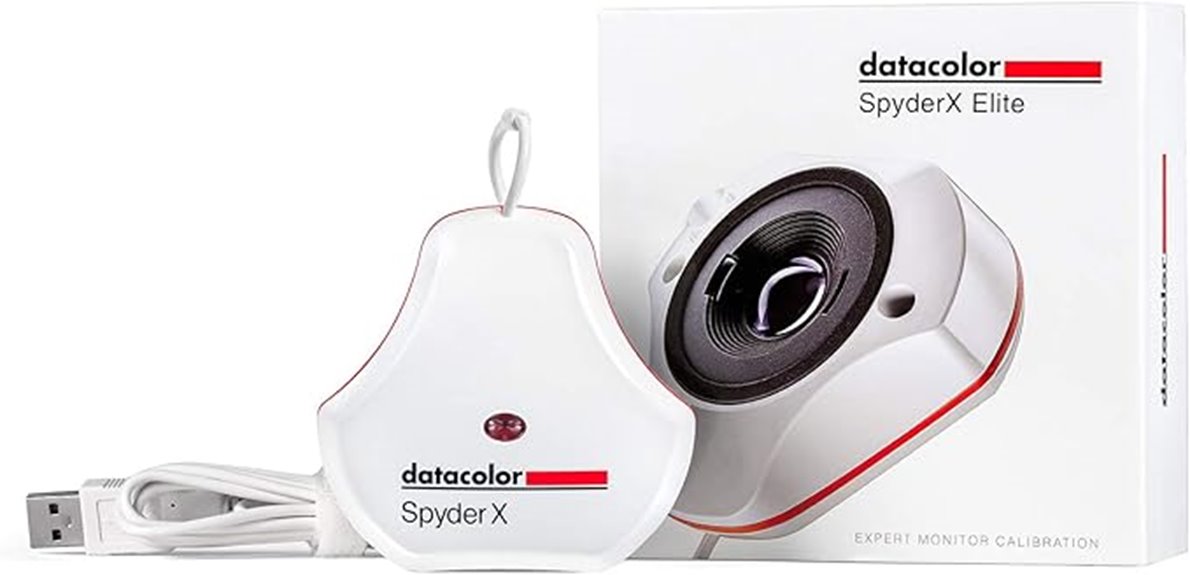
For professional photographers, videographers, and graphic artists demanding precise color management, the Datacolor Spyder X Elite stands out with its lightning-fast, lens-based calibration technology. It offers quick, accurate results supporting the latest screens, resolutions, and color gamuts. The device ensures on-screen colors, shadows, and white balance closely match prints and digital images. Its intuitive software provides detailed customization, multi-display support, and automatic profile adjustments. Calibration typically takes just a minute or two, making it efficient for busy workflows. Overall, Spyder X Elite delivers reliable, expert-level control over color fidelity, helping creators achieve consistent, professional results across various devices and standards.
Datacolor Spyder Print – Calibration Tool for Photographers and Print Professionals
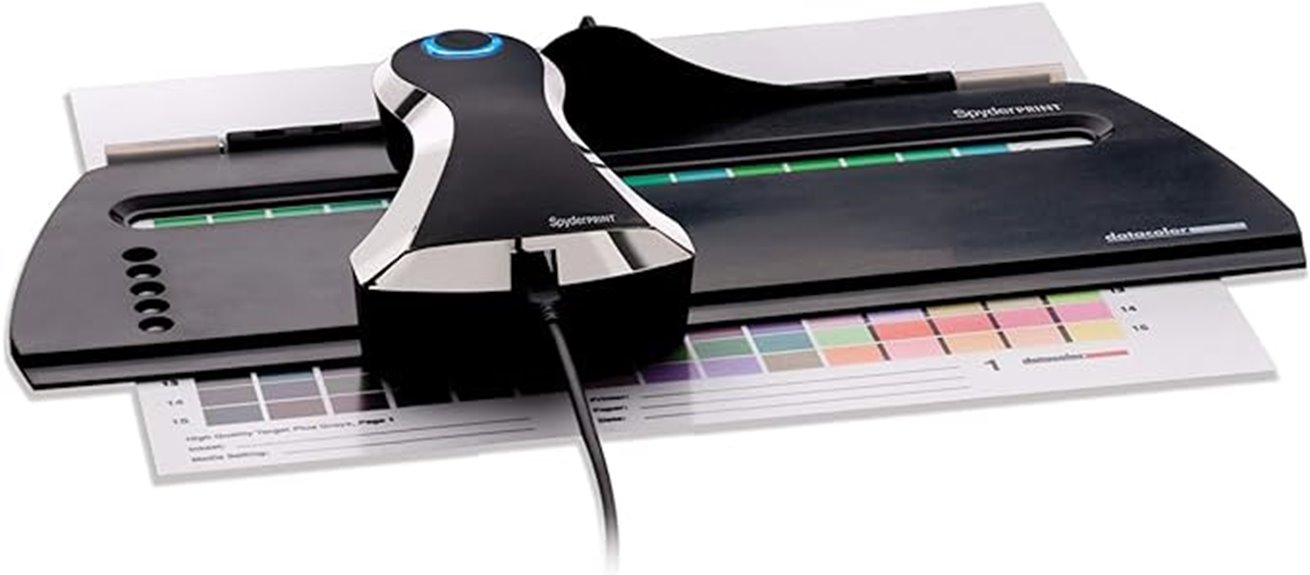
Photographers and print professionals seeking quick, accurate color profiling will find the Datacolor Spyder Print an ideal choice, thanks to its fast spectrocolorimeter and streamlined workflow. It creates custom profiles within minutes, ensuring consistent, true-to-life print results for both color and black-and-white images. The system includes software, a guide device, and supports media sizes up to A3+. Its intuitive process and extensive editing options make profile creation straightforward, reducing waste and saving time. Despite some software and hardware concerns reported by users, the Spyder Print remains a valuable tool for those needing reliable color management in professional printing environments.
Best For: professional photographers and print specialists who need quick, accurate color profiling and consistent print output.
Pros:
- Fast profiling process that generates custom profiles within minutes
- Intuitive, step-by-step workflow reduces the need for manuals
- Extensive editing options including tinting curves and gray targets for precise control
Cons:
- Software bugs and stability issues, especially on Mac systems, can hinder workflow
- Hardware reliability concerns such as inconsistent calibration and inaccurate readings
- Potential for diminished confidence in the accuracy of profiles due to reported technical issues
Starrett Stainless Steel Electronic Slide Caliper (EC799A-6/150)
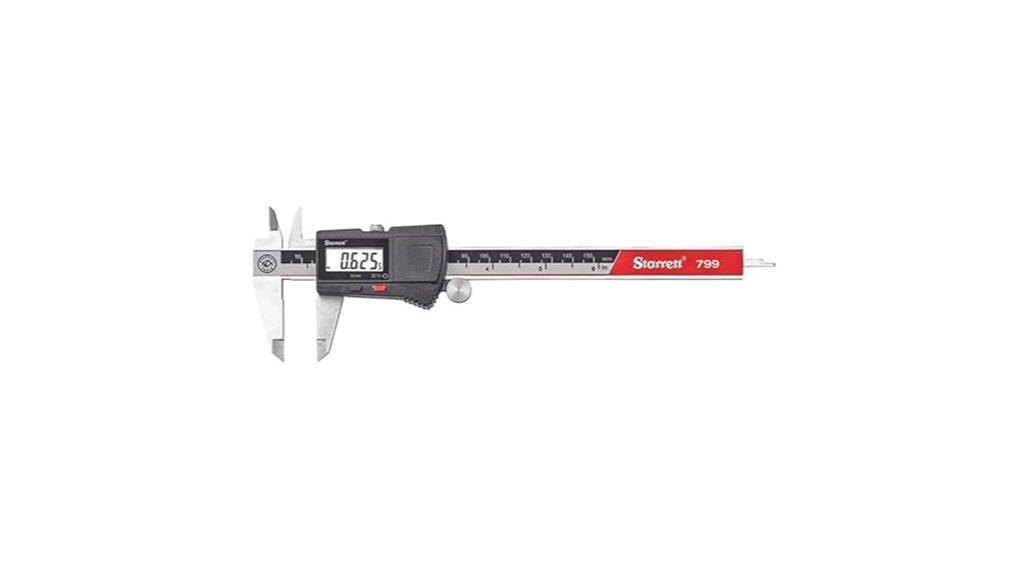
The Starrett Stainless Steel Electronic Slide Caliper (EC799A-6/150) stands out as an excellent choice for professionals and enthusiasts demanding accurate, reliable measurements in various applications. Its slim, ergonomic design and lightweight stainless steel construction guarantee durability and ease of use. The large LCD display provides quick, clear readings with a resolution of .0005 inches or 0.01mm. It offers functions like zeroing, inch/millimeter conversion, and automatic shut-off to conserve battery life. Suitable for measuring outside, inside, depth, and steps, this caliper combines precision with robustness, making it an essential tool for high-accuracy tasks.
Best For: professionals and DIY enthusiasts seeking precise, durable, and versatile measurement tools for various industrial or personal projects.
Pros:
- High-contrast LCD display for easy, quick reading of measurements
- Robust stainless steel construction offers excellent durability and corrosion resistance
- Multiple functions including zeroing, inch/mm conversion, and auto shut-off for convenience
Cons:
- Slight play in the adjustment wheel may affect fine measurement accuracy
- Battery compartment design can be difficult to access or replace
- Some users experienced initial confusion with instructions or unit selection settings
KLEIN TOOLS Cable Tester Kit with Scout Pro 3
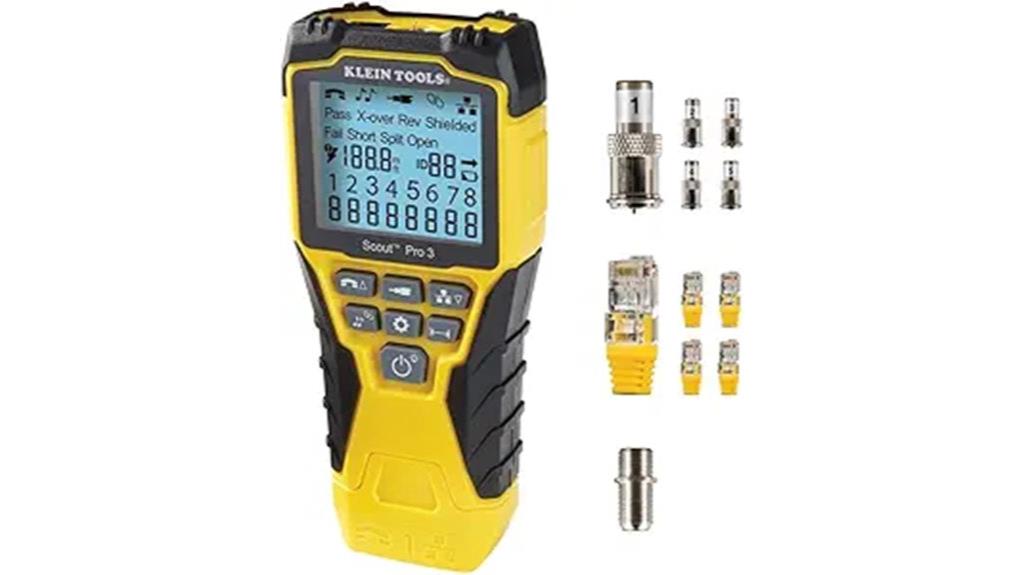
If you’re looking for a reliable cable testing solution that simplifies complex network troubleshooting, the KLEIN TOOLS Cable Tester Kit with Scout Pro 3 is an excellent choice. It tests voice, data, and video cables, detecting faults like open, short, miswire, and split-pair, ensuring thorough diagnostics. The device measures cable length up to 2000 feet and features a backlit LCD for easy reading in any lighting. It also includes tools for cable tracing and mapping, with multiple remotes for simultaneous testing. Designed for versatility, this kit streamlines cable management, making it an essential tool for network professionals seeking accuracy and efficiency.
Best For: network professionals and audiovisual technicians who need comprehensive cable testing, fault detection, and efficient cable management in complex setups.
Pros:
- Tests voice, data, and video cables with clear fault detection including open, short, miswire, and split-pair faults
- Measures cable lengths up to 2000 feet with a backlit LCD for easy readability in all lighting conditions
- Includes multiple remotes for simultaneous multi-cable mapping and effective organization
Cons:
- Requires a separate analog probe for cable tracing with the tone generator
- May be more feature-rich than necessary for simple or occasional cable testing needs
- Bulkier kit components might be less convenient for very tight or portable work environments
4-Channel Digi Sync Throttle Body & Digital Carb Sync Tool

For those seeking precise synchronization of carburetors and throttle bodies, the Channel Digi Sync Throttle Body & Digital Carb Sync Tool stands out with its 4-channel digital design. I find its real-time LCD display incredibly helpful for accurate readings, eliminating guesswork during tuning. With features like a vacuum gauge, peaking manometer, and quick calibration, it streamlines the process, saving time and effort. Built tough in the USA with a rubberized exterior, it’s reliable and easy to use—just plug in, calibrate, and tune. Its compatibility with carbureted and fuel-injected engines makes it a versatile tool for achieving ideal engine performance effortlessly.
Best For: DIY mechanics and professional tuners seeking precise, quick, and reliable synchronization of carburetors and throttle bodies on both carbureted and fuel-injected engines.
Pros:
- Provides accurate, real-time readings with an easy-to-read LCD display, reducing guesswork during tuning.
- Supports quick calibration and includes essential tools like a vacuum gauge and peaking manometer for efficient setup.
- Durable, USA-made construction with a rubberized exterior ensures reliability and longevity during frequent use.
Cons:
- Requires a 9V battery, which may need replacing after extended use.
- Slightly larger size (5.83 x 3.46 x 0.94 inches) may be less convenient for tight engine bays.
- The initial setup and calibration process, while straightforward, may be challenging for complete beginners.
Sound Level Meter Calibrator with 3 Calibration Levels

Anyone seeking precise sound level calibration will find the Sound Level Meter Calibrator with 3 Calibration Levels an ideal choice, thanks to its versatile three-point calibration system at 94dB, 104dB, and 114dB. Operating at 1000Hz, it aligns perfectly with microphone heads for accurate results. The device is lightweight, powered by two AA batteries, and features auto power-off for convenience. Its compatibility with many sound level meters makes it highly versatile. Users praise its accuracy, quick calibration process, and straightforward operation. It’s a reliable, portable tool that ensures consistent sound measurements, making it an essential device for professionals in the field.
Best For: professionals and audiophiles seeking precise, portable sound level calibration for microphones and audio equipment.
Pros:
- Accurate calibration across three levels (94dB, 104dB, 114dB) at 1000Hz for reliable measurements.
- Portable design powered by two AA batteries with auto power-off for convenience and energy efficiency.
- Compatible with many sound level meters and microphones, ensuring versatile use in various settings.
Cons:
- May require adapters to match microphone diameters for optimal fit and accuracy.
- Slightly longer calibration time when switching between levels, requiring a few seconds for self-calibration.
- Dependence on batteries means potential for power depletion, necessitating periodic replacements.
Sound Level Calibrator for Microphones

The Sound Level Calibrator for Microphones stands out with its high precision output levels at 94dB and 114dB, making it ideal for professionals who require accurate calibration across various noise environments. It’s calibrated to produce 94dB at sea level, ensuring immediate reliability, and supports A, B, C, D weighting networks, plus linear modes for versatile use. Compatible with both ½ inch and 1-inch microphones, it includes an adapter for easy setup. Conforming to IEC942 Class 1 standards, it guarantees high accuracy. With a long-lasting battery supporting about 100 hours of continuous use, it’s perfect for extended fieldwork and critical measurements.
Best For: Professionals and field technicians requiring high-accuracy microphone calibration across diverse noise measurement environments.
Pros:
- Provides high precision output levels at 94dB and 114dB for versatile calibration needs.
- Compatible with both ½ inch and 1-inch microphones, including an adapter for easy setup.
- Conforms to IEC942 Class 1 standards, ensuring reliable and accurate measurements.
Cons:
- May be more expensive than basic calibrators due to its high accuracy and features.
- Requires regular calibration checks to maintain optimal performance.
- Bulkier design might be less convenient for very compact or portable setups.
Calibrite ColorChecker Studio (CCSTUDIO)
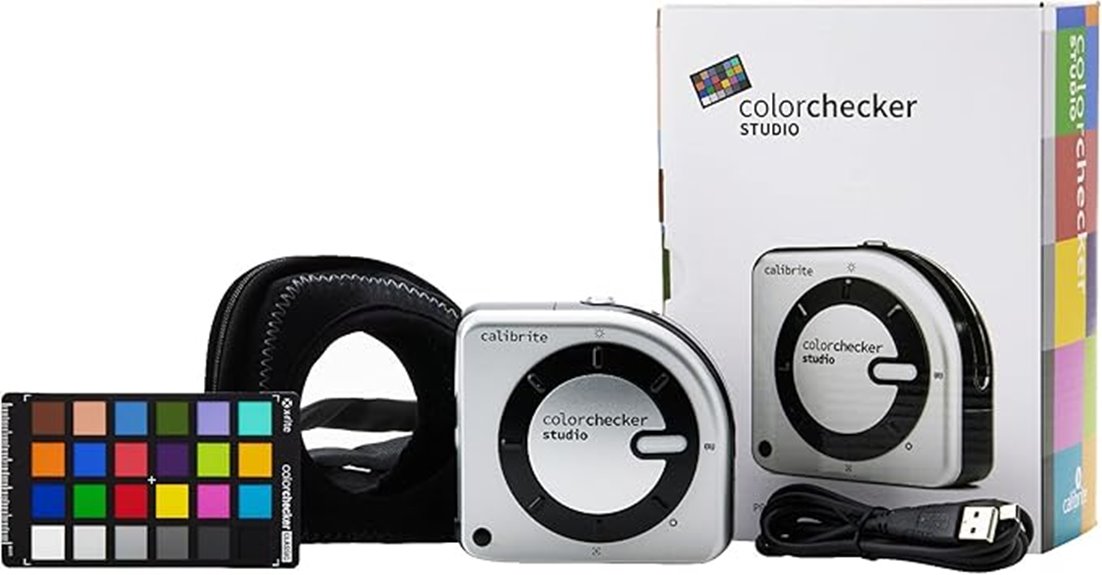
The Calibrite ColorChecker Studio (CCSTUDIO) stands out as an excellent choice for professionals seeking extensive calibration tools, thanks to its support for multiple profiling types—monitor, projector, scanner, and printer—all within a single device. It replaces the X-Rite i1Studio and offers adaptable profiling using ccStudio software, along with camera calibration via ColorChecker software. Its Intelligent Adaptive Iterative Profiling guarantees maximum color accuracy tailored to each display. Additionally, it automatically measures ambient light conditions to optimize luminance, making it ideal for precise color management in varying viewing environments. Powered by X-Rite technology, it combines versatility with advanced features for demanding calibration workflows.
Best For: professionals and enthusiasts seeking a comprehensive, versatile calibration tool capable of handling monitor, projector, scanner, printer, and camera profiling with advanced adaptive technology.
Pros:
- Supports multiple profiling types including monitor, projector, scanner, printer, and camera, offering all-in-one calibration solutions.
- Features Adaptive Iterative Profiling for highly accurate, tailored color calibration results.
- Automatically measures ambient light conditions to optimize display luminance for accurate print-to-display matching.
Cons:
- Requires software downloads and setup, which may be complex for beginners.
- Powered by proprietary X-Rite technology, potentially limiting compatibility with non-X-Rite software environments.
- May be more expensive than simpler calibration tools, reflecting its advanced features and capabilities.
Factors to Consider When Choosing Advanced Calibration Tools
When selecting advanced calibration tools, I focus on key factors like measurement range capabilities to make certain it fits my needs. Software compatibility and ease of use are also critical for seamless integration and efficiency. Additionally, I consider calibration speed, accuracy, and the build quality to guarantee reliable performance over time.
Measurement Range Capabilities
Choosing the right calibration tool depends heavily on its measurement range capabilities, as this determines how accurately it can gauge luminance, color, or sound levels within specific thresholds. For displays, verify the device can handle high luminance levels, such as up to 3,000 nits for HDR screens or even 10,000 nits for professional-grade displays. High-range tools are essential for accurately profiling modern monitors and TVs, especially with demanding HDR content. When calibrating sound equipment, a broader frequency and decibel range guarantees more precise measurements across different environments. Using a device with an insufficient range can lead to inaccurate profiles or require multiple tools, complicating the process. Matching the tool’s measurement range with the target device guarantees reliable, thorough data for ideal calibration.
Software Compatibility Options
Selecting a calibration tool that’s compatible with your operating system is crucial for smooth operation and efficient workflow. I always verify that the software supports Windows, Mac, or Linux, depending on my setup. It’s also important to check if the software integrates with third-party applications or industry standards, like ICC profiles or color management protocols, to ensure my workflow remains seamless. I look for tools that receive regular updates, providing support for new hardware and display technologies, which guarantees long-term usability. Customizable options, such as gamma, white point, or profile validation, are essential for tailoring calibration to specific needs. Additionally, I confirm whether the software can connect with existing color management systems, streamlining the calibration process and avoiding compatibility issues.
Ease of Use Features
Ease of use plays a vital role in guaranteeing that calibration tools fit seamlessly into my workflow. Intuitive software interfaces that guide me step-by-step help reduce errors and make the process straightforward. Simplified setup procedures, like automatic device recognition and minimal hardware adjustments, save time and make calibration accessible for both beginners and experts. Clear visual and audio prompts, along with easy-to-follow instructions, allow me to perform accurate calibrations without needing extensive technical knowledge. Tools offering preset calibration options and customizable profiles help me quickly achieve specific color and luminance targets with minimal effort. Compatibility with popular third-party software and various operating systems ensures smooth integration into my existing setup, streamlining my calibration process and boosting overall efficiency.
Calibration Speed and Accuracy
When evaluating advanced calibration tools, speed and accuracy are critical factors that directly impact my workflow. Fast calibration minimizes downtime and allows me to perform frequent adjustments, keeping displays and devices ideal. Accurate results depend on high-resolution sensors with low measurement error, ensuring luminance, color, and gamma are precisely measured. Many top tools use proprietary algorithms and high-precision sensors to deliver results within less than 1% deviation, boosting confidence in long-term color consistency. Repeatability and stability across multiple sessions are also essential for reliable calibration. The overall speed and accuracy depend on software efficiency, sensor quality, and the device’s ability to handle complex or high-luminance displays. Prioritizing these factors helps me achieve precise, consistent results efficiently.
Build Quality and Durability
The build quality of calibration tools directly influences their longevity and measurement reliability. High-quality tools are made from durable materials like stainless steel, reinforced plastics, or metal alloys, allowing them to withstand frequent use and environmental stress. Robust construction ensures consistent accuracy over time by preventing internal component wear and physical damage that can cause calibration drift. Devices with reinforced housings and sealed enclosures protect sensitive sensors and electronics from dust, moisture, and impacts, extending their operational lifespan. Additionally, well-designed tools often feature ergonomic shapes and secure fittings, making calibration procedures more precise and easier to handle. Investing in durable equipment reduces replacement costs and guarantees reliable performance, even in demanding industrial or professional settings.
Frequently Asked Questions
How Do Calibration Tools Ensure Long-Term Accuracy and Stability?
Calibration tools guarantee long-term accuracy and stability by incorporating high-quality materials and precise engineering, which reduce drift over time. I regularly use traceable standards and perform scheduled recalibrations to catch and correct any deviations early. Additionally, I monitor environmental conditions like temperature and humidity, which can affect measurements. This proactive approach keeps my calibration tools reliable, ensuring consistent, accurate results over the long haul.
What Are the Maintenance Requirements for Advanced Calibration Devices?
Imagine a sleek calibration device humming softly on my workbench. To keep it in top shape, I regularly perform routine cleaning to prevent dust buildup, check for software updates, and calibrate it against known standards. I also store it in a controlled environment, avoiding extreme temperatures and humidity. These steps guarantee my advanced calibration tools stay precise, reliable, and ready for any demanding measurement task.
Can Calibration Tools Be Integrated With Automated Testing Systems?
Yes, calibration tools can be integrated with automated testing systems. I’ve seen this firsthand, and it really streamlines measurement processes, reduces human error, and improves accuracy. Modern calibration devices often come with digital interfaces and software compatibility, making integration straightforward. I recommend choosing tools with open APIs or standardized communication protocols, so they fit seamlessly into your automated workflows, ultimately boosting efficiency and precision in your testing environment.
How Do Environmental Factors Affect Calibration Tool Performance?
Environmental factors can drastically impact calibration tool performance, almost like they have a mind of their own. Temperature fluctuations, humidity, and vibrations can skew results and reduce accuracy. I always make sure to regulate these conditions rigorously, because even minor changes can throw off measurements. By maintaining a stable environment, I ensure my calibration tools stay precise and reliable, giving me confidence in every measurement I take.
What Training Is Recommended for Optimal Use of Advanced Calibration Equipment?
I recommend thorough training that covers both theoretical principles and practical skills for calibration tools. You should focus on understanding equipment specifications, proper handling, and calibration procedures. Hands-on practice is essential, so look for courses or workshops that include real-world scenarios. Staying updated on industry standards and safety protocols is also vital. This approach guarantees you use advanced calibration equipment accurately, maintaining measurement precision and compliance.
Conclusion
Did you know that businesses using advanced calibration tools see up to a 30% improvement in measurement accuracy? Choosing the right tool can make all the difference in achieving precise results. Whether you’re calibrating displays, sensors, or audio equipment, these options in 2025 offer unmatched reliability. I encourage you to contemplate your specific needs carefully—investing in quality calibration tools can save you time and ensure your measurements are spot-on every time.