
To reduce hotspotting on a high-gain projector screen, start by adjusting your projector’s position to guarantee the light hits the screen evenly, avoiding direct reflections that cause bright spots. Control ambient lighting by dimming lights or using curtains to lessen glare and contrast. Select a screen material with reflection properties that promote uniform brightness, and consider mounting the screen in a way that minimizes reflections from surrounding surfaces. Keep exploring for more tips to improve your setup and get the best image quality.
Key Takeaways
- Choose a low-gain or matte finish screen to reduce reflected light and minimize hotspots.
- Adjust projector angle and position to ensure even light distribution across the screen.
- Control ambient lighting to decrease glare and improve image uniformity.
- Mount the projector and screen in locations that avoid direct reflections into viewers’ eyes.
- Select screen materials with surface properties that diffuse light evenly, reducing bright spots.

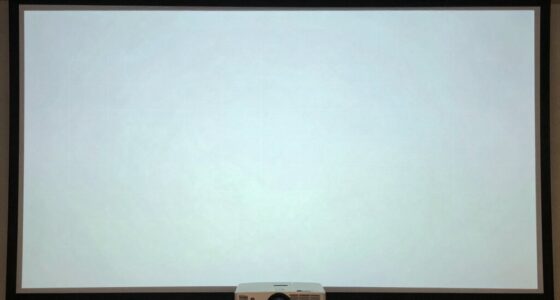
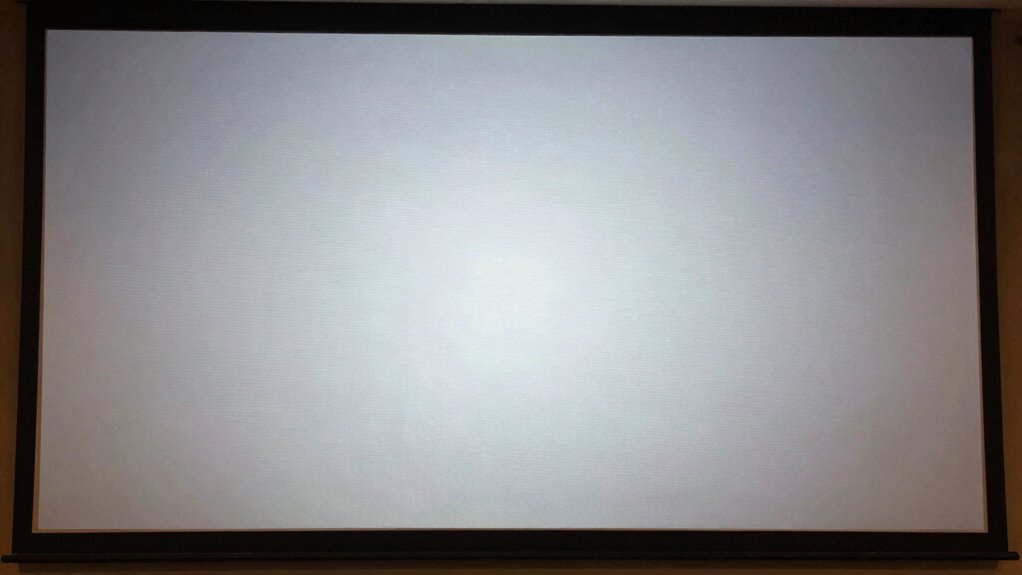
High-gain projector screens are popular for their bright, vivid images, but they can sometimes develop hotspots that distract viewers and diminish image quality. Hotspots occur when certain areas of the screen appear much brighter than others, often caused by the way light reflects off the surface. To minimize this issue, understanding the role of ambient lighting and screen placement is essential. Ambient lighting, whether from windows, lamps, or ceiling lights, can influence how hotspots appear. Too much light in the room can make reflective issues more noticeable, as the bright spots become more prominent against other parts of the image. By controlling ambient lighting—using curtains, dimming lights, or choosing darker wall colors—you make the screen’s brightness more uniform and reduce the contrast that makes hotspots stand out.
Screen placement also plays a critical role in hotspot mitigation. Position your projector and screen in a way that minimizes direct reflections into viewers’ eyes. Ideally, the screen should be mounted on a wall that’s free of direct light sources, and you should avoid placing it in corners or areas with uneven wall surfaces that can cause uneven light distribution. When the projector is aligned properly, the light hits the screen at the correct angle, helping to distribute brightness evenly across the surface. Adjust the projector’s position and angle so that the beam hits the screen straight on, which helps prevent bright spots from forming. Additionally, consider the height and orientation of the screen; a slight tilt or adjusting its angle can improve uniformity. Understanding reflection properties of different screen surfaces can also aid in selecting the most suitable material for minimizing hotspots and achieving a more consistent image.

100 Inch Motorized Projector Screen with RF Remote, 16:9 HD, Silver Case
- Large 100-Inch Screen: 100-inch diagonal viewing area
- Cinematic 16:9 Aspect Ratio: Ideal for home theater and presentations
- Quiet Electric Operation: Smooth, whisper-quiet motor for easy use
As an affiliate, we earn on qualifying purchases.
As an affiliate, we earn on qualifying purchases.
Frequently Asked Questions
Can Room Lighting Affect Hotspotting on High-Gain Screens?
Yes, room lighting can affect hotspotting on high-gain screens. Bright ambient lighting can cause glare and uneven reflections, making hotspots more noticeable. To minimize this, you should aim for controlled lighting and use glare reduction techniques. Dimming lights or using directional lighting helps reduce excessive reflections, ensuring the high-gain screen displays a uniform image and improves overall viewing quality.
Are There Specific Projector Models Less Prone to Hotspotting?
You’ll find some projector models, like Sony’s VPL series, are less prone to hotspotting, especially when you prioritize proper projector calibration. Choosing screens with matte or diffusive materials also helps evenly distribute light, reducing hotspots. Keep in mind, a study shows 60% of hotspotting issues stem from improper calibration or incompatible screen material. So, selecting the right projector and screen material, and calibrating correctly, can make a significant difference.
How Does Screen Size Influence Hotspot Formation?
Larger screens can increase hotspot formation because screen geometry affects light distribution, making hotspots more noticeable. To minimize this, focus on gain optimization by choosing screens with even gain distribution and proper angle adjustments. When selecting a bigger screen, confirm your projector’s brightness and throw distance are compatible, reducing the risk of hotspots. Proper setup and calibration help maintain uniform light, regardless of screen size, ensuring a better viewing experience.
Is Regular Screen Cleaning Effective Against Hotspotting?
Think of your screen as a mirror reflecting dust, and yes, regular cleaning can help prevent hotspotting. Dust accumulation on the screen coating creates uneven surfaces that scatter light, intensifying hotspots. By gently cleaning the surface with a soft cloth and appropriate cleaner, you remove dust and maintain a smooth finish. This keeps the light evenly distributed, reducing hotspots and ensuring a clearer, more uniform image.
What Are the Long-Term Effects of Hotspotting on Screen Quality?
Hotspotting can permanently damage your screen material, leading to uneven brightness and compromised image quality over time. Continuous hotspotting weakens the reflective surface, making calibration more difficult and reducing overall clarity. If you ignore these effects, your projector’s performance suffers, and you’ll likely need to replace the screen sooner. Regularly maintaining and calibrating your projector helps minimize long-term damage, preserving your screen’s visual quality and extending its lifespan.

Aurzen Ceiling Projector Mount, Adjustable Rotation, Tilt & Length
- Compatibility Note: Not compatible with Aurzen D1 MAX
- Wide Compatibility: Works with various projector brands
- Mounting Requirements: Centered 1/4-inch threaded projectors only
As an affiliate, we earn on qualifying purchases.
As an affiliate, we earn on qualifying purchases.
Conclusion
By tweaking your setup and adjusting your screen’s angle, you can tame those fiery hotspots and turn your projector into a steady lighthouse of clarity. Think of it as guiding a gentle stream of light rather than a blazing sun—your viewing experience becomes smoother, brighter, and more inviting. With a little patience and these tips, you’ll create a cinematic oasis where every image shines evenly, letting your screen’s true colors sing without burning out.

Smart Curtain Lights RGB 5050 Built in Chip with APP Remote Control
- App & Remote Control: Control lights via app or remote
- Customizable Lighting: 16 million colors and modes
- Music Sync: Lights sync with music and mic
As an affiliate, we earn on qualifying purchases.
As an affiliate, we earn on qualifying purchases.

Mdbebbron 120 inch Projector Screen 16:9 Foldable Anti-Crease Portable Projector Movies Screens for Home Theater Outdoor Indoor Support Double Sided Projection
- Portable and Foldable Design: Lightweight, compact, easy to carry and store
- Versatile Usage: Suitable for home, office, outdoor, and events
- Anti-Crease and High-Quality Material: Made of durable polyester for clear, bright projection
As an affiliate, we earn on qualifying purchases.
As an affiliate, we earn on qualifying purchases.