Room automation remotes split into three camps: simple RF plug kits that work in minutes with no hub, smart-platform buttons that trigger scenes and routines, and dedicated dimmer remotes built for lighting precision. After comparing 14 options, the Lutron Pico 3-Button Remote for Caseta stands out as the best overall pick for its flawless lighting control, wall-mount flexibility, and legendary battery life. The Syantek 3-Outlet Kit is the best value if you just want appliances and lamps switched without any smart-home plumbing, while the Shelly BLU RC Button 4 suits tinkerers who want Zigbee-grade scene control on a budget. The main tradeoff you’ll face is convenience versus capability: hub-free RF kits are dead simple but dumb, while platform remotes require a gateway or hub to unlock scenes, scheduling, and voice integration. Keep reading for the full ranked breakdown.

Get business pricing on your home office setup
- Business-only prices and quantity discounts
- Tax-exempt purchasing
- Multiple users, one account, clear invoices
Complete the kit


Key Takeaways
- The single biggest dividing line in this roundup is hub dependency: six of the fourteen remotes (both SONOFF models, the Zigbee scene button, both Lutron Picos, and the Shelly BLU) are useless without their matching hub, bridge, or gateway, while the Syantek, TREEWELL, and Amazon Basics options work standalone.
- The Lutron Pico 3-Button earned the top spot because it’s the only remote here that controls dimming granularity directly from the button — every other pick either toggles on/off or fires a pre-set scene.
- The Syantek and TREEWELL RF outlet kits are functionally near-identical; the real difference is range (100 ft vs 200 ft) and included outlets, so choosing between them comes down to home size, not feature depth.
- The MOES IR Blaster is the only remote that bridges legacy IR devices (ACs, TVs, DVDs) into Alexa and Google — it solves a completely different problem than every other product in this lineup.
- GoveeLife‘s two button sensors differ only in button count; the 6-button version makes sense exclusively if you’re running more than three scenes from one wall location.
| GoveeLife Wireless Mini Smart Button Sensor |  | Best Single-Button Simplicity | Buttons: 1 | Max Supported Devices: 50 GoveeLife devices | Connectivity: Bluetooth (dual-mode gateway required, sold separately) | VIEW ON AMAZON | See Our Full Breakdown |
| GoveeLife Wireless Smart 6-Button Sensor |  | Best for GoveeLife Ecosystem Power Users | Buttons: 6 | Max Supported Devices: 50 | Connectivity: Bluetooth via GoveeLife dual-mode gateway | VIEW ON AMAZON | See Our Full Breakdown |
| SONOFF Fusion Zigbee Smart Scene Button SNZB-01M |  | Best for Smart Home Tinkerers | Buttons: 4 programmable (single/double/triple/long press) | Scene Triggers: Up to 16 | Protocol: Zigbee (hub required) | VIEW ON AMAZON | See Our Full Breakdown |
| Amazon Basics Smart Dimmer Switch and Remote |  | Best for Alexa Households | Compatibility: Alexa only (Echo device required) | Hub: Echo device acts as hub | Controls: Lights, music, blinds, locks, thermostats, routines | VIEW ON AMAZON | See Our Full Breakdown |
| Syantek Remote Control Outlet Kit (3 Outlets + 1 Remote) | 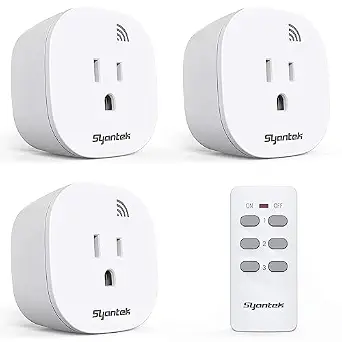 | Best No-Hub, No-App Starter Kit | Kit Contents: 3 remote outlets + 1 remote | Signal: RF wireless, up to 100ft line of sight | Voltage: 120V | VIEW ON AMAZON | See Our Full Breakdown |
| SONOFF Wireless Universal Scene Remote Control R5 |  | Best for Whole-Room Scene Automation | Buttons: 6 smart switches | Trigger Modes: Single-click, double-click, long-press (up to 18 triggers) | Gateway Requirement: Compatible eWeLink-Remote gateway required (T5, M5, MiniR4, NSPanelPro, others) | VIEW ON AMAZON | See Our Full Breakdown |
| Lutron Pico Remote for Caseta Smart Switch, Wireless 2-Button |  | Best Reliability Pick | Control Type: On/Off (2 buttons) | Connectivity: Lutron Clear Connect RF | Battery Life: Up to 10 years (battery included) | VIEW ON AMAZON | See Our Full Breakdown |
| TREEWELL Remote Control Outlet with Portable Magnetic Switch |  | Best Single-Outlet Starter Kit | Control Method: RF remote, no hub or app required | Range: Up to 200 ft through walls, doors, and windows | Operating Voltage: 125V AC | VIEW ON AMAZON | See Our Full Breakdown |
| TREEWELL Wireless Remote Control Outlet Kit (5 Outlets + 2 Remotes) |  | Best Value for Multi-Device Rooms | Outlets Included: 5 | Remotes Included: 2 | Range: Up to 200 ft | VIEW ON AMAZON | See Our Full Breakdown |
| Syantek Remote Control Outlet Wireless Light Switch Kit (5 Outlets + 2 Remotes) | 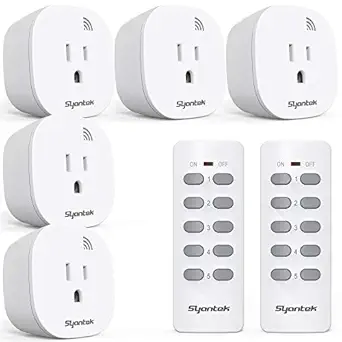 | Best for Accessibility on a Budget | Outlets Included: 5 | Remotes Included: 2 | Range: Up to 100 ft indoors | VIEW ON AMAZON | See Our Full Breakdown |
| Wireless Zigbee Smart Button, 4-Way Remote Switch and Scene Controller |  | Best for Tinkerers | Connectivity: Zigbee | Buttons: 4 (single, double, and long press) | Compatible Platforms: Hubitat, Zigbee2MQTT, Homey, Home Assistant; HomeKit/SmartThings via Zemismart M1/M6 gateway | VIEW ON AMAZON | See Our Full Breakdown |
| Lutron Pico Smart Remote Control for Caseta Wireless Dimmer Switch, 3-Button with Brighten/Dim |  | Best Reliability | Buttons: 3 (on, off, brighten/dim) | Battery Life: 10 years (battery included) | Connectivity: Lutron wireless RF | VIEW ON AMAZON | See Our Full Breakdown |
| MOES WiFi Smart IR Remote Controller – Universal Infrared Remote Blaster for AC, TV, DVD & More, Works with Alexa & Google Assistant |  | Best for Legacy Devices | Connectivity: 2.4G WiFi | Signal: Infrared (38KHz); RF not supported | Voice Assistants: Alexa, Google Assistant | VIEW ON AMAZON | See Our Full Breakdown |
| Shelly BLU RC Button 4 ZB – Smart Bluetooth & Zigbee 4-Button Remote Controller |  | Best Mounting Flexibility | Connectivity: Bluetooth and Zigbee | Buttons: 4 | Supported Actions: 16 (single, double, triple, long press) | VIEW ON AMAZON | See Our Full Breakdown |
| room automation remote | Buttons | Connectivity |
|---|---|---|
| GoveeLife Wireless Mini Smart | 1 | Bluetooth (dual-mode gateway required, sold separately) |
| GoveeLife Wireless Smart 6-But | 6 | Bluetooth via GoveeLife dual-mode gateway |
| SONOFF Fusion Zigbee Smart Sce | 4 programmable (single/double/triple/long press) | — |
| Amazon Basics Smart Dimmer Swi | — | — |
| Syantek Remote Control Outlet | — | — |
| SONOFF Wireless Universal Scen | 6 smart switches | — |
| Lutron Pico Remote for Caseta | — | Lutron Clear Connect RF |
| TREEWELL Remote Control Outlet | — | — |
| TREEWELL Wireless Remote Contr | — | — |
| Syantek Remote Control Outlet | — | — |
| Wireless Zigbee Smart Button | 4 (single, double, and long press) | Zigbee |
| Lutron Pico Smart Remote Contr | 3 (on, off, brighten/dim) | Lutron wireless RF |
| MOES WiFi Smart IR Remote Cont | — | 2.4G WiFi |
| Shelly BLU RC Button 4 ZB | 4 | Bluetooth and Zigbee |
More Details on Our Top Picks
GoveeLife Wireless Mini Smart Button Sensor
Not every room needs a command deck. The GoveeLife Mini Smart Button bets everything on doing one thing well: a single press that synchronously controls every GoveeLife device in a space, with an alternate mode that flips between running your scene and shutting everything off. That on/off toggle logic is genuinely useful at a doorway — tap when you enter, tap again when you leave.
Where the 6-button GoveeLife sensor spreads control across a room’s zones, this one is built for a single, decisive action. It controls up to 50 ecosystem devices and holds a connection at up to 180ft, but only through a dual-mode gateway (sold separately), and it refuses to talk to Alexa or Google Assistant at all. Battery life lands around four months, which is respectable for something this small.
Pros:- One-press synchronized control of up to 50 GoveeLife devices
- Alternate mode toggles scenes on and off with the same button
- Tiny footprint with lanyard loop for wall or keychain mounting
- 180ft effective range through the gateway
Cons:- Requires a separately sold dual-mode gateway for full functionality
- No Alexa or Google Assistant compatibility
- Single button limits it to one command set
Best for: GoveeLife households that want one tap at the door to trigger or kill an entire room scene
Not ideal for: Anyone hoping for voice-assistant integration or use outside the GoveeLife ecosystem — this button is walled in
- Buttons:1
- Max Supported Devices:50 GoveeLife devices
- Connectivity:Bluetooth (dual-mode gateway required, sold separately)
- Range:55m / 180ft
- Battery Life:Approx. 4 months (included)
- Voice Assistant Support:None
Our verdict“If your lighting, humidifier, and heater all live in the GoveeLife app, this is the simplest possible physical trigger for them — and useless to anyone else.”
GoveeLife Wireless Smart 6-Button Sensor
Think of this as the Mini Button’s bigger sibling: six buttons instead of one, same 50-device ceiling, same 180ft range. That jump from one action to six is what turns a doorway toggle into a genuine room control panel — one button for movie lighting, another for full brightness, another for the humidifier, and so on. Compared with the SONOFF Fusion SNZB-01M, you give up cross-platform flexibility (no Home Assistant, no Zigbee2MQTT) but gain an app-guided setup that never touches a line of code.
The tradeoff is the same one that runs through GoveeLife’s lineup: it is an ecosystem play, full stop. Alexa and Google Assistant are off the table, and Wi-Fi features hinge on a dual-mode gateway you buy separately. The CR2032 cell is included, and swapping it is a two-minute job, but a button-heavy remote will drain it faster than the single-button version.
Pros:- Six buttons allow distinct scenes and zone control across a room
- Group control of up to 50 devices with 180ft range
- Battery included with straightforward app setup
- Alternate mode provides quick all-off behavior
Cons:- Locked to GoveeLife ecosystem devices only
- Dual-mode gateway sold separately
- No 5G WiFi support and no voice assistant integration
Best for: GoveeLife-heavy households that want per-zone scene control without building automations in a hub platform
Not ideal for: Mixed-brand smart homes — nothing outside the GoveeLife app will respond to a single press
- Buttons:6
- Max Supported Devices:50
- Connectivity:Bluetooth via GoveeLife dual-mode gateway
- Range:55m / 180ft
- Battery:1x CR2032 (included)
- Compatibility:GoveeLife smart devices only
Our verdict“The right pick when your whole room already speaks GoveeLife and you want physical, per-scene buttons instead of phone taps.”
SONOFF Fusion Zigbee Smart Scene Button SNZB-01M
This is the enthusiast’s answer in the lineup. Four programmable buttons each accept single, double, triple, and long-press actions, yielding 16 scene triggers from a palm-sized device — nearly three times the assignments of the GoveeLife 6-button, and every one of them can run locally via Zigbee binding through Home Assistant, ZHA, or Zigbee2MQTT, meaning no cloud round-trip when your internet blinks out. TouchLink pairing adds direct dimming of compatible lights with zero hub logic.
The magnetic base is a clever touch absent from every other pick here: handheld, desk-bound, fridge-mounted, or screwed into a standard wall box. The catch is upfront friction — a Zigbee hub is mandatory, and you’ll get the most out of it only if you’re comfortable in Home Assistant or a similar platform. For a plug-in-and-go shopper, the Syantek RF kit or the Amazon Basics remote ask far less of you.
Pros:- 16 customizable triggers across four buttons
- Local Zigbee binding keeps automations fast and offline-capable
- TouchLink direct dimming without hub automation rules
- Versatile mounting: magnetic base, wall box, adhesive, or handheld
Cons:- Requires a compatible Zigbee hub to function at all
- Full value depends on willingness to configure in ZHA or Z2M
- No native voice-assistant route compared with Alexa-first remotes
Best for: Home Assistant, SmartThings, or Zigbee2MQTT users who want local, cloud-independent scene control
Not ideal for: Casual buyers without a Zigbee hub or appetite for configuration — half the features will sit unused
- Buttons:4 programmable (single/double/triple/long press)
- Scene Triggers:Up to 16
- Protocol:Zigbee (hub required)
- Compatibility:SONOFF hubs, Home Assistant (ZHA/Z2M), SmartThings (Aeotec V3)
- Special Features:Zigbee Binding, TouchLink dimming
- Mounting:Magnetic base, wall mount, handheld
- Operating Voltage:3V
Our verdict“The most capable remote in this batch, provided you run the kind of smart home that lets you exploit all 16 actions.”
Amazon Basics Smart Dimmer Switch and Remote
If your home already leans on Echo speakers, this remote slots in with almost no friction: pull the battery tab, follow the guided Alexa-app setup, and you’re pressing buttons instead of shouting voice commands at every device. It can trigger lights, music, blinds, locks, thermostats, and multi-device routines — a broader device menu than the GoveeLife buttons can touch, and without their gateway dependency, because your Echo doubles as the hub.
The limitation is as sharp as the convenience. This is Alexa-only; Google Home users and Home Assistant tinkerers get nothing, putting it at the opposite philosophical end from the SONOFF SNZB-01M. And a routine-based remote is only as reliable as your Wi-Fi and Alexa cloud — the SONOFF’s local binding beats it on response and outage resilience. As a silent, pocketable alternative to voice control, though, it does the job cleanly.
Pros:- Controls routines, lights, music, blinds, locks, and thermostats
- Echo device serves as the hub — no extra hardware to buy
- Guided setup takes minutes with no wiring
- Portable, battery-powered design works anywhere in the house
Cons:- Alexa-only; no support for other platforms
- Requires a compatible Echo device as the hub
- Cloud-dependent, so response lags behind locally bound Zigbee remotes
Best for: Alexa-centric households that want a silent alternative to voice commands for routines and device control
Not ideal for: Google Assistant or Home Assistant users — the remote is hard-locked to the Alexa app and Echo hardware
- Compatibility:Alexa only (Echo device required)
- Hub:Echo device acts as hub
- Controls:Lights, music, blinds, locks, thermostats, routines
- Power:Battery-powered, portable
- Setup:Guided pairing in Alexa app
- Wiring:None required
Our verdict“The path of least resistance for Alexa households — everyone else should look at the Zigbee options instead.”
Syantek Remote Control Outlet Kit (3 Outlets + 1 Remote)
Sometimes a room doesn’t need automation — it needs a switch where there isn’t one. This plug-in RF kit pairs three outlets to one remote out of the box with zero apps, accounts, hubs, or Wi-Fi. That puts it in a different category from the GoveeLife and SONOFF picks: no scenes, no scheduling, no ecosystem — just reliable on/off through walls and doors at up to 100ft. Compared with the TREEWELL 200ft kits, the range is shorter, but the outlets are compact enough to leave the second socket free, and the programming is flexible: pair one remote to everything, or several remotes to one outlet.
The post-outage behavior deserves note — outlets stay off after a power cut, which saves energy but may surprise anyone expecting lamps to return automatically. And unlike the Amazon Basics remote, there’s no pathway to smarter control later; what you buy is what you get.
Pros:- Zero setup: no hub, app, account, or Wi-Fi required
- RF signal works through walls and doors up to 100ft
- Programmable pairing — one remote runs all outlets or several remotes share one
- Compact outlets leave the second wall socket usable
Cons:- On/off only — no dimming, scenes, or scheduling
- Stays off after power outages, so lamps won’t self-restore
- Shorter range than competing 200ft RF kits
Best for: Renters, caregivers, and anyone who needs simple remote on/off for lamps, fans, or holiday decor with no setup
Not ideal for: Buyers who want scenes, scheduling, or app control — this kit is deliberately dumb in the best and worst sense
- Kit Contents:3 remote outlets + 1 remote
- Signal:RF wireless, up to 100ft line of sight
- Voltage:120V
- Amperage:Up to 23A circuit rating
- Mounting:Plug-in, occupies one socket
- Certifications:FCC, ETL listed
- Power-Fail Behavior:Outlet remains off after outage
Our verdict“The fastest route from ‘no switch’ to ‘working switch’ — just don’t expect it to grow into a smart home.”
SONOFF Wireless Universal Scene Remote Control R5
The R5 is the most ambitious remote in this lineup, and it earns its spot by doing something the TREEWELL and Syantek plug-in kits simply cannot: triggering multi-device scenes rather than switching single outlets. With six buttons supporting single-click, double-click, and long-press actions, a single unit can fire up to 18 distinct automations — a movie-night scene, a bedtime scene, a whole-floor shutoff. Where the SONOFF SNZB-01M covers one or two actions, the R5 is built for layered routines.
The tradeoff is real, though. It requires an eWeLink-Remote gateway (T5, M5, NSPanelPro, MiniR4, and others work), so buyers starting from zero face extra cost and setup. On the plus side, offline control within 90M of the gateway means the R5 keeps working when the internet drops — something Wi-Fi-only options like the Amazon Basics dimmer remote can’t claim.
Pros:- Six buttons with three press modes enable up to 18 distinct scene triggers from one device
- Works offline within 90M of the gateway, so scenes still fire without internet
- No wiring required — mounts with 3M adhesive or magnetic accessory, or detaches for handheld use
- Dual-control pairing with the M5 wall switch lets two controllers manage the same light
Cons:- Will not function at all without a compatible eWeLink-Remote gateway, adding cost and complexity
- Scene customization only through the eWeLink app, which is less polished than competing apps
Best for: Smart home enthusiasts already inside the SONOFF/eWeLink ecosystem who want one wall-mounted panel to trigger complex scenes
Not ideal for: Buyers without an existing eWeLink gateway or anyone who just wants a plug-and-play lamp switch with zero setup
- Buttons:6 smart switches
- Trigger Modes:Single-click, double-click, long-press (up to 18 triggers)
- Gateway Requirement:Compatible eWeLink-Remote gateway required (T5, M5, MiniR4, NSPanelPro, others)
- Offline Range:Up to 90M from gateway
- Mounting:3M adhesive or magnetic accessory; detachable handheld
- Wiring:None required
Our verdict“If you live in the SONOFF ecosystem and want scene-level control rather than simple on/off switching, the R5 is the remote to buy — but skip it if you don’t already own a gateway.”
Lutron Pico Remote for Caseta Smart Switch, Wireless 2-Button
Lutron’s Pico exists in a different reliability class from every RF plug-in kit here. Its Clear Connect RF protocol is purpose-built for lighting, which means presses register instantly and consistently — no missed toggles through walls, a common complaint with budget RF kits like the Syantek 5-outlet set. A 10-year battery life means you mount it once and forget it, versus the SONOFF R5, which ties you to gateway health and app behavior.
The catch is ecosystem lock-in: the Pico only controls Lutron Caseta switches, so it’s a component of a Lutron home, not a standalone gadget. This 2-button model is also strictly on/off — no dimming, no scenes, no multi-room triggers like the Pico 3-button with Brighten/Dim elsewhere in this roundup. Accessories like the wall bracket and tabletop pedestal are sold separately, which adds up if you’re furnishing several rooms.
Pros:- Clear Connect RF delivers fast, consistent signal through walls without the dropouts common to generic RF remotes
- 10-year battery life means essentially zero maintenance after installation
- Three mounting options: handheld, wall bracket, or tabletop pedestal
- Fits a standard wall plate, so it looks like a built-in switch without cutting holes or running wire
Cons:- Only works with Lutron Caseta devices — useless as a standalone controller
- On/off only; no dimming or scene triggering on this 2-button model
- Mounting accessories sold separately, which adds cost per room
Best for: Homeowners building out a Lutron Caseta lighting system who want dependable wireless switches anywhere without new wiring
Not ideal for: Anyone without Caseta switches, or buyers who want scene control or dimming from a single remote
- Control Type:On/Off (2 buttons)
- Connectivity:Lutron Clear Connect RF
- Battery Life:Up to 10 years (battery included)
- Mounting:Handheld, wall bracket, or tabletop pedestal (accessories sold separately)
- Compatibility:Lutron Caseta in-wall smart switches
- Operating Voltage:3 volts
Our verdict“The Pico is the remote to get if you’re committed to Caseta — nothing else here matches its reliability and battery life, but it’s an accessory, not a system.”
TREEWELL Remote Control Outlet with Portable Magnetic Switch
This kit answers the simplest version of room automation: one outlet, one switch, zero setup friction. Compared with the TREEWELL 5-outlet kit, it’s less about coverage and more about placement — the portable magnetic switch sticks to a fridge, desk edge, or wall, so the control lives wherever your hand naturally reaches. The 200-foot RF range doubles the Syantek kit’s 100-foot reach, and the signal punches through walls and doors without issue.
At 15A/1875W with ETL and FCC listings, it handles lamps and most household appliances safely, though space heaters and compressors near the limit are borderline. The obvious limitation is scale: it’s one outlet and one switch. Unlike the SONOFF R5, there’s no scene logic, and unlike its own 5-outlet sibling, you can’t address multiple devices independently out of the box — expansion means buying more kits and pairing them.
Pros:- 200-foot RF range working through walls, doors, and windows outclasses most plug-in competitors
- Magnetic portable switch mounts on fridges, desks, or walls so it rarely gets lost
- Compact receiver occupies one socket without blocking the second outlet
- ETL and FCC listed with fire-resistant casing for safe high-wattage use
Cons:- Single outlet only — no independent multi-device control without buying more kits
- Capped at 15A/1875W, which rules out some heavy-duty appliances
- No app, scheduling, or scene support — purely manual RF control
Best for: Renters or anyone wanting a no-app, no-hub way to add a switch for a hard-to-reach lamp or appliance across a room
Not ideal for: Buyers automating several devices at once — the 5-outlet TREEWELL kit covers more ground for similar setup effort
- Control Method:RF remote, no hub or app required
- Range:Up to 200 ft through walls, doors, and windows
- Operating Voltage:125V AC
- Switch Mounting:Magnetic surface mount
- Certifications:ETL & FCC listed
Our verdict“The right pick when you need one reliable switch for one device with maximum range and zero setup; scale up to the 5-outlet kit if you’re automating a whole room.”
TREEWELL Wireless Remote Control Outlet Kit (5 Outlets + 2 Remotes)
Where the single-outlet TREEWELL kit covers one lamp, this version covers a room: five independently addressable outlets and two remotes, so you can station a controller at the door and the bedside simultaneously. That dual-remote arrangement is something neither the Lutron Pico (single remote, Caseta-only) nor the Syantek 5-outlet kit matches at this scale, and the 200-foot RF range again doubles Syantek’s spec.
Pairing is flexible — one remote can run all five outlets, or you can split them into groups, and extra kits can join the system later. The honest limitation is the ceiling: beyond the included five outlets, expansion means buying entire additional kits, and there’s no scheduling, app control, or scene logic. If your ambitions grow toward whole-home automation, the SONOFF R5 route will serve you better long-term. For straightforward remote switching of lamps, fans, and holiday lighting across a large room, this is the most complete package here.
Pros:- Five outlets plus two remotes gives redundant control points for a fraction of a hub-based system’s complexity
- 200-foot through-wall RF range with free pairing and no cross-interference
- Compact receivers don’t block adjacent sockets
- ETL and FCC listed with fire-resistant housing
Cons:- Expansion beyond five outlets requires purchasing additional full kits
- No scheduling, app integration, or scene automation — manual RF switching only
- 15A/1875W per-outlet ceiling limits heavy-duty appliance use
Best for: Households automating several lamps or appliances in one large room who want two control points without any hub or app
Not ideal for: Buyers who expect to keep expanding — growth requires full additional kits rather than single add-on outlets
- Outlets Included:5
- Remotes Included:2
- Range:Up to 200 ft
- Control Method:RF (no hub required)
- Operating Voltage:120V AC
- Certifications:ETL & FCC listed
Our verdict“The best outlet-per-dollar play in this roundup for outfitting a whole room at once, as long as manual control is all you need.”
Syantek Remote Control Outlet Wireless Light Switch Kit (5 Outlets + 2 Remotes)
Syantek’s kit earns its place through who it serves best: elderly and mobility-impaired users. The remotes use a familiar large push-button form with 12V alkaline cells, and the programmable outlets let one button command multiple receivers — handy for turning a room’s lamps off from a bedside. A thoughtful safety detail: outlets stay off after power outages, so devices don’t restart unattended and waste energy.
Compared with the TREEWELL 5-outlet kit, the tradeoff is range — 100 feet versus 200 — which matters in larger homes or detached rooms, though both signals pass through walls. Unlike the Lutron Pico, nothing here integrates with a larger smart home; this is deliberately simple, indoor-only equipment. The non-rechargeable batteries are a minor ongoing cost, and the system’s 23A rating on the outlet hardware gives some headroom above typical plug-in kits for fans and heaters.
Pros:- Simple push-button remotes and programmable outlet grouping are genuinely easy for non-technical users
- One remote can control multiple outlets, enabling whole-room shutoff with one press
- Outlets remain off after power outages, preventing energy waste and unattended restarts
- FCC certified and ETL listed, with a 23A rating offering headroom for fans and heaters
Cons:- 100-foot indoor range is half what the TREEWELL kits offer
- Indoor use only, limiting garage or covered-patio applications
- Non-rechargeable alkaline batteries mean recurring replacement
Best for: Seniors, caregivers, or mobility-limited users who need simple large-button control of lamps, fans, and heaters without any smart home tech
Not ideal for: Owners of large properties where 100 feet of range may fall short, or anyone wanting app control and scheduling
- Outlets Included:5
- Remotes Included:2
- Range:Up to 100 ft indoors
- Operating Voltage:127V AC
- Battery:12V/23A alkaline (non-rechargeable)
- Certifications:FCC certified, ETL listed
Our verdict“The friendliest option here for older adults and anyone who wants dumb-simple, no-hub control of several devices — just accept the shorter range.”
Wireless Zigbee Smart Button, 4-Way Remote Switch and Scene Controller
This option stands out for deep customization: four buttons with single, double, and long-press gestures translate into 12 programmable actions across Hubitat, Zigbee2MQTT, Homey, and Home Assistant. Compared with the SONOFF Fusion SNZB-01M, which offers a single button, this model makes far more sense for anyone running whole-room scenes from one wall-mounted pad. HomeKit and SmartThings users can join in too, but only through the Zemismart M1 or M6 Matter gateway, which adds cost and setup friction. That tradeoff defines the pick: the raw flexibility is excellent, but you supply the ecosystem around it. Battery life is respectable rather than remarkable.
Pros:- 12 assignable actions across 4 buttons for scenes and device control
- Native pairing with Hubitat, Zigbee2MQTT, Homey, and Home Assistant
- HomeKit and SmartThings reachable via Zemismart Matter gateways
- Compact build with included long-life lithium button battery
Cons:- Requires a Zigbee hub, and HomeKit/SmartThings need a separately purchased gateway
- Button battery, while long-lasting, is less convenient than the Lutron Pico’s 10-year cell
- Setup complexity is far higher than plug-and-play RF outlet kits like the Syantek
Best for: Home Assistant, Hubitat, or Zigbee2MQTT users who want one wall controller to trigger scenes, blinds, and multi-device routines
Not ideal for: Buyers without a Zigbee hub or Matter gateway — this remote does almost nothing without ecosystem infrastructure behind it
- Connectivity:Zigbee
- Buttons:4 (single, double, and long press)
- Compatible Platforms:Hubitat, Zigbee2MQTT, Homey, Home Assistant; HomeKit/SmartThings via Zemismart M1/M6 gateway
- Power:Lithium button battery (included)
- Typical Use:Scene triggering, blinds, device actions, scheduled automations
Our verdict“This is the pick for hobbyists already invested in Zigbee automation who want maximum programmable control from a single wall pad.”
Lutron Pico Smart Remote Control for Caseta Wireless Dimmer Switch, 3-Button with Brighten/Dim
No remote in this lineup matches the Pico’s reputation for just working. The 10-year battery life dwarfs everything else here — the Zigbee scene buttons and the Shelly BLU RC need battery attention far sooner. Compared with the Amazon Basics Smart Dimmer Remote, the Pico trades Alexa-only smarts for Lutron’s rock-solid proprietary RF and dimming precision, plus mounting flexibility: handheld, wall-mounted, or on a tabletop pedestal. The catch is equally clear — it only controls Lutron Caseta dimmers and related Lutron gear, all sold separately. There’s no scene logic, no button gestures, no IR blasting. This is a single-purpose light controller that outlasts and outperforms every generalist here at that one job.
Pros:- 10-year battery life with the battery included
- Handheld, wall-mounted, or tabletop pedestal placement
- Brightness adjustment plus on/off from anywhere in the room, even from the car
- Broad compatibility across Caseta, RadioRA 2, Serena shades, and other Lutron wireless systems
Cons:- Requires separately purchased Lutron Caseta dimmers or plug-in lamp dimmers
- Pedestal and wall-plate accessories are sold separately
- No programmable scenes or multi-platform smart home integration
Best for: Homeowners already in or committing to the Lutron Caseta ecosystem who want dependable, battery-foolproof dimming control
Not ideal for: Buyers without Lutron dimmers — this remote is unusable as a standalone device
- Buttons:3 (on, off, brighten/dim)
- Battery Life:10 years (battery included)
- Connectivity:Lutron wireless RF
- Mounting:Handheld, wall mount, or tabletop pedestal (accessories sold separately)
- Compatible Systems:Caseta dimmers, plug-in lamp dimmers, RadioRA 2, Serena RF shades, Sivoia QS, Energi Savr Node, Quantum, myRoom, Maestro Wireless, PowPak
- Operating Temperature:32°F – 104°F
Our verdict“Buy this if Lutron lighting is already in your walls and you want a remote you’ll basically never think about again.”
MOES WiFi Smart IR Remote Controller – Universal Infrared Remote Blaster for AC, TV, DVD & More, Works with Alexa & Google Assistant
This pick makes the most sense for a completely different problem than the others: taming dumb IR devices. Instead of controlling smart lights like the Pico or scene buttons, it turns old air conditioners, TVs, fans, and DVD players into app- and voice-controllable gear with no hub required. The DIY learning function is the differentiator — unsupported brands, fireplaces, heaters, and ceiling fans can be cloned from their original remotes. The physics limitation is real, though: infrared can’t pass through walls, so multi-room setups need one blaster per room, which erodes the value advantage over purpose-built remotes. RF devices and 5GHz WiFi are also off the table.
Pros:- Consolidates AC, TV, fan, DVD, and TV box remotes into one hub-free device
- Alexa and Google Assistant voice control plus Smart Life/Tuya app access from anywhere
- DIY learning function clones functions from remotes of unsupported or unusual devices
- UL certified adapter and USB cable allow flexible placement
Cons:- IR signal cannot penetrate walls, so larger homes need one unit per room
- 2.4G WiFi only; no 5G support
- Cannot control RF-based devices like some fans and fireplaces
Best for: Renters and budget automators who want app and voice control of existing IR air conditioners, TVs, and fans without buying a hub
Not ideal for: Multi-room households expecting one unit to cover the house — IR requires a blaster per room
- Connectivity:2.4G WiFi
- Signal:Infrared (38KHz); RF not supported
- Voice Assistants:Alexa, Google Assistant
- App:Smart Life / Tuya (Android & iOS)
- Hub Required:No
- Included Accessories:UL certified adapter, USB 2.0 cable
- Controllable Devices:AC, TV, fan, DVD, TV box, plus DIY-learned IR devices
Our verdict“This is the cheapest path to smart-controlling the IR clutter you already own — just plan on one unit per room.”
Shelly BLU RC Button 4 ZB – Smart Bluetooth & Zigbee 4-Button Remote Controller
Where the Zigbee 4-Way Scene Controller offers 12 actions, the Shelly BLU RC pushes to 16 configurable actions with triple-press gestures added, giving power users the densest control surface in this roundup. Its real signature, though, is mounting: built-in magnets plus a magnetic holder and 3M metal plate mean it lives on the wall, sticks to a fridge, or rides in a pocket — no pedestal accessory to buy, unlike the Lutron Pico. The dual Bluetooth/Zigbee radio adds deployment flexibility the SONOFF scene button can’t match. But note the gatekeeping: full app integration demands a Shelly gateway or any Shelly Plus/Pro/Gen3/Gen4 device, and there’s no native HomeKit or Matter support mentioned.
Pros:- 16 configurable actions across 4 buttons, including triple-press gestures
- Magnetic mounting system works on walls, metal surfaces, or in a pocket
- Dual Bluetooth and Zigbee connectivity for flexible deployment
- Robust encryption suits security-sensitive uses like garage door control; 2-year warranty
Cons:- Requires a separate Shelly BLU Gateway or a Plus/Pro/Gen3/Gen4 device for app integration
- No native HomeKit or Matter support mentioned
- Button count and gesture depth are overkill for simple on/off lighting needs
Best for: Shelly ecosystem owners and garage-tinkerers who want a pocketable 16-action remote that controls doors, blinds, lights, and scenes
Not ideal for: HomeKit-first households or buyers with no Shelly gateway — integration options narrow quickly
- Connectivity:Bluetooth and Zigbee
- Buttons:4
- Supported Actions:16 (single, double, triple, long press)
- Mounting:Magnetic holder, metal plate with 3M sticker, built-in magnets
- Gateway Requirement:Shelly BLU Gateway or any Shelly Plus, Pro, Gen3, Gen4 device
- App:Shelly Smart Control App
- Power:Long-life battery
- Warranty:2 years
Our verdict“The most flexible mounting and the most actions per button make this the enthusiast’s remote — provided you already run Shelly gear.”
How We Picked
I evaluated each remote against five buyer-relevant criteria. Ecosystem compatibility came first, because a remote that doesn’t pair with your existing hub or platform is a paperweight. Setup burden mattered next — whether the device works out of the box or demands a gateway, wiring, or app configuration changes who can realistically use it. Control range and reliability separated the RF kits (where 100 ft versus 200 ft is a real difference in multi-room homes) from the Zigbee and WiFi options, which depend on hub placement instead. Build and battery life factored in heavily, since remotes live in hands, on walls, and under couch cushions. Finally, I weighed versatility — how many devices or scenes one remote can realistically manage.
The ranking logic follows a simple principle: the best room automation remote is the one that fits the most common real-world setup with the fewest compromises. The Lutron Pico tops the list because lighting is the number-one automation use case and its ecosystem is the most mature. Hub-free RF kits rank mid-pack for their simplicity but limited intelligence, and niche tools like the IR blaster rank for their specific problem-solving rather than broad appeal.
Factors to Consider When Choosing Room Automation Remotes
Choosing a room automation remote is less about the remote itself and more about what it needs to talk to. Before buying anything in this category, work through these factors — they’ll eliminate half the options instantly.
Hub or No Hub: Decide Before You Shop
The most expensive mistake in this category is buying a remote that requires a hub you don’t own. Every Zigbee product in this roundup — the SONOFF models, the Shelly BLU, and the generic 4-way scene button — needs a Zigbee coordinator, whether that’s a dedicated gateway, a SmartThings hub, or a compatible Echo model. The Lutron Pico remotes are the most locked-in of all: without a Caseta bridge or compatible Lutron dimmer, they do nothing at all. Meanwhile, the RF outlet kits from Syantek and TREEWELL skip hubs entirely, pairing directly with plug receivers out of the box. My advice: inventory what you already own before browsing, because a hub-dependent remote added to a hub-free home doubles your real cost.
Scenes and Routines vs. Simple On/Off
Not all buttons do the same thing, and the difference shapes your entire automation experience. An RF outlet remote toggles power — that’s it, forever. A smart scene button like the Shelly BLU RC Button 4 can fire multi-step routines: dim the lights, kill the TV, and arm a sensor with one press. If you’re automating a single lamp or fan, paying for scene logic is wasted money. But if you’re building out a home theater or bedtime routine, a pure on/off remote will frustrate you within a week. A common buyer error is treating these categories as interchangeable; they’re not, and the gap widens as your setup grows.
Range Requirements for Your Home Layout
Advertised range is measured in open air, not through walls, floors, and appliances. A 100 ft RF range can shrink to 40 ft or less across two interior walls and a floor — fine for an apartment, marginal for a two-story house. The 200 ft TREEWELL kits earn their premium mostly through this margin. Zigbee remotes sidestep the problem differently: their range depends on hub placement and mesh repeaters, so a well-positioned hub can outperform any direct RF link. Before buying, walk the actual path between where the remote will live and the devices it controls, counting walls. That count matters more than any number on the box.
Button Count and Physical Mounting
More buttons isn’t automatically better — it’s a tradeoff between capability and muscle memory. A single-button remote like the SONOFF SNZB-01M supports press, double-press, and long-press, giving you up to three actions from one control. Six buttons, like the GoveeLife 6-Button Sensor, let family members label and learn dedicated functions but raise the risk of pressing the wrong one in the dark. Also think about mounting: models with wall brackets and magnetic backs (the TREEWELL portable switch, the Shelly BLU) can live wherever convenient, while handheld-only units tend to get lost. If the remote will serve guests or kids, fewer buttons with clear labels beats feature density every time.
Battery Type and Long-Term Maintenance
Remotes are low-maintenance devices until they’re not. Coin-cell remotes (most Zigbee buttons here) run one to two years per battery but require you to keep spares of an odd size on hand. The Lutron Pico’s 10-year battery life is the category benchmark and a genuine reason to pay more if you hate maintenance. Remotes that use AA or AAA cells are easier to service but drain faster in WiFi-connected models. One overlooked detail: fixed-lifespan sealed remotes can’t be serviced at all, so check the battery type before committing to a wall-mounted install in a hard-to-reach spot.
When to Choose an IR Blaster Instead
If your goal is controlling an air conditioner, TV, or DVD player rather than lights and plugs, you need a completely different tool. The MOES WiFi IR blaster converts your phone and voice assistants into a universal remote for IR devices — something no button remote in this roundup can do. The catch is directionality: IR requires line-of-sight to the blaster, and obscure or very new devices sometimes lack matching IR codes in the app database. An IR blaster also can’t toggle wall power or trigger non-IR smart devices. Buyers automating a media room often end up needing both an IR blaster and a scene remote, which is worth budgeting for upfront.
Frequently Asked Questions
Can I use a Lutron Pico remote without a Caseta hub or dimmer?
No — the Pico is not a standalone remote. It communicates with Caseta dimmers, switches, or the Caseta Smart Bridge, and without one of those on the other end, its presses go nowhere. This catches buyers off guard because the Pico looks and is priced like a simple wireless switch. If you already own Caseta dimmers, adding a Pico is one of the best upgrades in home automation. If you don’t, factor the cost of a compatible dimmer or bridge into your decision, at which point a hub-free RF outlet kit becomes far cheaper for basic switching.
What’s the difference between the Syantek and TREEWELL remote outlet kits?
Functionally they’re near twins: both are FCC-certified RF kits that pair handheld remotes to plug-in receivers with no hub or WiFi required. The practical differences are range and kit composition. TREEWELL advertises a 200 ft range versus Syantek’s 100 ft, which matters in larger homes or when controlling devices across floors. Syantek’s two kit sizes (3 outlets with 1 remote, or 5 outlets with 2 remotes) give you more flexibility in how you distribute receivers. If you’re covering a single room, either works and the smaller Syantek kit is the simpler buy; for whole-floor or multi-room coverage, the extra range justifies the TREEWELL.
Do Zigbee scene buttons work with Alexa or Google Home directly?
Not directly — Zigbee buttons need a Zigbee coordinator to translate their presses into something a voice platform understands. Some Echo devices have a built-in Zigbee radio and can pair certain buttons natively, but compatibility is model-specific and inconsistent, so verify your exact Echo model before buying. Google Home has no built-in Zigbee support at all, meaning you’d need a third-party hub like SmartThings in the chain. The SONOFF scene remotes are additionally gated behind SONOFF’s own gateway. If you want guaranteed voice-platform integration without hub research, a WiFi-based option like the MOES IR blaster or Amazon Basics remote is the safer path.
Are more buttons on a smart remote always better?
No, and in shared households fewer buttons often win. A single button that distinguishes press, double-press, and long-press can trigger three different scenes while remaining impossible to misuse in the dark. Six buttons, like on the GoveeLife 6-Button Sensor, shine when you’re running distinct zones or routines from one fixed wall location — say, a hallway panel controlling four rooms. But every added button increases setup time, label clutter, and the chance a guest presses the wrong thing. Match button count to the number of genuinely distinct actions you need, not to the maximum available.
Can one remote control both my TV and my smart lights?
Not any single product in this roundup, but a combination gets you there. The MOES IR blaster handles TVs, ACs, and other infrared devices through Alexa or Google routines, while a scene button like the Shelly BLU RC handles your smart lights and plugs. Because both can plug into the same voice platform, you can build a single routine — for example, ‘movie night’ — that turns on the TV, dims the lights, and kills a lamp, then trigger it from one button or voice command. What you can’t do is point a Zigbee button at your TV or use an IR blaster to switch a smart plug’s radio. Plan for two devices if your automation spans both IR and smart-home gear.
Conclusion
The right pick here depends entirely on what your rooms already run. For best overall, the Lutron Pico 3-Button Remote delivers the most refined lighting automation experience in the category — assuming you have or will add Caseta dimmers. For best value, the Syantek 3-Outlet Kit turns three dumb devices into remote-controlled ones for less than the cost of most smart buttons. The best premium setup is the Syantek 5-Outlet Kit with two remotes for whole-room coverage, or the Lutron Pico 2-Button if you’re building out a full Caseta lighting system. Beginners should start with the Amazon Basics Smart Dimmer Switch and Remote — it requires only a compatible Echo device, no wiring, and no hub research. For specific needs: the Shelly BLU RC Button 4 for multi-scene Zigbee control, the Syantek or TREEWELL kits for long-range RF switching in larger homes, and the MOES IR Blaster if your real goal is automating an air conditioner or entertainment center. Whatever you choose, confirm the hub and ecosystem requirements before checkout — that single step prevents the most common regret in this category.