Editorial update log
November 19, 2026:
Deal update: RoundupForge price history now flags ASIN B0FFGBL72C on amazon.com as below its typical tracked range. RF labels the deal as all_time_low.
Exact pricing remains intentionally gated through the live Grimfaste price module in the article.
The Epson Home Cinema 5050UB is my best overall pick for a dedicated home theater, combining 3-chip 3LCD imaging with 4K PRO-UHD processing and HDR support. For a premium laser option, the Optoma UHZ36 adds 4K UHD resolution and a laser light source, while the Epson Home Cinema 3800 offers a more flexible middle ground for viewers who want a theater-oriented model without stepping up to the 5050UB. The main tradeoffs are image quality and room suitability versus built-in streaming, portability, and setup convenience. Several compact smart models decode 4K signals but use native 1080p resolution, so they are not direct image-quality peers to dedicated 4K home theater projectors. Read on for my full breakdown of which option best fits your room and viewing habits.

Get business pricing on your home office setup
- Business-only prices and quantity discounts
- Tax-exempt purchasing
- Multiple users, one account, clear invoices
Complete the kit


Key Takeaways
- The 5050UB leads for a dedicated theater: Its 3-chip 3LCD design and 4K PRO-UHD processing give it a more theater-focused role than the portable smart projectors in this roundup.
- 4K decoding is not the same as native 4K: Many smart models listed here accept 4K content while projecting at native 1080p, a meaningful distinction for large screens and close seating.
- The Optoma UHZ36 stands apart on light-source design: Its laser illumination makes it the premium alternative to the lamp-based Epson models, though buyers should still match it to their room and installation needs.
- Smart features are concentrated in the convenience picks: Google TV, VIDAA, built-in apps, autofocus, and rotating stands can simplify casual setups, but they do not replace resolution or theater-room performance.
- The Epson 3800 and 2350 serve different compromises: The 3800 is a more theater-oriented option, while the 2350 pairs 4K PRO-UHD processing with smart streaming for viewers who value convenience alongside a larger-screen setup.
| Epson Home Cinema 5050UB 4K PRO-UHD 3-Chip 3LCD Projector with HDR |  | Best for Dedicated Home Theaters | Projection technology: 4K PRO-UHD with pixel shifting | Display type: 3-chip 3LCD | Brightness: 2,600 lumens | VIEW LATEST PRICE | See Our Full Breakdown |
| Smart Projector with Google TV, Native 1080p, 4K Support, and 360° Stand |  | Best for Flexible Streaming Setups | Operating system: Google TV 14.0 | Resolution: Native 1080p; supports 4K decoding | Brightness: 500 ISO ANSI | VIEW LATEST PRICE | See Our Full Breakdown |
| AuKing Smart Projector with 4K Support, 5100 ANSI Lumens, Dolby Audio, and Autofocus |  | Best for Large Images in Flexible Spaces | Native resolution: 1920 × 1080 | Maximum display resolution: 3840 × 2160 input | Brightness: Up to 5,000 ANSI lumens | VIEW LATEST PRICE | See Our Full Breakdown |
| Epson Home Cinema 2350 4K PRO-UHD Smart Streaming Projector | 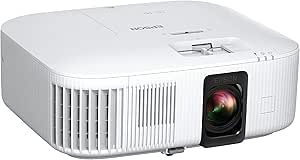 | Best for Streaming and Gaming | Resolution: 4K PRO-UHD resolution enhancement | Display type: 3-chip 3LCD | Brightness: 2,800 lumens | VIEW LATEST PRICE | See Our Full Breakdown |
| WiMiUS P62 Pro Smart Projector with Built-In Apps, Native 1080p, 4K Support, Wi-Fi 6, and Bluetooth |  | Best Value for a Simple Smart Setup | Native resolution: 1080p | 4K support: Accepts 4K content; displays at native 1080p | Brightness: 600 ANSI lumens | VIEW LATEST PRICE | See Our Full Breakdown |
| GOODEE 4K Smart Projector with AI ToF Autofocus, Wi-Fi 6, and Bluetooth |  | Best for Easy Setup and Built-In Audio | Native resolution: 1920 × 1080 | Maximum display resolution: 4096 × 2160 pixels | Display type: LCD | VIEW LATEST PRICE | See Our Full Breakdown |
| VIDAA Smart Projector with Native 1080p, 4K Decoding, Wi-Fi 6, and Dolby Audio |  | Best for Streaming-First Viewers | Operating system: VIDAA | Native resolution: 1920 × 1080 | Maximum display resolution: 3840 × 2160 pixels | VIEW LATEST PRICE | See Our Full Breakdown |
| HAPPRUN 2000 ANSI Portable Projector with 4K Decoding, Wi-Fi 6, Bluetooth, and Auto Focus |  | Best for Flexible Placement | Native resolution: 1920 × 1080 | Maximum display resolution: 1920 × 1080 pixels | Brightness: 2000 ANSI lumens | VIEW LATEST PRICE | See Our Full Breakdown |
| Optoma UHZ36 4K UHD Laser HDR Home Theater Projector |  | Best for Native 4K Laser Projection | Native resolution: 3840 × 2160 | Display type: DLP | Brightness: 3,500 lumens | VIEW LATEST PRICE | See Our Full Breakdown |
| Epson Home Cinema 3800 4K PRO-UHD 3LCD Projector |  | Best for Bright, Color-Rich 4K PRO-UHD Viewing | Projection technology: 3-chip 3LCD | Resolution: 3840 × 2160 via 4K PRO-UHD pixel shifting | Brightness: 3,000 lumens color and white | VIEW LATEST PRICE | See Our Full Breakdown |
| X9 Pro Smart Projector with VIDAA OS, Native 1080p, 4K Decoding, and Dolby Audio |  | Best for Smart-Home Streaming | Native resolution: 1080p | Video decoding: 4K | Brightness: 920 ISO lumens | VIEW LATEST PRICE | See Our Full Breakdown |
| Pemoon Smart 1080p Projector with Google TV Stick, Wi-Fi 6, Bluetooth 5.2, Auto Focus and Rotating Stand |  | Best for Flexible Placement | Native resolution: 1920 × 1080 | Maximum display resolution: 1920 × 1080 pixels | 4K support: 4K decoding | VIEW LATEST PRICE | See Our Full Breakdown |
| 4K projectors for home theater | Brightness | Native resolution | Display type | Connectivity |
|---|---|---|---|---|
| Epson Home Cinema 5050UB 4K PR | 2,600 lumens | — | 3-chip 3LCD | — |
| Smart Projector with Google TV | 500 ISO ANSI | — | — | Wi-Fi 6; Bluetooth 5.4; HDMI ARC/CEC; USB |
| AuKing Smart Projector with 4K | Up to 5,000 ANSI lumens | 1920 × 1080 | LCD | Wi-Fi 6, Bluetooth 5.2, 3.5mm jack |
| Epson Home Cinema 2350 4K PRO- | 2,800 lumens | — | 3-chip 3LCD | HDMI, Wi-Fi, Bluetooth audio |
| WiMiUS P62 Pro Smart Projector | 600 ANSI lumens | 1080p | — | — |
| GOODEE 4K Smart Projector with | 4000 lumens | 1920 × 1080 | LCD | Wi-Fi 6, Bluetooth 5.4, HDMI, 3.5 mm |
| VIDAA Smart Projector with Nat | 550 ANSI lumens | 1920 × 1080 | — | Wi-Fi 6, Bluetooth 5.4, HDMI 2.1 CEC/ARC, 3.5 mm, AirPlay |
| HAPPRUN 2000 ANSI Portable Pro | 2000 ANSI lumens | 1920 × 1080 | — | — |
| Optoma UHZ36 4K UHD Laser HDR | 3,500 lumens | 3840 × 2160 | DLP | HDMI, USB, RCA |
| Epson Home Cinema 3800 4K PRO- | 3,000 lumens color and white | — | — | — |
| X9 Pro Smart Projector with VI | 920 ISO lumens | 1080p | — | — |
| Pemoon Smart 1080p Projector w | 3000 ANSI lumens | 1920 × 1080 | LED | — |
More Details on Our Top Picks
Epson Home Cinema 5050UB 4K PRO-UHD 3-Chip 3LCD Projector with HDR
The 5050UB is the strongest fit here for a fixed, carefully planned theater where color and flexible installation matter more than built-in streaming. Its 3-chip 3LCD design displays the full RGB signal in each frame, and its 2,600 lumens of color and white brightness support a large image without relying on a dark-room-only setup. Compared with the Epson Home Cinema 2350, it offers a much wider stated contrast ratio and broader mounting and throw-distance flexibility; the 2350 counters with smart streaming and a gaming-oriented feature set. The tradeoff is that the 5050UB’s 4K PRO-UHD image uses pixel shifting, and you’ll need an external source for compatible HDR content. Choose it for a dedicated room and installation flexibility, not an all-in-one streaming setup.
Pros:- 3-chip 3LCD displays the full RGB color signal in every frame.
- Up to 2,600 lumens of both color and white brightness.
- Full 10-bit HDR processing.
- Front, rear, and ceiling mounting plus a 50–300-inch image range.
Cons:- 4K PRO-UHD is produced through pixel shifting rather than native 4K imaging.
- HDR viewing depends on compatible third-party devices.
- No built-in streaming platform is listed.
Best for: Home-theater owners planning a ceiling- or rear-mounted installation who prioritize color brightness, HDR processing, and a large adjustable image.
Not ideal for: Buyers who want built-in streaming, native 4K resolution, or a simple tabletop projector with minimal setup.
- Projection technology:4K PRO-UHD with pixel shifting
- Display type:3-chip 3LCD
- Brightness:2,600 lumens
- HDR processing:Full 10-bit
- Contrast ratio:Up to 1,000,000:1
- Image size:50–300 inches
- Throw distance:1.35–2.84 meters
- Mounting:Front, rear, or ceiling
Our verdict“Choose the 5050UB for a flexible, color-focused dedicated theater, but pick the Epson 2350 if built-in streaming matters more.”
Smart Projector with Google TV, Native 1080p, 4K Support, and 360° Stand
This projector is best treated as a convenient, movable screen for streaming and casual movie nights, not as a true 4K theater centerpiece. Google TV, voice control, and a 30W speaker reduce the need for separate playback and audio gear, while the 360° stand and auto focus make changing rooms or projection angles easier. Compared with the WiMiUS P62 Pro, it offers a rotatable stand and Google TV; the WiMiUS instead lists more ports and automatic screen-alignment features. The key limitation is resolution: it accepts 4K decoding but displays at native 1080p. Its 500 ISO ANSI brightness also makes room light a bigger constraint than it is with the Epson Home Cinema 2350. Pick it for flexible placement and easy streaming, not for fine-detail 4K viewing or a bright, permanent theater room.
Pros:- Google TV includes streaming apps, voice control, and live TV channels.
- 360° stand supports varied projection angles.
- AI autofocus and auto keystone simplify setup.
- Built-in 30W stereo speaker and Wi-Fi 6.
Cons:- 4K sources display at native 1080p resolution.
- 500 ISO ANSI brightness is less suited to rooms with ambient light than the Epson Home Cinema 2350.
- A portable feature set does not replace the installation flexibility of a dedicated theater projector.
Best for: Renters and households who want a movable projector with built-in Google TV, simple setup, and a stand that can aim at different surfaces.
Not ideal for: Dedicated-theater buyers seeking native 4K detail or viewers who need a bright image with ambient light in the room.
- Operating system:Google TV 14.0
- Resolution:Native 1080p; supports 4K decoding
- Brightness:500 ISO ANSI
- HDR:HDR10
- Throw ratio:1.17:1
- Stand:360° rotatable
- Speaker:30W built-in stereo
- Connectivity:Wi-Fi 6; Bluetooth 5.4; HDMI ARC/CEC; USB
- Setup:AI autofocus and auto keystone
Our verdict“Choose this for flexible Google TV viewing around the home, but skip it if your priority is detailed 4K projection in a dedicated theater.”
AuKing Smart Projector with 4K Support, 5100 ANSI Lumens, Dolby Audio, and Autofocus
The AuKing’s headline appeal is its stated 5,000 ANSI lumens and flexible placement, making it a more plausible choice for a large image in a room that is not fully light-controlled than the lower-brightness smart models here. It also brings streaming apps, TOF autofocus, automatic keystone correction, and a foldable stand, so setup need not be as involved as with the Epson Home Cinema 5050UB. That convenience comes with a clear resolution compromise: its native resolution is 1920 × 1080, and 4K input is downscaled. The Epson is the better match when home-theater image refinement and 3-chip color matter more; the AuKing favors brightness claims and placement flexibility. The listing also gives a 200-inch maximum image size, but offers no native 4K detail to match that scale.
Pros:- Listed brightness of up to 5,000 ANSI lumens.
- TOF autofocus and automatic keystone correction reduce manual adjustments.
- Built-in streaming apps and Wi-Fi 6.
- Foldable stand supports 360° rotation and 180° tilt.
Cons:- Native resolution is 1920 × 1080, so 4K input is downscaled.
- The listed 200-inch maximum image size does not change its 1080p detail limit.
- Compared with the Epson Home Cinema 5050UB, it lacks the stated 3-chip 3LCD design and 10-bit HDR processing.
Best for: Buyers seeking a large-screen, adaptable projector with built-in apps and automatic setup adjustments for a multipurpose room.
Not ideal for: Home-cinema viewers who prioritize native 4K detail, a verified theater-focused image specification, or a carefully controlled installation.
- Native resolution:1920 × 1080
- Maximum display resolution:3840 × 2160 input
- Brightness:Up to 5,000 ANSI lumens
- Display type:LCD
- Image size:35–200 inches
- Throw distance:3.9–9.8 feet
- Light source operating life:65,000 hours
- Connectivity:Wi-Fi 6, Bluetooth 5.2, 3.5mm jack
- Mounting:Tripod, ceiling, tabletop, floor, or wall
Our verdict“Choose the AuKing for adaptable placement and a large image, but choose the Epson 5050UB if theater image detail and color processing come first.”
Epson Home Cinema 2350 4K PRO-UHD Smart Streaming Projector
The Home Cinema 2350 is the most balanced pick here for households that split time between movies, streaming, and games. Its 2,800 lumens, 3-chip 3LCD color, and HDR10/HLG support suit a range of home viewing, while Android TV keeps streaming close at hand. A stated input lag under 20 ms gives it a practical advantage over the theater-focused Epson 5050UB when gaming is part of the plan. The 5050UB, by contrast, lists a far higher contrast ratio and more flexible mounting options, making it the stronger dedicated-room candidate. The 2350’s tradeoffs are its tabletop-focused mounting information and a built-in 10W speaker that may not satisfy buyers planning a full theater sound system. Bluetooth audio is limited to content played through Android TV.
Pros:- 3-chip 3LCD technology supports bright, accurate color.
- 2,800 lumens with HDR10 and HLG support.
- Android TV with voice search for built-in streaming.
- Input lag under 20 ms for gaming.
Cons:- Bluetooth audio is limited to content played through Android TV.
- The listed mounting type is tabletop, offering less stated flexibility than the Epson 5050UB.
- The built-in 10W speaker may not suit buyers expecting theater-scale sound.
Best for: Households who want one projector for streaming, movies, and gaming, especially when a tabletop setup and built-in smart features suit the room.
Not ideal for: Dedicated theater builders who need broad mounting flexibility, an external-device-friendly Bluetooth audio path, or the 5050UB’s stated contrast range.
- Resolution:4K PRO-UHD resolution enhancement
- Display type:3-chip 3LCD
- Brightness:2,800 lumens
- HDR:HDR10 and HLG
- Contrast ratio:35,000:1
- Input lag:Under 20 ms
- Speaker:Built-in 10W bass-reflex
- Connectivity:HDMI, Wi-Fi, Bluetooth audio
- Mounting:Tabletop
Our verdict“Choose the 2350 for a versatile streaming-and-gaming room, while the 5050UB is a better fit for a dedicated, flexibly mounted theater.”
WiMiUS P62 Pro Smart Projector with Built-In Apps, Native 1080p, 4K Support, Wi-Fi 6, and Bluetooth
The P62 Pro suits buyers who want streaming and straightforward setup in one compact home-entertainment package, rather than a dedicated 4K theater projector. Its built-in apps, dual HDMI ports, Wi-Fi 6, and automatic focus and keystone correction make it easier to connect common sources and get an image aligned. Compared with the Google TV projector in this group, it offers more listed physical connections and screen-alignment features; that model has a 360° stand and Google TV. The central limitation is shared by both: the P62 Pro accepts 4K content but displays at native 1080p. Its 600 ANSI brightness also places it below the AuKing’s stated brightness, while the AuKing likewise cannot deliver native 4K detail. This is a convenience-led choice, not a resolution upgrade for a theater system.
Pros:- Built-in apps support streaming without a separate player.
- Two HDMI ports plus two USB ports provide useful connection options.
- Autofocus, auto keystone, obstacle avoidance, and screen alignment simplify setup.
- Dual 10W speakers with Dolby audio and Bluetooth 5.2.
Cons:- 4K content displays at native 1080p resolution.
- 600 ANSI lumens is lower than the AuKing’s stated 5,000 ANSI lumens.
- A carrying case is not included.
Best for: Streamers setting up a secondary home-theater room who want built-in apps, multiple HDMI connections, and automatic image adjustment.
Not ideal for: Buyers seeking native 4K detail, a bright-room theater image, or a projector supplied with a carrying case.
- Native resolution:1080p
- 4K support:Accepts 4K content; displays at native 1080p
- Brightness:600 ANSI lumens
- HDR:HDR10
- Audio:Dual 10W speakers with Dolby audio
- Wireless connectivity:Wi-Fi 6; Bluetooth 5.2
- Ports:2 HDMI, 2 USB, 3.5mm audio output
- Image adjustment:Autofocus, auto keystone, obstacle avoidance, screen alignment, 50–100% zoom
- Warranty and support:2-year money-back guarantee, 3-year repair coverage, lifetime technical support
Our verdict“Choose the P62 Pro for an easy, connected 1080p streaming setup, but look to a theater-focused model if 4K image detail is your priority.”
GOODEE 4K Smart Projector with AI ToF Autofocus, Wi-Fi 6, and Bluetooth
The GOODEE makes the most sense for a home theater where quick setup and self-contained playback matter more than native 4K detail. Its 1080p native resolution accepts 4K video, but it does not display it at full 4K resolution; the Optoma UHZ36 is the clearer fit for buyers who want native 4K. GOODEE counters with AI ToF autofocus, automatic keystone correction, and screen alignment, which can reduce setup adjustments when moving it between rooms. The 60W Dolby Audio speakers are a more substantial built-in audio proposition than the HAPPRUN’s 8W speaker, though a dedicated sound system remains a better route for theater-scale sound. Its 4,000-lumen claim and 400-inch maximum image size are appealing on paper, but the 19-foot maximum throw distance can constrain placement in long rooms.
Pros:- AI ToF autofocus and automatic image adjustments simplify setup.
- 60W Dolby Audio speakers offer more built-in output than the HAPPRUN’s 8W speaker.
- Wi-Fi 6 and Bluetooth 5.4 support wireless connections.
- Accepts 4K video and lists a maximum image size of 400 inches.
Cons:- Native resolution is 1920 × 1080, not 4K.
- A 19-foot maximum throw distance may limit placement in larger rooms.
- The listed 4,000-lumen brightness is not specified in ANSI lumens, making direct brightness comparisons difficult.
Best for: Viewers who want a large, easy-to-set-up 1080p image with built-in streaming and stronger onboard audio for a flexible family room.
Not ideal for: Home theater buyers prioritizing true 4K projection, or owners who need to place a projector more than 19 feet from the screen.
- Native resolution:1920 × 1080
- Maximum display resolution:4096 × 2160 pixels
- Display type:LCD
- Brightness:4000 lumens
- Maximum image size:400 inches
- Maximum throw distance:19 feet
- Audio:Built-in 60W Dolby Audio speakers
- Connectivity:Wi-Fi 6, Bluetooth 5.4, HDMI, 3.5 mm
Our verdict“Choose the GOODEE for convenient setup and substantial built-in audio, but choose the Optoma UHZ36 if native 4K is the priority.”
VIDAA Smart Projector with Native 1080p, 4K Decoding, Wi-Fi 6, and Dolby Audio
For buyers who want a projector to double as a straightforward streaming hub, this VIDAA model stands out for its listed access to more than 1,200 apps and 1,000 live TV channels, plus AirPlay. It decodes 4K content but projects at native 1080p, so it is not a substitute for the Epson Home Cinema 3800’s 4K PRO-UHD presentation or the Optoma UHZ36’s native 4K. Its 550 ANSI lumens also make it better suited to a darkened room than brighter options such as the GOODEE, whose brightness is listed as 4,000 lumens, though the measurement standards differ. Autofocus, 6D keystone correction, obstacle avoidance, and screen alignment help with flexible placement. The tradeoff is a lower brightness ceiling, which can flatten the image when room lights are on.
Pros:- VIDAA OS lists access to more than 1,200 apps and 1,000 live TV channels.
- AirPlay, Wi-Fi 6, and Bluetooth 5.4 provide flexible wireless connections.
- Autofocus, keystone correction, obstacle avoidance, and screen alignment ease setup.
- HDR10+ and MEMC support are included for compatible content.
Cons:- Native resolution is 1080p; 4K is decoded rather than projected at native 4K.
- 550 ANSI lumens may be limiting outside a darkened viewing space.
- The 300-inch maximum image size is not a promise of equally bright or detailed results at that size.
Best for: Streaming-focused viewers who want VIDAA apps, live channels, and AirPlay in a projector for a light-controlled room.
Not ideal for: Buyers with bright living rooms or anyone seeking native 4K detail and a brighter image for daytime viewing.
- Operating system:VIDAA
- Native resolution:1920 × 1080
- Maximum display resolution:3840 × 2160 pixels
- Brightness:550 ANSI lumens
- Maximum image size:300 inches
- Throw distance:4.5–16.4 feet
- Audio:Dolby Audio
- Connectivity:Wi-Fi 6, Bluetooth 5.4, HDMI 2.1 CEC/ARC, 3.5 mm, AirPlay
Our verdict“Pick this VIDAA projector for built-in streaming convenience in a dark room, not for bright-room viewing or native 4K sharpness.”
HAPPRUN 2000 ANSI Portable Projector with 4K Decoding, Wi-Fi 6, Bluetooth, and Auto Focus
The HAPPRUN’s strongest home theater case is placement flexibility: its listed throw range runs from 4.72 to 28.4 feet, and it can sit on a table, tripod, floor, wall, or ceiling. That gives it an advantage over the GOODEE when the room layout calls for a longer throw, while its 2,000 ANSI lumens provide a clearer brightness specification than GOODEE’s unqualified lumen figure. Image resolution is the bigger limitation: this model lists both native and maximum display resolution as 1080p, so 4K decoding does not make it a 4K projector in displayed detail. Auto focus and image correction reduce manual setup, but autofocus may fail when the projector angle exceeds 15°. Streaming services such as Disney+, Prime Video, and Hulu require a separate streaming device.
Pros:- Broad 4.72-to-28.4-foot throw range accommodates varied room layouts.
- Brightness is specified as 2,000 ANSI lumens.
- Auto focus, 6D keystone correction, obstacle avoidance, and screen alignment help with setup.
- Two HDMI ports and two USB ports support multiple connected devices.
Cons:- Native and maximum display resolution are both 1920 × 1080; 4K decoding does not deliver native 4K projection.
- Major streaming services require a connected streaming device.
- Autofocus may fail when the projector angle exceeds 15°, and best results require a dark environment.
Best for: Buyers needing a flexible projector position and a clearly specified 1080p image for a dark or controlled-light home theater.
Not ideal for: Viewers who want native 4K, built-in access to major streaming services, or dependable autofocus at steep projection angles.
- Native resolution:1920 × 1080
- Maximum display resolution:1920 × 1080 pixels
- Brightness:2000 ANSI lumens
- Contrast ratio:20000:1
- Image size:50–300 inches
- Throw distance:4.72–28.4 feet
- Wireless connectivity:Wi-Fi 6, Bluetooth 5.2
- Ports:2 HDMI, 2 USB, AV, 3.5 mm headphone jack
Our verdict“Choose the HAPPRUN when flexible throw and mounting options matter more than native 4K or built-in streaming.”
Optoma UHZ36 4K UHD Laser HDR Home Theater Projector
The Optoma UHZ36 is the most direct match here for a buyer who wants native 4K resolution: unlike the GOODEE and HAPPRUN, it does not rely on 1080p native resolution with 4K decoding. Its 3,500-lumen laser output and HDR support suit a dedicated theater where image detail and flexible screen placement matter more than an all-in-one smart interface. Filmmaker Mode preserves the source’s frame rate, color, and aspect ratio, while PureMotion is available for smoother-looking fast action. The Epson Home Cinema 3800 is another theater-oriented option, but it uses pixel shifting for 4K PRO-UHD; the Optoma takes the native-resolution route. Its 15W speaker is modest for home theater use, and at 10.4 pounds it is less convenient to move around than the portable LCD choices.
Pros:- 3840 × 2160 native resolution provides a native 4K option among these picks.
- 3,500-lumen brightness and HDR support suit dedicated movie viewing.
- Laser light source is rated for up to 30,000 hours.
- Filmmaker Mode and PureMotion offer different approaches to source presentation and motion.
Cons:- The built-in 15W speaker is limited for theater-scale sound.
- At 10.4 pounds, it is heavier than the portable LCD options.
- The light source warranty is limited to one year or 20,000 hours.
Best for: Home theater owners prioritizing native 4K, laser illumination, and HDR in a more permanent setup.
Not ideal for: Buyers who need built-in streaming, powerful onboard sound, or a lightweight projector for frequent room-to-room use.
- Native resolution:3840 × 2160
- Display type:DLP
- Brightness:3,500 lumens
- Contrast ratio:1,500,000:1
- Light source life:Up to 30,000 hours
- Maximum image size:300 inches
- Throw distance:3.19–34.6 feet
- Connectivity:HDMI, USB, RCA
Our verdict“Choose the Optoma UHZ36 for native 4K laser projection, and plan on separate audio for a fuller home theater setup.”
Epson Home Cinema 3800 4K PRO-UHD 3LCD Projector
The Epson Home Cinema 3800 suits buyers who want bright, color-focused home theater viewing and can accept 4K PRO-UHD pixel shifting instead of native 4K imaging. Its three-chip 3LCD design avoids rainbow effects associated with some single-chip DLP projectors, a useful distinction from the Optoma UHZ36. Epson lists 3,000 lumens for both color and white brightness, giving buyers a clearer picture of its light output than the VIDAA projector’s 550 ANSI lumens, though the figures use different specifications. Lens shift adds placement flexibility without relying solely on digital image correction, and 4K HDR at 60 Hz supports compatible sources. The built-in dual 10W speakers and Bluetooth help with basic playback, but they are not a replacement for a dedicated theater sound system. Compared with the Optoma, the Epson trades native 4K for pixel-shifted 4K PRO-UHD.
Pros:- 3-chip 3LCD design avoids rainbow effects associated with some DLP projectors.
- 3,000 lumens of color and white brightness support a bright, colorful image.
- Lens shift gives more placement flexibility than models relying only on digital correction.
- Supports 4K HDR at 60 Hz.
Cons:- Uses pixel shifting for 4K PRO-UHD rather than native 4K resolution.
- Dual 10W speakers are limited for immersive home theater audio.
- The listed throw-distance figures are presented as a minimum and maximum rather than a full placement guide.
Best for: Movie and sports viewers who value bright color, 3LCD imaging, and lens-shift flexibility over native 4K resolution.
Not ideal for: Buyers who specifically want native 4K projection, a built-in streaming platform, or theater-grade audio from the projector itself.
- Projection technology:3-chip 3LCD
- Resolution:3840 × 2160 via 4K PRO-UHD pixel shifting
- Brightness:3,000 lumens color and white
- Contrast ratio:Up to 100,000:1
- HDR:Full 10-bit HDR support
- HDMI:HDMI 2.0, 18 Gbps
- Maximum image size:300 inches
- Speakers:Dual 10W stereo speakers
Our verdict“Choose the Epson 3800 for bright 3LCD color and flexible lens placement, or the Optoma UHZ36 if native 4K is non-negotiable.”
X9 Pro Smart Projector with VIDAA OS, Native 1080p, 4K Decoding, and Dolby Audio
The X9 Pro suits a home theater where easy streaming and smart-home control matter more than true 4K detail. VIDAA OS includes streaming apps and live TV channels, while AirPlay 2 and HomeKit make it a natural fit for Apple households. Its native 1080p resolution is the key limitation: it decodes 4K content but displays it at 1080p, unlike the Epson Home Cinema 5050UB, which is designed for a sharper 4K-style theater image. Automatic focus, keystone correction, obstacle avoidance, and screen fit reduce setup fuss, and HDMI ARC/CEC makes connecting a separate sound system simpler. The 920 ISO lumens and built-in speakers favor a dim room and casual viewing over a large, bright theater. Choose it for convenience, not resolution-led performance.
Pros:- VIDAA OS provides built-in streaming apps and more than 1,000 live TV channels.
- AirPlay 2 and HomeKit support suit Apple devices and smart-home setups.
- Auto focus, 6D keystone correction, obstacle avoidance, and screen fit simplify placement.
- Dolby Audio speakers and HDMI ARC/CEC offer flexible audio options.
Cons:- Native 1080p resolution means 4K video is decoded but displayed at 1080p.
- The stated 920 ISO lumens may limit picture impact in rooms with ambient light.
- Built-in speakers may not satisfy viewers seeking more expansive home theater sound.
Best for: Apple households and casual movie viewers who want built-in streaming, live TV, and automatic setup in a dim home theater.
Not ideal for: Buyers seeking detailed native 4K-style images, a bright picture in rooms with ambient light, or a projector primarily for a large dedicated theater.
- Native resolution:1080p
- Video decoding:4K
- Brightness:920 ISO lumens
- HDR:HDR10
- Operating system:VIDAA OS
- Speakers:2 × 20W
- Audio and Bluetooth:Dolby Audio; Bluetooth 5.4
- Setup features:Auto focus, 6D keystone correction, obstacle avoidance, and screen fit
- Casting and connections:AirPlay 2, HomeKit, HDMI with ARC/CEC, USB, and 3.5 mm headphone jack
Our verdict“Choose the X9 Pro for a convenient, Apple-friendly streaming setup in a dim room, but pick a higher-resolution theater projector if image detail comes first.”
Pemoon Smart 1080p Projector with Google TV Stick, Wi-Fi 6, Bluetooth 5.2, Auto Focus and Rotating Stand
The Pemoon is the more adaptable pick here for a room where the projector needs to move or point in different directions. Its 360° rotating stand and automatic focus and keystone correction can ease setup on a shelf, table, or temporary viewing spot. A bundled Google TV Stick supplies streaming access, while Wi-Fi 6 and Bluetooth 5.2 cover wireless connections. The listed 3000 ANSI lumens is a notable brightness claim compared with the X9 Pro’s 920 ISO lumens, though the different measurement standards do not make them directly comparable. Neither model delivers native 4K: the Pemoon’s 4K decoding feeds a 1920 × 1080 image. Digital zoom can shrink the picture, so placement and throw distance still matter. It makes more sense for flexible, portable viewing than a fixed theater build centered on maximum resolution.
Pros:- Included Google TV Stick provides access to streaming apps.
- 360° rotating stand supports flexible projector positioning.
- Auto focus and auto keystone correction simplify setup.
- Wi-Fi 6, Bluetooth 5.2, and screen mirroring support wireless use.
Cons:- Native and maximum display resolution are 1920 × 1080, despite 4K decoding support.
- Digital zoom can reduce the projected image size.
- The supplied details do not specify HDMI ARC or dedicated home theater audio features.
Best for: Viewers who move a projector between rooms or need an adjustable stand, automatic setup, and bundled Google TV streaming.
Not ideal for: Dedicated home theater buyers who prioritize native 4K detail, fixed-installation image precision, or a large picture without relying on digital zoom.
- Native resolution:1920 × 1080
- Maximum display resolution:1920 × 1080 pixels
- 4K support:4K decoding
- Brightness:3000 ANSI lumens
- Display type:LED
- Wireless:Wi-Fi 6 and Bluetooth 5.2
- Setup and positioning:Auto focus, auto keystone correction, and 360° rotating stand
- Digital zoom:50–100%
- Included streaming device:Google TV Stick
Our verdict“Pick the Pemoon if flexible positioning and bundled streaming matter more than native 4K resolution or a permanent theater installation.”
How We Picked
I compared these projectors by how well they suit a home theater, not by treating every product labeled “4K” as equivalent. The main criteria were projected resolution and image-processing approach, light-source type, HDR support, suitability for controlled lighting, setup flexibility, and how much streaming or autofocus convenience each model adds. I also weighed practical fit: a dedicated theater projector has different strengths and drawbacks from a portable model intended for occasional use.
The ranking gives priority to models with a clearer theater-first role and more relevant imaging features, which puts the Epson Home Cinema 5050UB first, followed by the laser-based Optoma UHZ36 and the Epson Home Cinema 3800. The Epson 2350 earns a place for combining 4K PRO-UHD processing with smart streaming. Models described as native 1080p with 4K support or decoding sit lower for buyers prioritizing fine detail on a large theater screen, though their apps, autofocus, and compact designs can make them better fits for flexible or casual viewing. Product names and advertised features alone do not establish native resolution, brightness in a buyer’s room, or final image quality, so I treat those as points to verify before purchase.
| 4K projectors for home theater | Connectivity |
|---|---|
| Epson Home Cinema 5050UB 4K PR | — |
| Smart Projector with Google TV | Wi-Fi 6; Bluetooth 5.4; HDMI ARC/CEC; USB |
| AuKing Smart Projector with 4K | Wi-Fi 6, Bluetooth 5.2, 3.5mm jack |
| Epson Home Cinema 2350 4K PRO- | HDMI, Wi-Fi, Bluetooth audio |
| WiMiUS P62 Pro Smart Projector | — |
| GOODEE 4K Smart Projector with | Wi-Fi 6, Bluetooth 5.4, HDMI, 3.5 mm |
| VIDAA Smart Projector with Nat | Wi-Fi 6, Bluetooth 5.4, HDMI 2.1 CEC/ARC, 3.5 mm, AirPlay |
| HAPPRUN 2000 ANSI Portable Pro | — |
| Optoma UHZ36 4K UHD Laser HDR | HDMI, USB, RCA |
| Epson Home Cinema 3800 4K PRO- | — |
| X9 Pro Smart Projector with VI | — |
| Pemoon Smart 1080p Projector w | — |
Factors to Consider When Choosing 4K Projectors For Home Theaters
Before choosing among these 4K projectors for home theaters, decide what “4K” needs to mean for your screen, room, and viewing distance. A theater-focused projector and an all-in-one smart projector solve different problems. These checks can help you avoid paying for features that do not improve your setup.
Separate Native Resolution From 4K Support
Product listings may use “4K support,” “4K decoding,” or “4K PRO-UHD,” and those phrases do not all describe the same image pipeline. A native 1080p projector can accept a 4K source and still display an image with 1080p resolution. That may be sufficient for casual viewing, but the difference can become easier to see on a large screen or from a short seating distance. Check the exact resolution claim in the manufacturer’s specifications rather than relying on the headline. Also look for how the projector handles HDR and input signals, since accepting a format does not guarantee the full format’s benefits on screen. If fine detail is your priority, compare the imaging method and resolution before comparing smart features.
Match Brightness to Room Lighting and Screen Size
A projector’s brightness claim does not tell you by itself how vivid an image will look in your room. Ambient light, screen size, screen material, and picture mode all affect perceived brightness. A large image spreads available light across more area, while daylight or room lighting can wash out dark scenes and reduce contrast. If movie watching happens mainly at night with lights controlled, contrast and black-level performance may matter more than a headline brightness figure. For mixed-use rooms, plan how you will reduce light and consider whether a smaller screen would produce a more satisfying image. Treat advertised brightness figures as one input, not a guarantee of theater-like performance.
Plan Throw Distance, Lens Placement, and Mounting
Measure your room before buying, including the distance from the intended projector position to the screen and the available mounting height. Throw ratio determines the image size a projector can create from a given distance, while lens shift and zoom affect how easily you can position that image without moving the mount. Digital keystone correction can straighten a picture, but using it may reduce usable image detail. A portable projector with a rotating stand can be easier to aim for temporary viewing, yet that convenience is not a substitute for checking whether it can fill your fixed theater screen. Confirm the manual’s throw and installation guidance against your room measurements. This step can prevent a projector from arriving only to find that the image is too small or the mount location is impractical.
Choose Between a Lamp and a Laser Light Source
Light-source type affects ownership as well as the image, so weigh maintenance against the way you watch. Lamp-based models may require eventual lamp replacement, and brightness can change over the lamp’s service life. Laser models avoid routine lamp swaps, which can be appealing for frequent viewing or a fixed installation, but the initial purchase and repair picture can differ by model. Check the manufacturer’s stated light-source life and warranty rather than assuming every laser projector lasts the same amount of time. Also consider whether the projector’s overall image and installation features justify the light-source choice for your room. Paying more for laser illumination makes less sense if your viewing schedule is occasional and other aspects of the setup are a bigger constraint.
Treat Streaming and Autofocus as Convenience Features
Built-in apps, Google TV, VIDAA, Wi-Fi, Bluetooth, autofocus, and automatic image correction can shorten setup and reduce the need for extra devices. They may be especially useful in a shared room where the projector is moved or used for different kinds of viewing. A separate streaming player can be a better choice if you want a familiar interface, longer software support, or a simple way to replace an aging platform. Wireless audio and networking also depend on your home connection and sound system; they do not guarantee low-latency playback or theater-grade sound. Compare app support and connection options against the devices you already own. Avoid letting a convenient interface outweigh the projector’s image performance if a dedicated theater is your main goal.
Budget for the Whole Theater, Not Just the Projector
The projector is only one part of the viewing system. A screen suited to your room, a secure mount, suitable cables, and a separate sound system can affect the final experience as much as a step up in projector features. Built-in Dolby Audio or a compact speaker may be convenient, but movie dialogue, bass, and surround effects often call for a dedicated audio setup. Check which ports and audio outputs your sources and receiver need before committing to a model. A fixed installation can also call for longer cable runs, ventilation clearance, or a serviceable mounting position. Set aside room in your plan for those needs instead of choosing a projector based on its feature list alone.
Frequently Asked Questions
Does a projector that supports 4K display a native 4K image?
Not necessarily. “4K support” or “4K decoding” can mean a projector accepts a 4K video signal while displaying it at native 1080p, as with several compact smart models in this roundup. Epson’s 4K PRO-UHD wording describes a different processing approach and should not be read as identical to every native 4K claim. Check the manufacturer’s resolution specification and how the image is produced. This matters most when you plan a large screen or sit close enough to notice fine detail.
Should I choose the Epson 5050UB or the Optoma UHZ36 for a dedicated theater?
Start with the difference that matters most to you: the 5050UB’s 3-chip 3LCD design and 4K PRO-UHD processing, or the UHZ36’s 4K UHD resolution and laser light source. The Epson is my overall pick in this roundup for a theater-first setup, while the Optoma is the premium alternative for buyers who specifically want laser illumination. Neither choice can be made from resolution labels alone; check the installation requirements, room conditions, and desired screen size. Compare the manufacturer’s specifications for throw distance, HDR handling, connections, and light-source maintenance before deciding. If easy app access matters more than a dedicated theater setup, the Epson 2350 may fit your priorities better.
Are built-in streaming apps enough, or should I use a separate streaming player?
Built-in Google TV or VIDAA can make a projector simpler to use, especially when you want fewer devices and cables. App availability, platform updates, and interface preferences vary, so check that the services you use are supported. A separate player gives you a replaceable streaming device and may be easier to integrate with a receiver or other home theater equipment. It can also keep the projector choice focused on image and installation rather than its app platform. If the projector will be moved often, built-in apps can be a worthwhile convenience; for a fixed theater, they may be secondary.
Will a portable native-1080p projector work for a large home theater screen?
It can fill a large screen, but screen size alone does not mean the image will retain the detail of a theater-oriented model. With native 1080p, detail may be less defined on a large image, particularly from close seating. Room light and the projector’s actual brightness in your selected mode can also affect whether the picture remains clear. Portable models in this roundup add conveniences such as autofocus, built-in apps, or rotating stands, which may suit flexible rooms better than fixed installations. Check the recommended image size, throw distance, and lighting conditions before treating portability as a substitute for theater performance.
What should I check before mounting a projector in my room?
Measure the screen dimensions and the distance from the planned projector position to the screen, then compare those figures with the manufacturer’s throw guidance. Check lens shift, zoom range, mounting offset, and ventilation clearance so the image can be placed without relying heavily on digital correction. Confirm that your ceiling or shelf can support the mount and that power and video cables can reach cleanly. Think about access for cleaning or service as well, especially with a fixed installation. These checks can prevent a good projector choice from becoming a poor fit for the room.
Conclusion
For a dedicated home theater, I recommend the Epson Home Cinema 5050UB as the best overall pick in this group. Choose the Epson Home Cinema 3800 as my value-oriented theater option if you want a more theater-focused model, or the Epson Home Cinema 2350 for beginner-friendly smart streaming in a simpler setup. Buyers seeking a premium laser model should compare the Optoma UHZ36 with their room and installation needs. For flexible viewing, autofocus, built-in apps, or a rotating stand, consider the smart and portable options—but remember that 4K decoding does not make a native 1080p projector a native 4K display. Match your pick to your room, screen, and main use, then verify the exact specifications before buying.
Black Friday Picks

Philips Hue Play Gradient Light Tube, Large, Black
As an affiliate, we earn on qualifying purchases.