4K gaming monitors pair detailed UHD resolution with gaming-focused refresh rates, but the right choice depends on whether you favor speed, screen size, contrast, or everyday versatility. My best overall pick is the LG 27G810A-B, whose dual-mode design lets you choose 4K at 180Hz or Full HD at 360Hz. The ASUS ROG XG32UCWG stands out for premium OLED contrast, while the Amzfast 27-inch offers a similar 4K/Full HD speed switch in a different price tier. The main tradeoffs are that very high refresh rates demand capable graphics hardware, and larger or OLED screens can bring compromises in desk fit, cost, or long-term care. Read on for the full breakdown and a guide to choosing the right 4K gaming monitor for your setup.

Get business pricing on your home office setup
- Business-only prices and quantity discounts
- Tax-exempt purchasing
- Multiple users, one account, clear invoices
Complete the kit


Key Takeaways
- Dual-mode models lead on flexibility: the LG 27G810A-B, Amzfast 27-inch, and Samsung Odyssey G7 G70F can switch from high-refresh 4K to even faster Full HD, suiting players who alternate between visual detail and competitive speed.
- OLED is the premium image-quality choice: the 32-inch ASUS ROG XG32UCWG pairs 4K and 165Hz with OLED contrast, but it is a more specialized pick than the IPS and VA options.
- Screen size changes the experience: the 27-inch models favor compact desks and sharper pixel density, while the 32-inch CRUA, ASUS VP327Q, ASUS ROG, and Dell S3225QS offer a larger view.
- Refresh-rate needs vary widely: 160Hz and above suits players chasing fluid motion, while 120Hz Dell models may be a better match for mixed gaming and everyday use than for the fastest competitive play.
- Similar model names do not mean identical choices: the Acer Nitro VG270K V4 and VG270K are separate listings, so buyers should check the exact model and its stated features before choosing.
| CRUA 32-Inch 4K UHD Curved Gaming Monitor, 160Hz, AMD FreeSync, Black |  | Best Large Curved Pick | Display size: 32 inches | Resolution: 3840 x 2160 (4K UHD) | Refresh rate: 160Hz | VIEW LATEST PRICE | See Our Full Breakdown |
| Amzfast 27″ 4K Gaming Monitor, UHD 160Hz / FHD 320Hz Dual Mode, Fast IPS |  | Best for Flexible Refresh Modes | Display size: 27 inches | Resolution and refresh modes: 4K UHD at 160Hz; FHD at 320Hz | Panel type: Fast IPS | VIEW LATEST PRICE | See Our Full Breakdown |
| Acer Nitro 27-inch 4K UHD IPS Gaming Monitor VG270K V4 | 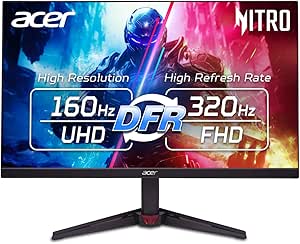 | Best Straightforward 4K Gaming Pick | Screen size: 27 inches | Resolution: 3840 x 2160 (4K UHD) | Refresh rate: 160Hz | VIEW LATEST PRICE | See Our Full Breakdown |
| LG 27G810A-B 27-inch Ultragear 4K UHD IPS Gaming Monitor, Dual Mode 180Hz/360Hz, 1ms, G-Sync, FreeSync Premium, HDR400, HDMI 2.1 |  | Best Premium Dual-Mode Pick | Screen size: 27 inches | Resolution: 3840 x 2160 (4K UHD) | Refresh modes: 4K at 180Hz; FHD at 360Hz | VIEW LATEST PRICE | See Our Full Breakdown |
| ASUS TUF Gaming VG27UQ1A 27-Inch 4K 160Hz G-SYNC Gaming Monitor |  | Best for Adaptive-Sync Compatibility | Display size: 27 inches | Resolution: 3840 x 2160 (4K UHD) | Refresh rate: 160Hz | VIEW LATEST PRICE | See Our Full Breakdown |
| ASUS VP327Q 32 Inch 4K UHD Computer Monitor with HDMI, DisplayPort, Speakers |  | Best for Mixed Work and Casual Gaming | Display size: 32 inches | Resolution: 3840 x 2160 (4K UHD) | Panel type: IPS | VIEW LATEST PRICE | See Our Full Breakdown |
| Samsung 27” Odyssey G7 (G70F) Series Gaming Monitor, 4K UHD / FHD, 180Hz/360Hz, G-Sync & FreeSync Premium |  | Best for Dual-Mode Competitive Gaming | Display size: 27 inches | Resolution: 3840 x 2160 (4K UHD) | Refresh rate: 180Hz at 4K; 360Hz at FHD | VIEW LATEST PRICE | See Our Full Breakdown |
| Acer Nitro 27-inch 4K UHD IPS Gaming Monitor VG270K |  | Best Entry-Level Step Up from 60Hz | Display size: 27 inches | Resolution: 3840 x 2160 (4K UHD) | Refresh rate: 72Hz at 4K; 144Hz at 1080p DFR | VIEW LATEST PRICE | See Our Full Breakdown |
| ASUS ROG XG32UCWG 32-Inch 4K 165Hz Glossy OLED G-SYNC Gaming Monitor |  | Best Premium OLED | Display size: 32 inches | Resolution: 3840 x 2160 (4K UHD) | Panel type: TrueBlack Glossy WOLED | VIEW LATEST PRICE | See Our Full Breakdown |
| Dell 32 Monitor S3225QS 4K UHD VA, 120Hz, FreeSync Premium, Eye Comfort |  | Best 32-Inch Value for Everyday Gaming | Display size: 32 inches | Resolution: 3840 x 2160 (4K UHD) | Panel type: VA | VIEW LATEST PRICE | See Our Full Breakdown |
| Dell 27 Monitor S2725QS 4K UHD IPS, 120Hz, 5ms, FreeSync Premium |  | Best for Work-and-Play | Display size: 27 inches | Resolution: 3840 x 2160 (4K UHD) | Panel type: IPS | VIEW LATEST PRICE | See Our Full Breakdown |
| 4K gaming monitor | Resolution | Display size | Refresh rate | Response time |
|---|---|---|---|---|
| CRUA 32-Inch 4K UHD Curved Gam | 3840 x 2160 (4K UHD) | 32 inches | 160Hz | 1ms |
| Amzfast 27" 4K Gaming Monitor | — | 27 inches | — | 1ms MPRT |
| Acer Nitro 27-inch 4K UHD IPS | 3840 x 2160 (4K UHD) | — | 160Hz | 0.5ms GTG |
| LG 27G810A-B 27-inch Ultragear | 3840 x 2160 (4K UHD) | — | — | 1ms GtG |
| ASUS TUF Gaming VG27UQ1A 27-In | 3840 x 2160 (4K UHD) | 27 inches | 160Hz | 1ms |
| ASUS VP327Q 32 Inch 4K UHD Com | 3840 x 2160 (4K UHD) | 32 inches | 60 Hz | — |
| Samsung 27” Odyssey G7 | 3840 x 2160 (4K UHD) | 27 inches | 180Hz at 4K; 360Hz at FHD | 1ms GtG |
| Acer Nitro 27-inch 4K UHD IPS | 3840 x 2160 (4K UHD) | 27 inches | 72Hz at 4K; 144Hz at 1080p DFR | 0.5ms G to G |
| ASUS ROG XG32UCWG 32-Inch 4K 1 | 3840 x 2160 (4K UHD) | 32 inches | 165Hz at 4K; 330Hz at FHD | 0.03ms |
| Dell 32 Monitor S3225QS 4K UHD | 3840 x 2160 (4K UHD) | 32 inches | 120Hz | — |
| Dell 27 Monitor S2725QS 4K UHD | 3840 x 2160 (4K UHD) | 27 inches | 120Hz | 5ms |
More Details on Our Top Picks
CRUA 32-Inch 4K UHD Curved Gaming Monitor, 160Hz, AMD FreeSync, Black
The 32-inch 1500R curve gives this CRUA a more enveloping feel than the 27-inch Acer Nitro VG270K, while its 4K resolution at 160Hz keeps fine detail and fast motion in focus. Its VA panel’s listed 3000:1 contrast ratio is higher than the 1000:1 figures listed for the IPS options here, a useful advantage for darker game scenes. HDMI 2.1 and DisplayPort 1.4 provide current-generation connection options, and the built-in speakers can cover basic audio needs without extra equipment.
The tradeoff is a less flexible setup: the supplied details do not list height adjustment, and the 1500R curve is a matter of preference rather than a fit for every desk. The IPS Amzfast and LG models offer more stand adjustments, and the LG adds dual refresh modes. I’d choose CRUA for screen size and contrast, not ergonomics or audio quality.
Pros:- 32-inch 4K display offers more screen area than the 27-inch models in this batch.
- 160Hz refresh rate pairs high-resolution play with smooth motion.
- 1500R curve and listed 3000:1 contrast suit immersive, darker scenes.
- HDMI 2.1, DisplayPort 1.4, and built-in speakers support a straightforward setup.
Cons:- No height adjustment or other stand ergonomics are listed.
- The 1500R curve may not suit buyers who prefer a flat display.
- Built-in speakers may not provide satisfying game audio.
Best for: Players who want a large, curved 4K screen for immersive single-player games and have room for a 32-inch display.
Not ideal for: Buyers who need a height-adjustable stand, prefer a flat screen, or want built-in speakers to serve as their main audio system.
- Display size:32 inches
- Resolution:3840 x 2160 (4K UHD)
- Refresh rate:160Hz
- Panel and curve:VA, 1500R
- Response time:1ms
- Contrast ratio:3000:1
- Color gamut:120% sRGB
- Ports:HDMI 2.1, DisplayPort 1.4
Our verdict“Choose the CRUA if you want a roomier, curved 4K gaming screen and can accept limited stand flexibility.”
Amzfast 27″ 4K Gaming Monitor, UHD 160Hz / FHD 320Hz Dual Mode, Fast IPS
The Amzfast’s defining advantage is its dual-mode display: choose 4K at 160Hz for detailed single-player games, or switch to FHD at 320Hz for competitive play. That gives it a different purpose from the Acer Nitro VG270K, which offers 4K at 160Hz but no listed high-refresh FHD mode. Its IPS panel, 126% sRGB coverage, and HDR400 make it a versatile choice for gaming and general desktop use, while the height, tilt, swivel, and pivot adjustments make positioning easier than on Acer’s tilt-only stand.
The compromise is the smaller 27-inch screen, and the FHD mode trades away the crispness that defines a 4K monitor. The 1000:1 contrast ratio also does not match the CRUA’s listed VA contrast. I’d pick Amzfast for players who switch between visual detail and high frame rates, rather than buyers focused on a larger screen or darker-scene contrast.
Pros:- Switches between 4K at 160Hz and FHD at 320Hz without a restart, according to the product description.
- Four-way stand adjustments support a wider range of desk setups.
- IPS panel with 126% sRGB and 93% DCI-P3 coverage offers broad color reproduction.
- Two HDMI 2.1 and two DisplayPort 1.4 connections provide multiple inputs.
Cons:- At 27 inches, it offers less screen area than the 32-inch CRUA.
- The 320Hz mode runs at FHD rather than 4K resolution.
- Its listed 1000:1 contrast ratio trails the CRUA’s VA panel specification.
Best for: Competitive players who want 4K detail for some games and a 320Hz FHD mode for fast-paced titles, plus a highly adjustable stand.
Not ideal for: Buyers who want a larger screen, prioritize native 4K in every mode, or favor VA-style contrast for dark-room gaming.
- Display size:27 inches
- Resolution and refresh modes:4K UHD at 160Hz; FHD at 320Hz
- Panel type:Fast IPS
- Response time:1ms MPRT
- Color gamut:126% sRGB, 93% DCI-P3
- HDR:HDR400
- Adjustments:Height, tilt, swivel, pivot
- Connectivity:2 x HDMI 2.1, 2 x DisplayPort 1.4
Our verdict“Pick the Amzfast if you want one monitor to shift between high-detail 4K gaming and very high-refresh FHD competition.”
Acer Nitro 27-inch 4K UHD IPS Gaming Monitor VG270K V4
The Acer Nitro VG270K V4 keeps its appeal focused: 4K resolution, 160Hz, and an IPS panel deliver a clear, fast-refresh gaming setup without a second resolution mode to manage. Its 0.5ms GTG response-time specification and AMD FreeSync Premium support target responsive motion, while HDR10 and 90% DCI-P3 coverage add compatibility and color range for supported content. Compared with the Amzfast, Acer gives up the 320Hz FHD option and the more adjustable stand; in return, its feature set is simpler to understand if 4K is the main goal.
The 27-inch screen may feel compact next to the 32-inch CRUA, and the stand only lists tilt adjustment from -5° to 25°. The product data also cautions that using 4K at high refresh rates calls for a capable graphics card. I’d favor this Acer for a direct 4K gaming setup, but not for users who need extensive ergonomics or dual-mode flexibility.
Pros:- 4K UHD resolution and 160Hz refresh rate suit detailed, fast-moving games.
- IPS panel with 90% DCI-P3 coverage supports a wide color range.
- AMD FreeSync Premium and HDR10 support are included.
- HDMI 2.1 and DisplayPort 1.4 provide current video connections.
Cons:- Stand adjustment is limited to tilt.
- No alternate high-refresh FHD mode is listed, unlike the Amzfast and LG.
- A capable graphics card is needed to make full use of 4K at high refresh rates.
Best for: PC and console players seeking a 27-inch IPS 4K display with a 160Hz refresh rate and a simple, single-resolution focus.
Not ideal for: Players who want a 320Hz FHD option, a larger 32-inch screen, or a stand with height and swivel adjustment.
- Screen size:27 inches
- Resolution:3840 x 2160 (4K UHD)
- Refresh rate:160Hz
- Panel type:IPS
- Response time:0.5ms GTG
- HDR:HDR10
- Color gamut:90% DCI-P3
- Ports:1 x DisplayPort 1.4, 2 x HDMI 2.1
Our verdict“Choose the Acer Nitro if you want a direct 4K-at-160Hz IPS setup and do not need dual modes or a highly adjustable stand.”
LG 27G810A-B 27-inch Ultragear 4K UHD IPS Gaming Monitor, Dual Mode 180Hz/360Hz, 1ms, G-Sync, FreeSync Premium, HDR400, HDMI 2.1
Among these 27-inch options, the LG 27G810A-B pushes the dual-mode idea furthest: it lists 4K at 180Hz and FHD at 360Hz, exceeding the Amzfast’s respective 160Hz and 320Hz modes. That gives players more refresh headroom for competitive games while preserving a high-resolution mode for visually rich titles. Its G-SYNC compatibility and FreeSync Premium support make it a flexible match for different graphics cards, and the stand adjusts for height, tilt, swivel, and pivot—more versatile than the Acer Nitro’s tilt-only setup.
It remains a 27-inch IPS display, so it will not offer the larger, curved presentation of the CRUA. The FHD mode also lowers resolution, and DisplayHDR 400 is a modest HDR specification rather than a reason by itself to choose this monitor. I’d put the LG ahead of Amzfast for higher listed refresh rates, but its added modes and connections may take more setup than a straightforward 4K display.
Pros:- Dual modes provide 4K at 180Hz and FHD at 360Hz.
- G-SYNC compatibility and FreeSync Premium cover both major adaptive-sync ecosystems.
- Height, tilt, swivel, and pivot adjustments help tailor the viewing position.
- USB upstream/downstream ports add connectivity beyond the listed video inputs.
Cons:- The 360Hz mode runs at FHD, not 4K.
- At 27 inches, it has less screen area than the CRUA 32-inch model.
- The combination of modes and connections may require more setup than the Acer Nitro.
Best for: Competitive gamers who want a 27-inch monitor that pairs high-refresh 4K with an even faster FHD mode and broad adaptive-sync support.
Not ideal for: Buyers seeking a 32-inch immersive screen, a curved panel, or a simple 4K-only monitor with fewer modes to configure.
- Screen size:27 inches
- Resolution:3840 x 2160 (4K UHD)
- Refresh modes:4K at 180Hz; FHD at 360Hz
- Panel type:IPS
- Response time:1ms GtG
- Color coverage:95% DCI-P3
- HDR:DisplayHDR 400
- Adjustments:Height, tilt, swivel, pivot
- Connectivity:HDMI 2.1, DisplayPort 1.4, USB upstream/downstream, 4-pole headphone jack
Our verdict“Choose the LG if you want the highest listed refresh options in this group and are comfortable switching between 4K and FHD modes.”
ASUS TUF Gaming VG27UQ1A 27-Inch 4K 160Hz G-SYNC Gaming Monitor
The ASUS TUF VG27UQ1A is a focused 4K-at-160Hz Fast IPS option for buyers who want a high-resolution gaming display with support for both G-SYNC Compatible and FreeSync Premium. That broad adaptive-sync coverage is its clearest distinction from the Acer Nitro VG270K, which lists FreeSync Premium but not G-SYNC compatibility. The ASUS also specifies 95% DCI-P3 color coverage and HDR, giving it a useful mix for games that combine detailed environments with saturated color.
It does not offer the LG’s 180Hz 4K or 360Hz FHD modes, nor the Amzfast’s mode switching and extensive stand adjustments. Its listed connections name HDMI and DisplayPort without specifying versions, so buyers comparing ports should check compatibility with their sources. The 27-inch format and 160Hz ceiling are practical, but a demanding 4K setup still depends on capable hardware. I’d choose ASUS for sync flexibility, not for dual-mode speed.
Pros:- Supports both G-SYNC Compatible and FreeSync Premium.
- 4K resolution and 160Hz refresh rate balance detail with smooth motion.
- Fast IPS panel lists a 1ms response time.
- 95% DCI-P3 color coverage and HDR support broaden its visual feature set.
Cons:- Lacks the LG’s higher 180Hz 4K and 360Hz FHD modes.
- Does not list the extensive height, swivel, and pivot adjustments found on Amzfast and LG.
- HDMI and DisplayPort versions are not specified in the supplied product data.
Best for: PC gamers who want a 27-inch 4K 160Hz Fast IPS display and use hardware that benefits from either G-SYNC Compatible or FreeSync Premium.
Not ideal for: Players who want a 180Hz or faster 4K mode, a 360Hz competitive mode, or detailed stand-adjustment specifications.
- Display size:27 inches
- Resolution:3840 x 2160 (4K UHD)
- Refresh rate:160Hz
- Panel technology:Fast IPS
- Response time:1ms
- Color gamut:95% DCI-P3
- Adaptive sync:FreeSync Premium, G-SYNC Compatible
- Connectivity:HDMI, DisplayPort
Our verdict“Pick the ASUS TUF if cross-platform adaptive-sync support matters more to you than dual-mode refresh rates or extensive stand adjustments.”
ASUS VP327Q 32 Inch 4K UHD Computer Monitor with HDMI, DisplayPort, Speakers
The ASUS VP327Q prioritizes a large 32-inch 4K workspace over gaming speed. Its 99% sRGB coverage, IPS viewing angles, and built-in speakers suit a desk shared by everyday work, video, and relaxed single-player games. Compared with the Dell S3225QS, it trades that model’s 120Hz refresh rate for a more basic 60Hz experience, so fast camera movement and competitive play feel less fluid. The VP327Q’s 4K resolution still gives detailed images, while HDR-10 support adds compatibility rather than a guarantee of striking HDR. I’d choose it when screen area and general-purpose use matter more than high frame rates. Its specified connections are HDMI and DisplayPort, but no USB hub is listed, and the response time is not specified.
Pros:- 32-inch 4K screen provides generous workspace and detailed game visuals.
- 99% sRGB coverage suits general creative work and colorful entertainment.
- Built-in speakers support a simple setup without separate desktop audio.
- VESA mounting and HDMI plus DisplayPort offer practical setup flexibility.
Cons:- 60Hz refresh rate is a clear limit for fast or competitive gaming.
- Response time is not specified, making motion performance harder to judge.
- No USB hub or additional USB connectivity is listed.
Best for: Desk users who want a roomy 32-inch 4K screen for office work, media, and occasional low-pressure gaming.
Not ideal for: Competitive players or anyone prioritizing high-refresh 4K gaming; its 60Hz limit trails the Dell S3225QS and Samsung Odyssey G7.
- Display size:32 inches
- Resolution:3840 x 2160 (4K UHD)
- Panel type:IPS
- Refresh rate:60 Hz
- Color coverage:99% sRGB
- HDR:HDR-10
- Connectivity:HDMI, DisplayPort
- Speakers:Built-in
Our verdict“Choose the VP327Q for a large, flexible 4K work-and-entertainment screen, not for high-refresh gaming.”
Samsung 27” Odyssey G7 (G70F) Series Gaming Monitor, 4K UHD / FHD, 180Hz/360Hz, G-Sync & FreeSync Premium
The Samsung Odyssey G7 G70F is the most flexible pick here for players who switch between detailed 4K games and high-frame-rate competition. It runs at 180Hz in 4K and offers a 360Hz Full HD mode, so fast-paced games can take priority over pixel density when needed. Its 1ms-rated IPS panel and G-Sync and FreeSync Premium support add useful tools for responsive, tear-reduced play. Against the Acer Nitro VG270K, the Samsung offers a much higher 4K refresh ceiling and a more ambitious low-resolution mode, though the Acer’s listed DCI-P3 coverage is wider. The 27-inch size keeps the pixel-dense image on a smaller footprint than the 32-inch ASUS ROG XG32UCWG. HDR10 and 350 cd/m² brightness are more modest than the OLED ASUS’s contrast experience.
Pros:- 180Hz at 4K supports smoother gameplay than the Acer Nitro VG270K’s 72Hz 4K mode.
- 360Hz Full HD mode gives competitive players a high-refresh alternative.
- 1ms response-time rating and G-Sync/FreeSync Premium support target responsive, tear-reduced gaming.
- Height, tilt, and pivot adjustments allow more flexible positioning.
Cons:- 350 cd/m² brightness and HDR10 do not match the dramatic contrast potential of the ASUS ROG OLED.
- 27-inch screen offers less physical viewing area than the 32-inch Dell and ASUS options.
- 78-watt listed power consumption may be a consideration in a continuously used setup.
Best for: Players with a capable gaming PC who want one 27-inch monitor for sharp 4K play and very high-refresh competitive modes.
Not ideal for: Buyers seeking a large 32-inch screen or OLED-level contrast; the Samsung’s IPS panel and 27-inch format make those priorities a better fit elsewhere.
- Display size:27 inches
- Resolution:3840 x 2160 (4K UHD)
- Refresh rate:180Hz at 4K; 360Hz at FHD
- Panel type:IPS
- Response time:1ms GtG
- Brightness:350 cd/m²
- HDR:HDR10
- Connectivity:2 HDMI, 3 USB
- Adaptive sync:G-Sync and FreeSync Premium
Our verdict“Pick the Odyssey G7 if you want high-refresh 4K plus a dedicated 360Hz Full HD mode in one monitor.”
Acer Nitro 27-inch 4K UHD IPS Gaming Monitor VG270K
The Acer Nitro VG270K is a sensible middle ground for gamers who want 4K detail but do not need the 165Hz-plus performance of the Samsung Odyssey G7 or ASUS ROG XG32UCWG. Its 72Hz 4K refresh rate is a modest upgrade over the 60Hz ASUS VP327Q, while FreeSync support can help reduce tearing when frame rates vary. The listed 144Hz Full HD DFR mode offers a faster option for games where frame rate matters more than sharpness. An IPS panel and 95% DCI-P3 coverage favor colorful, wide-view gaming, and the near-borderless design works well in a multi-monitor setup. The tradeoff is clear: 72Hz at native resolution is restrained by current high-refresh gaming standards, and the monitor has no built-in speakers. The response-time figure alone does not change that refresh-rate ceiling.
Pros:- 4K IPS panel brings detailed visuals and wide viewing angles to a 27-inch screen.
- 72Hz at 4K is a small but useful step beyond 60Hz displays such as the ASUS VP327Q.
- FreeSync and HDR10 support add compatibility for smoother and HDR-capable gameplay.
- 95% DCI-P3 coverage and zero-frame styling suit colorful games and multi-monitor arrangements.
Cons:- 72Hz at 4K falls well short of the Samsung Odyssey G7 and ASUS ROG XG32UCWG.
- No built-in speakers are listed.
- Using 4K and higher-refresh modes depends on a capable graphics card and compatible setup.
Best for: PC gamers moving up from a standard 60Hz display who want 4K resolution, FreeSync, and a more affordable-feeling performance tier.
Not ideal for: Competitive players seeking high-refresh native 4K or users who need integrated speakers; the Samsung G70F and ASUS ROG offer faster gaming modes.
- Display size:27 inches
- Resolution:3840 x 2160 (4K UHD)
- Refresh rate:72Hz at 4K; 144Hz at 1080p DFR
- Panel type:IPS
- Response time:0.5ms G to G
- Color gamut:95% DCI-P3
- HDR:HDR10
- Connectivity:DisplayPort 1.4, 2 x HDMI 2.0
- Mount and tilt:VESA 100 x 100mm; -5° to 25° tilt
Our verdict“Choose the VG270K for entry-level 4K gaming above 60Hz, but look to the Samsung or ASUS ROG for genuinely high-refresh play.”
ASUS ROG XG32UCWG 32-Inch 4K 165Hz Glossy OLED G-SYNC Gaming Monitor
The ASUS ROG XG32UCWG is the premium image-quality pick: its 32-inch 4K glossy WOLED panel pairs deep stated contrast with a 165Hz native refresh rate and a 0.03ms response-time specification. That combination gives detailed scenes, rich blacks, and fast motion a stronger emphasis than the VA Dell S3225QS or IPS Samsung Odyssey G7. It also offers a 330Hz Full HD mode for players who want speed over resolution. The Samsung reaches a higher 4K refresh rate on paper, but the ASUS counters with OLED contrast and a larger screen. USB-C with 15W power delivery and HDMI 2.1 broaden its role beyond gaming. OLED still calls for sensible static-image habits despite the Neo Proximity Sensor, and stand-adjustment details are not provided.
Pros:- Glossy WOLED panel and 1,500,000:1 stated contrast support deep blacks and vivid 4K scenes.
- 165Hz at 4K and 330Hz at FHD cover both detailed and high-speed play.
- 0.03ms response-time specification supports fast pixel transitions.
- USB-C, HDMI 2.1, and DisplayPort provide broad connectivity, with a Neo Proximity Sensor aimed at burn-in prevention.
Cons:- OLED can still be vulnerable to burn-in with prolonged static content, despite the proximity sensor.
- Stand-adjustment details are not specified.
- HDR is listed as DisplayHDR 400, while the Samsung G70F offers a higher 180Hz 4K refresh rate.
Best for: Enthusiasts who want a large 4K OLED screen for immersive single-player games, fast motion, and color-focused creative work.
Not ideal for: Buyers who leave static desktop elements onscreen for long periods, need extensive stand adjustment, or prefer to avoid OLED burn-in risk.
- Display size:32 inches
- Resolution:3840 x 2160 (4K UHD)
- Panel type:TrueBlack Glossy WOLED
- Refresh rate:165Hz at 4K; 330Hz at FHD
- Response time:0.03ms
- Contrast ratio:1,500,000:1
- Color gamut:90% DCI-P3
- HDR:DisplayHDR 400
- Connectivity:DisplayPort 1.4, HDMI 2.1, USB-C with 15W Power Delivery
Our verdict“Choose the XG32UCWG for 32-inch OLED contrast and dual-mode speed, provided you accept OLED care habits and unspecified stand adjustments.”
Dell 32 Monitor S3225QS 4K UHD VA, 120Hz, FreeSync Premium, Eye Comfort
The Dell S3225QS makes the strongest case for a large 4K screen without moving into the high-refresh or OLED tiers. Its 32-inch VA panel and 120Hz refresh rate offer a more fluid gaming experience than the 60Hz ASUS VP327Q, while the built-in speakers and height-and-tilt adjustment help keep a mixed work-and-play desk straightforward. FreeSync Premium is a useful match for variable frame rates. Against the ASUS ROG XG32UCWG, Dell gives up OLED contrast, a higher refresh ceiling, and the FHD dual mode; in return, it avoids OLED’s burn-in concern. The listed 99% sRGB and 95% DCI-P3 coverage support colorful content, though the 0.03ms response-time figure should not be treated as proof of competitive motion performance without further detail. Its stated 300 cd/m² brightness is also a practical limit for bright rooms.
Pros:- 120Hz refresh rate is substantially smoother than the 60Hz ASUS VP327Q for games with higher frame rates.
- 32-inch 4K VA panel combines a large viewing area with listed 99% sRGB and 95% DCI-P3 coverage.
- FreeSync Premium supports smoother variable-frame-rate gaming.
- Built-in speakers and height-and-tilt adjustment simplify a shared work-and-play setup.
Cons:- VA panel and 1500:1 stated contrast do not match the ASUS ROG OLED’s specified contrast.
- 300 cd/m² brightness may be limiting in a bright room.
- Response-time performance for fast competitive play is difficult to judge from the supplied 0.03ms figure alone.
Best for: Players who want a 32-inch 4K display for console or PC gaming, everyday work, and media, with speakers and basic ergonomic adjustment built in.
Not ideal for: Competitive gamers focused on the fastest motion or enthusiasts seeking OLED contrast; the Samsung Odyssey G7 and ASUS ROG XG32UCWG offer more specialized performance.
- Display size:32 inches
- Resolution:3840 x 2160 (4K UHD)
- Panel type:VA
- Refresh rate:120Hz
- Brightness:300 cd/m²
- Color coverage:99% sRGB, 95% DCI-P3
- Adaptive sync:AMD FreeSync Premium
- Connectivity:DisplayPort, HDMI
- Adjustments and audio:Height and tilt adjustment; built-in speakers
Our verdict“Pick the Dell S3225QS for a large, practical 120Hz 4K screen with speakers, rather than OLED contrast or elite competitive speed.”
Dell 27 Monitor S2725QS 4K UHD IPS, 120Hz, 5ms, FreeSync Premium
The Dell S2725QS suits buyers who want a sharp 4K screen for games and everyday work, rather than a monitor focused on competitive speed. Its 27-inch IPS panel and 99% sRGB coverage support vivid, consistent color, while 120Hz makes motion smoother than on a standard 60Hz display. Compared with the LG 27G810A-B, which offers much higher refresh rates and a faster stated response time, the Dell gives up high-speed gaming performance in favor of a more restrained, work-friendly feature set.
The adjustable stand, eye-comfort mode, and USB-C connectivity add flexibility for mixed-use desks. Its 5ms response time is a real limitation for players chasing the quickest on-screen response, and HDR readiness should not be mistaken for a high-impact HDR experience. Buyers should also plan for separate speakers, since none are built in.
Pros:- 4K IPS picture with 99% sRGB color coverage
- 120Hz refresh rate delivers smoother motion than a standard 60Hz screen
- Height, swivel, and pivot adjustments help tailor the monitor to a mixed-use desk
- USB-C connectivity and blue-light reduction support everyday work use
Cons:- 5ms response time is less suited to fast competitive gaming than the LG 27G810A-B
- HDR readiness does not indicate a high-impact HDR experience
- No built-in speakers
Best for: PC gamers who split desk time between 4K single-player games, video, and everyday work and want an adjustable 27-inch IPS display.
Not ideal for: Competitive players prioritizing very fast response and high refresh rates, or anyone who needs built-in speakers or a more impactful HDR display.
- Display size:27 inches
- Resolution:3840 x 2160 (4K UHD)
- Panel type:IPS
- Refresh rate:120Hz
- Response time:5ms
- Color gamut:99% sRGB
- Brightness:350 cd/m²
- Connectivity:DisplayPort, HDMI, USB-C
- Stand adjustments:Height, swivel, and pivot
Our verdict“Choose the Dell S2725QS if you want a flexible 4K monitor for both gaming and work, but skip it if competitive speed is your main priority.”

How We Picked
I ranked these monitors by how well their stated specifications serve real 4K gaming setups: refresh rate, panel type, screen size, adaptive sync support, and useful connectivity or built-in features. I also weighed whether each model gives buyers a clear reason to choose it, such as dual-mode speed, OLED contrast, a larger screen, or a straightforward 120Hz setup. A high refresh-rate claim matters less if a buyer’s PC cannot drive the games they play at 4K, so flexibility and fit count alongside headline specifications.
The order favors monitors that balance strong 4K gaming performance with a clearly useful feature set for a broad range of players. The LG 27G810A-B takes the lead for its 4K and Full HD refresh-rate options; the ASUS ROG XG32UCWG ranks as the premium OLED choice rather than the default for everyone. More specialized, simpler, or lower-refresh models sit lower because they suit narrower needs, not because their tradeoffs make them poor choices. I treat the two Acer Nitro listings separately and recommend verifying the exact model number, since their names differ.
| 4K gaming monitor | Panel type | HDR |
|---|---|---|
| CRUA 32-Inch 4K UHD Curved Gam | — | — |
| Amzfast 27" 4K Gaming Monitor | Fast IPS | HDR400 |
| Acer Nitro 27-inch 4K UHD IPS | IPS | HDR10 |
| LG 27G810A-B 27-inch Ultragear | IPS | DisplayHDR 400 |
| ASUS TUF Gaming VG27UQ1A 27-In | — | — |
| ASUS VP327Q 32 Inch 4K UHD Com | IPS | HDR-10 |
| Samsung 27” Odyssey G7 | IPS | HDR10 |
| Acer Nitro 27-inch 4K UHD IPS | IPS | HDR10 |
| ASUS ROG XG32UCWG 32-Inch 4K 1 | TrueBlack Glossy WOLED | DisplayHDR 400 |
| Dell 32 Monitor S3225QS 4K UHD | VA | — |
| Dell 27 Monitor S2725QS 4K UHD | IPS | — |
Factors to Consider When Choosing 4K Gaming Monitors
Before picking a model, match its strengths to your desk, games, and graphics hardware. A monitor’s resolution and refresh-rate figures only tell part of the story: panel type, viewing distance, connection limits, and the games you play can change which tradeoffs feel worthwhile.
Decide Whether You Can Drive 4K at High Refresh Rates
A 4K monitor can display a detailed image without your PC being able to render demanding games at a similarly high frame rate. Competitive titles are often easier to run quickly than visually intensive single-player games, so base your choice on the games you actually play. A dual-mode display can give you 4K for visual detail and a lower resolution for higher frame rates, but check which resolution and refresh-rate combinations it supports. Console owners should also confirm that their console and chosen connection support the monitor’s intended modes. Paying for an exceptionally high refresh ceiling makes less sense if your system rarely reaches it. A steadier frame rate and adaptive sync may serve you better than a specification you seldom use.
Choose 27 or 32 Inches Around Your Desk
A 27-inch 4K screen keeps the pixel density high and can fit more comfortably on a shallow or crowded desk. At 32 inches, games and text appear physically larger, but the monitor takes up more space and may call for a greater viewing distance. Do not assume that a bigger screen automatically gives a more immersive experience; desk depth, seating position, and whether you use the monitor for work all matter. A curved screen can suit some users at larger sizes, while a flat display may fit a more flexible desk setup. Measure the available width and depth before choosing, including room for the stand. The 27-inch models in this roundup prioritize compactness, while the 32-inch options emphasize scale.
Match Panel Type to the Image You Prefer
IPS, VA, and OLED panels make different compromises, so choose based on what you notice most. IPS is a common fit for players who want consistent viewing angles and a versatile screen for varied tasks. VA can offer a different contrast profile, though performance can vary by model and should be checked in independent technical reviews. OLED is the standout choice here for deep blacks and vivid contrast, but it typically carries a premium and calls for sensible care during long sessions with fixed interface elements. HDR labels alone do not guarantee a dramatic improvement; panel behavior and brightness matter too. If image contrast is a priority, weigh it against panel care and your room’s lighting.
Check the Actual Resolution and Refresh-Rate Modes
Headline refresh rates can hide an important distinction: a monitor may reach its highest rate only at a lower resolution. In this roundup, dual-mode models switch between 4K and Full HD, so buyers should decide whether that trade suits their games and preferences. Read the exact mode specifications rather than assuming the maximum refresh rate applies to 4K. Also check whether the connection you plan to use supports the combination of resolution, refresh rate, and color settings you want. This matters especially when switching between a PC and console or using an older graphics card. If you mainly play at 4K, prioritize the 4K refresh rate over the largest number in the product name.
Plan for Connectivity and Everyday Use
List every device you want to connect before selecting a monitor: gaming PC, console, laptop, or streaming device. Check the number and type of ports, then confirm they support the signal modes your devices need; a port’s presence alone does not promise every refresh-rate combination. Built-in speakers, as on the ASUS VP327Q, can cover basic audio needs, but buyers seeking immersive sound may still prefer separate speakers or a headset. Stand adjustment and desk mounting options also affect day-to-day comfort, so check the product details rather than focusing only on the panel. If you work at the same display, text clarity, screen size, and convenient input switching may matter as much as gaming speed. These practical details can make a simpler monitor a better fit than a faster one.
Spend More Only for a Feature You Will Use
Premium features are easiest to justify when they change your regular gaming experience, not just the spec sheet. OLED makes sense for buyers who value contrast and are comfortable following the panel maker’s care guidance; dual-mode operation suits players who alternate between demanding visual games and competitive titles. If you mostly play casually or use a console at moderate refresh rates, a 120Hz model may cover your needs without adding features you will rarely use. Beginners should prioritize clear setup, suitable size, and compatibility with their current devices before chasing a top refresh rate. Compare the full feature set and exact model number, particularly when two listings share a product family name. A good match is the monitor whose tradeoffs you can live with, not simply the one with the most ambitious headline.
Frequently Asked Questions
Is a dual-mode 4K monitor worth choosing if I mostly play competitive games?
It can be, if you want one screen for both detailed 4K play and faster competitive sessions. The LG 27G810A-B, Amzfast 27-inch, and Samsung Odyssey G7 G70F offer a 4K mode alongside a faster Full HD mode. Check whether the lower-resolution image looks acceptable to you and whether your games benefit from the higher refresh ceiling. If you spend nearly all your time in competitive games, compare the 4K-mode refresh rate against other display features before paying for flexibility you may not use. For a mixed library, switching modes can be a useful compromise.
Should I choose the 32-inch ASUS OLED over a 27-inch IPS monitor?
Choose the ASUS ROG XG32UCWG if deep contrast, a larger screen, and OLED image quality are priorities. A 27-inch IPS option may fit a smaller desk better and can be a more straightforward match for mixed work and gaming. The ASUS also runs at 4K and 165Hz, but its OLED panel is a specialized choice that calls for attention to the maker’s care recommendations. Think about viewing distance and room lighting as well as image quality. If you value compactness and broad everyday use more than OLED contrast, the 27-inch models may fit better.
Will a 120Hz 4K monitor feel too slow for PC gaming?
Not for every player. A 120Hz display can deliver fluid play for many games, particularly if your PC or console does not consistently produce frame rates beyond that level at 4K. Players focused on competitive titles may prefer a 160Hz-or-higher model or a dual-mode monitor with a faster Full HD option. Your graphics hardware and the specific games you play matter more than the refresh-rate figure alone. The Dell S3225QS and S2725QS are more compelling when a balanced 4K screen matters more than chasing the highest refresh rate.
Can I use one of these monitors for both a gaming PC and a console?
That can work, but confirm the inputs and supported resolution-and-refresh combinations for both devices before buying. A monitor may list HDMI and DisplayPort yet still have different limits across inputs or display modes. Check your console’s output capabilities and the graphics card’s ports, then make sure the desired 4K mode is supported over the connection you plan to use. If you regularly switch devices, the number of available inputs and ease of changing sources also matter. Do not rely on a maximum refresh-rate claim without checking which connection and resolution it applies to.
How can I choose between the two Acer Nitro VG270K listings?
Start by matching the exact model identifier on the listing to the product documentation; this roundup includes both VG270K and VG270K V4 as separate entries. Similar names do not prove that the monitors share the same refresh rate, ports, stand, or other details. Compare the full specifications for each version, including the resolution and refresh rate at the connection you will use. If a listing leaves a key feature unclear, verify it with the seller or manufacturer before ordering. That check is more reliable than choosing by a shared Nitro family name.
Conclusion
For most buyers seeking a flexible 4K gaming display, I recommend the LG 27G810A-B as best overall for its dual-mode approach to detailed and faster play. The Amzfast 27-inch is my value-oriented pick for shoppers who want that same broad 4K/Full HD speed concept, while the ASUS ROG XG32UCWG is best premium for players who prioritize a larger OLED image and contrast. For beginners or mixed-use setups, I would start with a 120Hz Dell model or the ASUS VP327Q if built-in speakers and straightforward 4K use matter more than top-end speed. Choose the Samsung Odyssey G7 G70F if its dual-mode flexibility suits your gaming mix, and consider the CRUA 32-inch if a large curved screen is the priority. Before deciding, verify the exact model and supported connection modes, then match the monitor’s refresh rate to your hardware and games.
Fall Picks
fall essentials
As an affiliate, we earn on qualifying purchases.