To tune your projector for dark horror games, start by adjusting the color temperature to cooler tones for a chilling atmosphere or warmer tones for a sinister feel. Carefully set brightness and contrast to deepen shadows and prevent light spots that break immersion. Fine-tune the projector’s settings to guarantee colors remain muted and shadows rich, preventing color bleed. Proper calibration makes subtle lighting cues stand out, heightening suspense. Keep this in mind, and you’ll discover key tips to perfect your setup for maximum horror impact.
Key Takeaways
- Adjust color temperature to cooler tones for a chilling, unsettling atmosphere in dark horror environments.
- Fine-tune brightness and gamma settings to deepen shadows and enhance contrast without overexposing scenes.
- Calibrate projectors to ensure accurate color reproduction and prevent color bleed, maintaining dark ambiance.
- Use dark room conditions and minimal ambient light to maximize contrast and shadow depth.
- Regularly calibrate and test the projector to preserve visual fidelity and subtle lighting cues critical for horror immersion.
Ever wondered how to optimize your projector for the best dark horror gaming experience? It all starts with fine-tuning your projector’s settings to create that perfect spooky atmosphere. Your goal is to make the environment as immersive and unsettling as possible, and achieving this depends heavily on proper calibration. First, focus on color calibration. You want the colors to be true to the game’s design, but also to enhance the eerie mood. Start by adjusting the color temperature; a cooler temperature usually adds a chilling tone, while warmer tones might make the scene feel more sinister. Use your projector’s menu to tweak these settings until the colors look natural but slightly muted, avoiding overly bright or washed-out visuals that can detract from the dark ambiance. Maintaining accurate color calibration ensures that shadows appear deep and colors don’t bleed into each other, which is critical for horror games that rely on subtle lighting cues and creepy details. Additionally, understanding how color temperature impacts the overall mood can help you craft a more atmospheric experience. Proper projector calibration not only enhances visual fidelity but also helps set the right tone for your horror environment. To further improve the immersive quality, consider adjusting the brightness and gamma settings, which can significantly influence how shadows and highlights are perceived in dark scenes. Ensuring your projector’s settings are well-calibrated can also help prevent color bleed, which can lessen the unsettling effect of dark, shadowy environments.

datacolor SpyderPro Monitor Calibration Tool: Ensures Accurate Color When Viewing and Editing Photos & Videos
ACHIEVE TRUE COLOR – Ensures your monitor displays colors accurately, critical for photography, design, and video editing, with…
As an affiliate, we earn on qualifying purchases.
As an affiliate, we earn on qualifying purchases.
Frequently Asked Questions
What Projector Brands Are Best for Horror Gaming Setups?
You should look for projector brands like Epson, BenQ, and Optoma for horror gaming setups. These brands offer models with high contrast ratios and bright images, essential for dark environments. Make sure your projector supports ambient lighting adjustments and sound synchronization features, which enhance immersion during tense horror moments. By choosing reputable brands with these features, you’ll create a chilling, atmospheric experience that fully immerses you in the game.
How Do I Prevent Image Ghosting During Gameplay?
Think of ghosting like a lingering shadow in a haunted house. To prevent it, you should boost image contrast and guarantee your projector has a high refresh rate. Adjust the settings to match your game’s fast-paced movements, reducing motion blur. Using a projector with a quick response time helps minimize ghosting effects, making your gameplay smoother and more immersive—perfect for those dark horror moments where clarity is everything.
Can I Use a Projector Outdoors for Horror Games?
Yes, you can use a projector outdoors for horror games, but you need to take into account outdoor lighting and projector placement. Bright ambient light can wash out the image, so choose a darker area or use a high-lumen projector designed for outdoor use. Position your projector securely at an angle that minimizes glare and shadows, ensuring the image stays clear and immersive for your horror experience.
What Are the Recommended Projection Screen Types for Dark Rooms?
For dark rooms, you’ll want a projection screen with high gain and a matte surface to reduce glare and enhance contrast. Opt for screen materials like gray or ambient light-rejecting screens, which absorb room lighting and improve image depth. Consider your room lighting conditions—if there’s any ambient light, choose a screen designed to combat it. This way, your horror game visuals stay vivid and immersive, even in low-light environments.
How Often Should I Calibrate My Projector for Optimal Darkness?
You should calibrate your projector every few months, especially if you notice color inaccuracies or shifts in ambient lighting. Regular calibration helps maintain ideal darkness, ensuring shadows stay deep, colors stay true, and the image is crisp. Keep an eye on your setup, adjust settings as needed, and don’t wait too long—consistent calibration keeps your dark horror gaming immersive and visually stunning.

Galaxy Projector for Gaming Room Decor – Black Astronaut Star Projector, Cool Stuff for Men's Bedroom Accessories, LED Nebula Light with Remote, for Teen Boys & Gamers
[Night Light Projector for Kids] This star projector night light features 9 stunning nebula effects accompanied by twinkling…
As an affiliate, we earn on qualifying purchases.
As an affiliate, we earn on qualifying purchases.
Conclusion
Now that you know how to fine-tune your projector for dark horror games, you’re ready to plunge into a world where shadows dance and fear feels real. Think of your projector as a lantern, guiding you through the darkest haunted woods. With a few simple adjustments, you’ll turn your setup into a portal of terror, pulling you deeper into the game’s eerie atmosphere. Get ready to embrace the darkness—your horror experience just got a lot more chilling.

ViewSonic PA503HD 4000 Lumens 1080p Projector, Full HD High Brightness for Home Theater and Living Rooms, 1.1x Optical Zoom, Auto Keystone, Dual HDMI, and USB Inputs
High Brightness DLP Lamp FHD Projector: Full HD (1920x1080p) resolution with a 1.4-1.6 throw ratio and 4,000 ANSI…
As an affiliate, we earn on qualifying purchases.
As an affiliate, we earn on qualifying purchases.
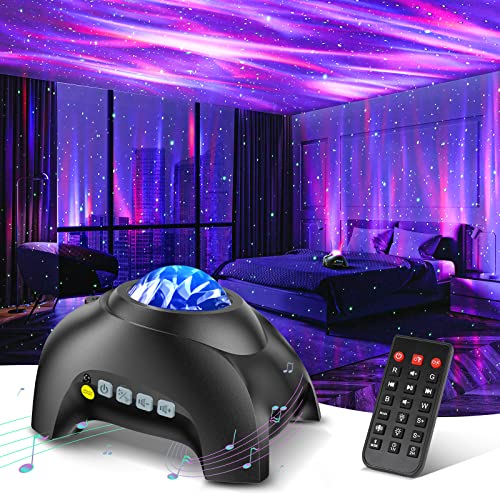
Northern Galaxy Light Aurora Projector with 33 Light Effects, Night Lights LED Star Projector for Bedroom Nebula Lamp, Remote Control, White Noises, Bluetooth Speaker for Parties Black
🏡【𝐔𝐩𝐠𝐫𝐚𝐝𝐞𝐝 𝟑-𝐢𝐧-𝟏 𝐆𝐚𝐥𝐚𝐱𝐲 𝐏𝐫𝐨𝐣𝐞𝐜𝐭𝐨𝐫】Watch the splendid aurora views without chasing around or hiking far away, turning your home…
As an affiliate, we earn on qualifying purchases.
As an affiliate, we earn on qualifying purchases.