Motion interpolation smooths motion and improves viewing but has hidden costs. It can cause input lag, motion artifacts like ghosting, and make images look unnatural, which may distract or reduce realism. Plus, it increases processing demands, consuming more energy and raising your power bills. Hardware and software upgrades add costs, and gaming responsiveness might suffer. To manage these issues, learn how to optimize or disable features properly—more tips to help you make informed choices ahead.
Key Takeaways
- Motion interpolation increases processing demands, leading to higher energy consumption and environmental impact.
- Upgraded hardware and licensing fees for advanced algorithms add significant costs and may raise purchase prices.
- Processing delays can cause input lag, affecting responsiveness especially in gaming or fast-paced content.
- Artifacts like ghosting and soap opera effects reduce image authenticity and viewer comfort.
- Disabling or fine-tuning settings helps avoid hidden costs, artifacts, and unnatural motion effects for a better viewing experience.
motion interpolation settings for TVs
As an affiliate, we earn on qualifying purchases.
As an affiliate, we earn on qualifying purchases.
Understanding Motion Interpolation and How It Works
Motion interpolation is a process that smooths out fast-moving images on your screen by creating and inserting additional frames between the original ones. This technique enhances the frame rate, making motion appear more fluid and reducing blurriness. It works through motion smoothing techniques that analyze each frame’s movement, then generate new in-between frames based on this data. By doing so, the original content’s frame rate gets a boost, often from 24 or 30 frames per second up to 60 or even 120 fps. This process is common in modern TVs and monitors, especially during fast-paced scenes. While it improves clarity in motion, understanding how motion interpolation enhances frame rate and employs various motion smoothing techniques helps you grasp its core function in delivering smoother visuals on your screen. Additionally, the effectiveness of motion interpolation can vary depending on the type of display technology used and the quality of its processing algorithms.

BenQ TH671ST 3000 Lumens 1080p Short Throw Home Entertainment Projector
- High-Resolution Display: Native Full HD 1080p resolution
- Vivid Color Accuracy: 92% Rec. 709 color accuracy
- Bright Image: 3000 lumens brightness
As an affiliate, we earn on qualifying purchases.
As an affiliate, we earn on qualifying purchases.
Benefits of Motion Interpolation: Why People Love It
You’ll notice that motion interpolation creates a smoother visual experience that makes fast-paced scenes look more fluid. It also enhances motion clarity, so you catch every detail without blur. Many people love the cinematic feel it adds, making movies and sports more immersive. Additionally, understanding the visual impact of trailer music can help you appreciate how sound design complements these visual enhancements.
Smoother Visual Experience
Many viewers find that motion interpolation creates a noticeably smoother and more fluid visual experience, especially during fast-paced scenes. Frame interpolation works by generating additional frames between the original ones, enhancing visual smoothness. This process reduces motion blur and judders, making rapid movements appear seamless. If you enjoy watching sports, action movies, or fast-paced gaming, you’ll likely notice how much clearer and more natural the motion looks. The increased visual smoothness can make scenes feel more immersive, giving you a sense of realism and clarity that standard playback may lack. Additionally, understanding cybersecurity vulnerabilities associated with motion interpolation devices can help users better protect their viewing setups. Overall, motion interpolation’s ability to deliver a smoother visual experience is one of its biggest attractions, helping you enjoy content with less distraction and more fluid motion.
Enhanced Motion Clarity
Enhanced motion clarity is one of the main reasons people appreciate motion interpolation, as it makes fast-moving scenes much sharper and easier to follow. Frame interpolation creates new intermediate frames, boosting clarity enhancement during rapid action. This technology helps you see details that might otherwise blur or smear. Here are three benefits:
- Sharper Action Sequences: Fast sports or action scenes become more defined, reducing motion blur.
- Easier Tracking: Moving objects or characters stay more visible, making it easier to follow the story.
- Improved Visual Comfort: Less eye strain occurs when scenes are clearer and smoother.
Cinematic Feel
Motion interpolation not only boosts clarity during fast scenes but also transforms the overall look of your TV’s display, giving it a more cinematic feel. This technology enhances visual storytelling by making motion appear smoother and more natural, closely mimicking the fluidity seen in theaters. Many viewers appreciate how it restores cinematic authenticity, making movies feel less like video recordings and more like the director’s original vision. The result is a more immersive experience that captures the essence of filmmaking. When used correctly, motion interpolation can elevate your viewing pleasure, creating a sense of realism and continuity that draws you into the story. It’s no wonder people love how it enhances the emotional impact and authenticity of their favorite films. Properly calibrating your display ensures the best balance between smoothness and natural motion, maximizing the technology’s benefits.

Dell 27 Monitor S2725QS, 4K UHD IPS, 120Hz, 5ms, FreeSync Premium
- Blue Light Reduction: Reduces blue light emissions to ≤35%
- High Refresh Rate: 120Hz refresh rate with FreeSync Premium
- Fast Response Time: 5ms response time for smooth visuals
As an affiliate, we earn on qualifying purchases.
As an affiliate, we earn on qualifying purchases.
Common Drawbacks: Input Lag and Motion Artifacts
Motion interpolation can cause increased input response times, making fast-paced games feel sluggish. You might also notice unnatural motion effects that look fake or distracting. Additionally, visual distortions and artifacts often appear, undermining image quality.
Increased Input Response Time
While motion interpolation aims to create smoother video playback, it often leads to increased input response times that can disrupt your viewing experience. This happens because the processing introduces a delay between your input and the on-screen action, known as motion delay. The key issues include:
- Increased input lag, making fast-paced games or quick commands feel sluggish.
- Delayed reaction times, which can frustrate you during gaming or interactive tasks.
- Reduced responsiveness, as the TV takes longer to display your commands, impacting your overall experience.
- Additionally, this processing can sometimes introduce motion artifacts, which further degrade image quality and clarity.
These effects stem from the extra processing needed for motion interpolation, which adds to the motion delay. As a result, your inputs don’t translate instantly, diminishing the fluidity and responsiveness you expect.
Unnatural Motion Effects
Although motion interpolation aims to enhance video smoothness, it often introduces unnatural motion effects that can detract from your viewing experience. These effects, known as motion artifacts, can make fast movements appear less realistic or overly smooth, compromising visual authenticity. You might notice a “soap opera” effect or unnatural blurring during rapid action scenes, which can feel distracting and diminish immersion. These artifacts occur because the interpolated frames may not accurately reflect real motion, leading to a disconnect between what you see and reality. While the goal is to create seamless motion, the result can sometimes be jarring or uncanny. To preserve authentic visuals, you may need to turn off or fine-tune the interpolation settings, avoiding these unwanted unnatural motion effects. Additionally, understanding the impact of contrast ratio and color accuracy can help maintain image quality without relying on motion interpolation.
Visual Distortions Occur
Using motion interpolation can introduce visual distortions that disrupt your viewing experience. These distortions often manifest as image artifacts or unnatural motion, making the footage look off. You might notice:
- Soap opera effect – overly smooth motion that feels unnatural.
- Motion artifacts – ghosting or double images during fast scenes.
- Input lag – delay between your device’s response and what you see, causing a disconnect.
These issues stem from the way interpolated frames are generated, which can create visual distortions. While the technology aims to smooth motion, it sometimes results in image artifacts that distract from the content. Understanding these drawbacks helps you decide whether to keep motion interpolation on or turn it off for a better viewing experience.
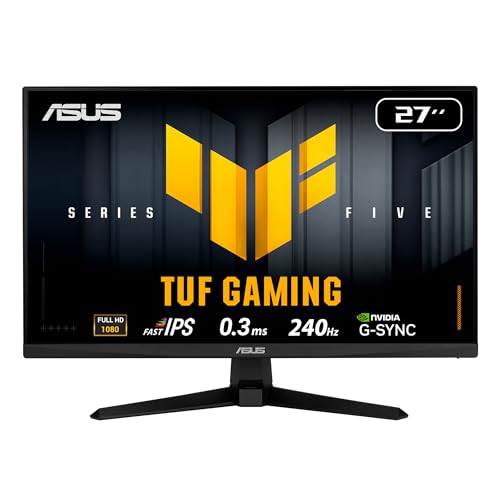
ASUS TUF Gaming 27”1080P Monitor (VG279QM5A) – Full HD (1920 x 1080), 240Hz, 0.3ms, Fast IPS, G-SYNC Compatible, Extreme Low Motion Blur Sync, 99% sRGB, DisplayWidget, Gaming AI, 3 yr Warranty
- Display Size: 27-inch Full HD IPS panel
- Refresh Rate: 240Hz for smooth gameplay
- Response Time: 0.3ms Fast IPS technology
As an affiliate, we earn on qualifying purchases.
As an affiliate, we earn on qualifying purchases.
Energy Consumption and Environmental Impact
Motion interpolation increases the processing demands on your device’s hardware, leading to higher energy consumption. As your TV or monitor works harder to generate intermediate frames, its power consumption rises, which can notably impact your device’s eco footprint. This extra energy use means your device draws more electricity, often from non-renewable sources, contributing to increased greenhouse gas emissions. Over time, this added energy demand not only raises your utility bills but also amplifies environmental concerns. If you’re concerned about sustainability, consider disabling motion interpolation or choosing models that optimize energy efficiency. Reducing unnecessary processing can help lower your device’s power consumption, making your viewing habits more eco-friendly while minimizing your overall environmental impact. Additionally, the increased energy demand associated with motion interpolation highlights the importance of AI safety measures in ensuring that AI-driven features operate efficiently and securely.
Cost of Hardware and Software Enhancements

Upgrading hardware and software for motion interpolation can considerably increase your production costs. You’ll also face licensing fees and patent royalties that add to the expenses. These costs can quickly impact your overall budget and decision-making process. Additionally, investing in self-watering plant pots may involve material choices, which influence both cost and durability.
Increased Production Expenses
Implementing motion interpolation often demands significant investment in both hardware and software, which can substantially amplify production costs. These upgrades lead to higher energy costs and manufacturing expenses, making the process more expensive overall. You’ll need advanced processors, enhanced display panels, and sophisticated algorithms, all of which add to your budget. Consider these factors:
- Upgraded hardware components that consume more energy, raising operational costs.
- Specialized software licenses and development tools that increase initial expenses.
- Additional testing and quality control to ensure seamless motion interpolation, extending production timelines and costs.
- Vetted options for portable camping gear, which can also influence the overall costs if integrated into larger production setups or demonstrations.
These expenses can make your production process less cost-effective, especially when scaling up. Being aware of these increased expenses helps you plan better and avoid surprise budget overruns.
Licensing and Patent Fees
As you enhance your hardware and software for motion interpolation, licensing and patent fees can considerably increase your costs. Patent licensing requires you to pay royalty fees to patent holders for using their technology. These fees can add up quickly, especially if the motion interpolation features rely on patented algorithms or proprietary components. You might also face ongoing royalty payments for each device sold that includes this technology. Licensing agreements can be complex, requiring legal oversight and negotiations that prolong the process. If you’re developing your own solution, obtaining the necessary patents and licenses guarantees legal compliance but comes with upfront costs. Being aware of these licensing and patent fee obligations helps you plan your budget and avoid unexpected expenses down the line. Additionally, understanding the risks associated with new payment technologies can help you better manage potential vulnerabilities in your licensing strategies.
Effects on Visual Authenticity and Image Quality

Motion interpolation can considerably impact the perceived authenticity of images, often making videos look less natural. This process can introduce artifacts like ghosting, blurring, or unnatural motion, which diminish the overall image quality. As a result, your viewing experience may feel less genuine and more artificial. To better understand this, consider these effects:
- Loss of visual authenticity, making scenes seem overly smooth or surreal.
- Reduced image quality due to artifacts that distract from the actual content.
- A less immersive experience, as the processed images can feel disconnected from real-life visuals.
While motion interpolation aims to improve clarity, it often does so at the expense of naturalness. Being aware of these effects helps you decide when to disable it for more authentic viewing.
How Motion Interpolation Can Affect Gaming Performance
While motion interpolation can make videos appear smoother and more visually appealing, it can negatively impact gaming performance by introducing input lag and motion artifacts. When you enable interpolation, your screen’s frame rate is artificially increased, but this can cause delays between your input and on-screen actions, increasing gaming latency. This lag can make fast-paced games feel sluggish and reduce your reaction time. Additionally, the added frames may create motion artifacts, such as ghosting or smearing, which can distort fast-moving objects or characters. These issues are especially problematic in competitive gaming, where timing and precision matter. If you prioritize quick responses and clear visuals, you might find that motion interpolation hampers your overall gaming experience more than it benefits it.
Recognizing When to Use or Disable Motion Interpolation
Knowing when to enable or disable motion interpolation depends on your viewing needs and priorities. If you’re sensitive to motion sickness or watch fast-paced content like sports or action movies, turning it off may be best. Conversely, if you prefer smooth motion for soap operas or nature documentaries, enabling it can enhance your experience. To decide, consider these points:
- Check for motion sickness symptoms—disabling may reduce discomfort.
- Assess content compatibility; some movies or shows look unnatural with interpolation.
- Experiment with settings during different content types to find your comfort zone.
Tips for Minimizing Hidden Costs and Maximizing Benefits

To get the most value from your TV’s motion interpolation features, it’s important to be aware of potential hidden costs and ways to maximize benefits. Start with cost-effective upgrades, like adjusting picture settings or updating your firmware, to improve performance without extra expense. Use user customization options to tailor motion settings to your preferences, reducing the need for expensive hardware changes. Avoid relying solely on default settings; experimenting with different levels of motion smoothing can help minimize artifacts and reduce eye strain. Additionally, consider investing in a good calibration tool or professional calibration service to optimize picture quality. By being proactive with these strategies, you can enjoy smoother motion and better picture quality while avoiding unnecessary costs.
Making an Informed Choice: Is Motion Interpolation Right for You
Deciding whether motion interpolation is right for you depends on how you use your TV and what viewing experience you prefer. If you’re sensitive to motion sickness or prioritize smooth motion for sports or fast-paced movies, it might be beneficial. However, if you value natural images and comfortable viewing ergonomics, you might want to turn it off. Consider these points:
- If you experience motion sickness or eye strain with the effect, avoid using interpolation.
- For fast action scenes, it enhances clarity but can cause unnatural “soap opera” look.
- To prevent viewing discomfort, experiment with settings or disable it during extended viewing sessions.
Ultimately, understanding your comfort level and how you watch can help you make an informed choice about motion interpolation.
Frequently Asked Questions
How Does Motion Interpolation Affect Different Types of Video Content?
Motion interpolation can enhance sports broadcasting by making fast-paced action smoother, but it might distort film preservation efforts by altering the original look of movies. For different video content, it works well for sports but can create unwanted artifacts in cinematic films. You should consider turning it off for movies to maintain authenticity, yet keep it on for sports to enjoy clear, fluid motion.
Can Disabling Motion Interpolation Improve Overall Viewing Experience?
Disabling motion interpolation can substantially improve your overall viewing experience, especially on content with a high refresh rate. Without the added frames, you’ll notice better image clarity and more natural motion, reducing the soap opera effect. This makes fast-paced scenes smoother and more realistic. If you prefer a more authentic, cinema-like picture, turning off motion interpolation helps you enjoy movies and sports without artificial motion artifacts.
Are There Affordable Alternatives to High-End Motion Interpolation Technology?
Think of finding affordable alternatives like hunting for hidden gems in a treasure chest. You can explore budget-friendly options like software-based motion smoothing, cheaper TVs with basic interpolation features, or external devices that enhance your display without breaking the bank. These alternatives may lack high-end polish but still improve your viewing experience without draining your wallet. With a little research, you’ll discover cost-effective ways to enjoy smoother motion on a budget.
What Are the Long-Term Maintenance Costs of Motion Interpolation-Enabled Devices?
You’ll find that the long-term maintenance costs of motion interpolation-enabled devices mainly involve repair costs and software updates. Over time, you might need to pay for repairs if components wear out or break. Additionally, regular software updates are necessary to keep features functioning smoothly and to fix bugs, which can sometimes require professional assistance or incur service fees. Staying proactive helps minimize unexpected expenses down the line.
How Does Motion Interpolation Influence the Lifespan of Display Hardware?
Motion interpolation can slightly reduce your display’s lifespan because it increases hardware stress and power consumption. When you enable this feature, your device works harder, generating more heat and putting extra strain on components. Over time, this added stress may accelerate wear and tear, potentially shortening the hardware’s longevity. To minimize these effects, consider using motion interpolation sparingly or turning it off when not needed.
Conclusion
So, next time you’re dazzled by ultra-smooth motion, remember the hidden costs lurking behind that perfect picture. It’s funny how something so appealing can quietly drain energy, bump up costs, and even mess with your gaming. But hey, if you’re okay with sacrificing a little performance or footing the bill for better hardware, go ahead and indulge. After all, who doesn’t love a little hidden expense with their crystal-clear motion?