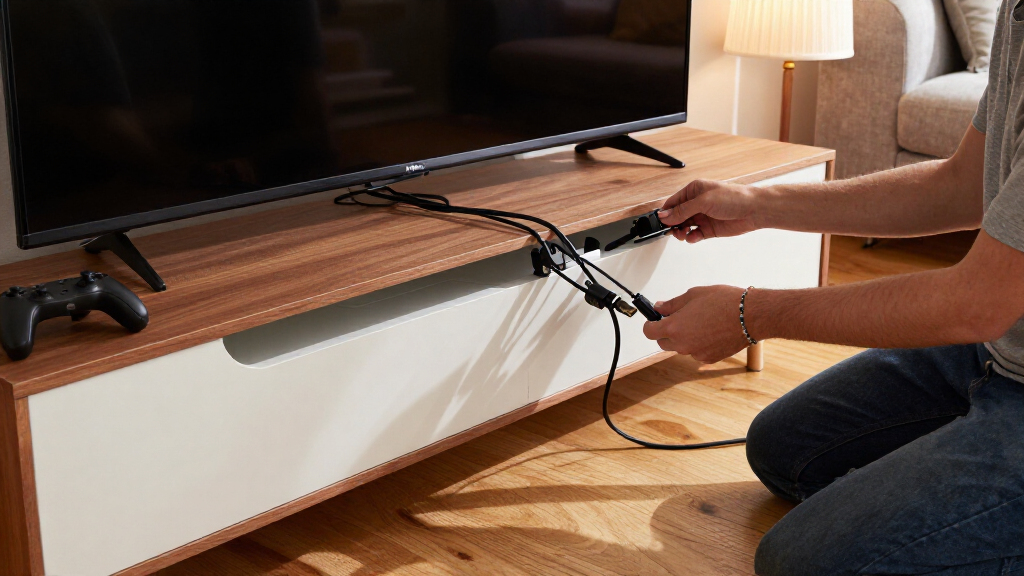

This checklist is for anyone organizing cables in a home media room, whether you’re setting up a projector, display, or work area. The picks cover ways to manage wiring at the desk, around devices, and along a wall, with tidy routing in mind.

Get business pricing on your home office setup
- Business-only prices and quantity discounts
- Tax-exempt purchasing
- Multiple users, one account, clear invoices
It’s organized by cable-management job: holding cables under a desk, containing loose accessories, securing runs, powering devices, hiding wall wires, and bundling cords for reuse. Each section focuses on one specific slot in the setup.
Start by tracing where each cable needs to go, then check the available space and how the product attaches before choosing a solution. Use the checklist to match each pick to your room’s layout and cable paths, and avoid buying organizers that won’t fit the surfaces or connections you have.
Under-Desk Cable Tray
An under-desk tray gives power cords and cable slack a place beneath the work surface, helping keep them away from the floor. It can be useful when a media room desk also holds equipment or serves as a work area. Before choosing this slot, note the desk’s underside, leg placement, and the route cables need to take. Mounting clearance matters: a tray that conflicts with a crossbar or drawer may be hard to position.
Check the listed length against the available span and consider where power connections will sit once the tray is installed. A common mistake is focusing only on tray length while overlooking depth, attachment space, or access to the cords afterward. Keep room for plugs and cable bends, and avoid pulling cables tight across the desk edge. The Ascrono Original is listed at 40.6 inches, so compare that measurement with your desk before deciding. Measure first, including nearby obstructions, and plan a route that leaves connections reachable for adjustments.
What to look for:
- Compare the 40.6-inch length with the clear span beneath the desk.
- Check for crossbars, drawers, or legs that may affect placement.
- Plan access to plugs and connections after installation.
- Leave slack so cables are not pulled tight around desk edges.
Ascrono Original Under Desk Cable Management Tray, Black, 40.6 inches

This under desk cable management tray conceals cords, power strips, and adapters, keeping your workspace tidy and organized. Made from fire-retardant fabric, it supports up to 66 lbs and offers versatile mounting options for various desk setups.
Pros:
- Conceals cords and power strips for a tidy workspace
- Supports a large capacity for multiple devices
- Easy to install with versatile mounting options
Cons:
- Limited to a length of 40.6 inches, may not fit larger desks
- Fabric material may wear over time with heavy use
Best for: desks with a clear underside span that fits the listed length
Not ideal for: desks with limited mounting room or obstructing hardware
Bottom line: Measure the underside and cable path before selecting this tray.
Cable Management Box
A cable management box groups loose cords and related connections in one contained area, which can help make a media setup feel less scattered. This pick is described as extra-large, wooden, and fitted with a magnetic lid. Think through where it will sit and which cables need to reach it; the location should allow cords to enter and exit without sharp bends. Placement and access shape whether a box is convenient in daily use.
One common mistake is choosing a container based on its appearance without checking whether the equipment and cable slack will fit. The product name does not specify interior dimensions, so compare the available space with the items you intend to place inside before buying. Also consider whether you’ll need to open the lid often to reach connections. Keep plugs accessible and avoid crowding cords together. A clear cable plan helps you decide whether this box suits the room, rather than assuming “extra-large” will fit every setup. Check the footprint and the path each cord must take to and from the box.
What to look for:
- Check the box footprint against the intended location.
- Confirm interior space for the equipment and cable slack you plan to contain.
- Plan cord entry and exit paths before placing the box.
- Consider how often you’ll need to open the magnetic lid.
Extra-Large Wooden Cable Management Box with Magnetic Lid

This freestanding cable management box hides power strips and cords in home offices or living spaces. Made from solid acacia or beech wood, it has a magnetic lid and includes cable sleeves and clips.
Pros:
- Fits chargers of different heights, including standing MacBook chargers
- Solid wood construction offers a plastic-free option
- Includes cable sleeves and clips
- Magnetic lid helps keep the box securely closed
Cons:
- Listed for indoor use only
- Dimensions provided do not include the box height
Best for: setups that need a contained place for cords and connections
Not ideal for: equipment that needs frequent access or more space than the box provides
Bottom line: Confirm the footprint and interior fit for your actual setup.
Adhesive Cable Clips
Adhesive cable clips can help keep a cable run in place along a suitable surface, and zip tie mounts can gather or secure wires at chosen points. This pick is described as black, self-adhesive, and supplied with 8-inch zip ties. It may suit a media room where cables need discreet routing near a desk or equipment area. Surface compatibility deserves attention before you stick anything down.
A frequent mistake is applying adhesive to a dusty, uneven, or unsuitable surface and expecting the mount to stay put. Check the mounting surface and plan the route before installation; repositioning adhesive mounts may be difficult. Make sure the cables fit the intended tie arrangement without being squeezed or sharply bent. The product name gives the tie length but not the mount dimensions or cable capacity, so verify those details against your cable bundle. Use gentle restraint when securing wires and leave enough slack near plugs or equipment that may need to move. Decide where each mount belongs before attaching it, especially along visible surfaces.
What to look for:
- Check that the mounting surface is appropriate for adhesive attachment.
- Verify mount dimensions and cable capacity for your wire bundle.
- Plan clip positions before applying the adhesive.
- Leave slack near plugs and equipment that may move.
XHF 3/4" Self-Adhesive Black Cable Zip Tie Mounts, 100 pcs with 8" Zip Ties, Scr
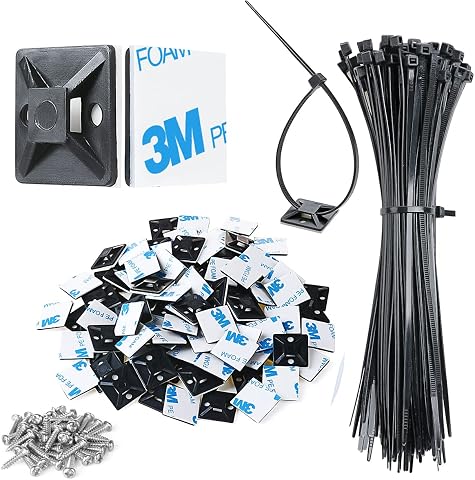
These high-quality adhesive zip tie mounts are made from durable PA66 nylon and 3M strong adhesive, suitable for outdoor use. They are ideal for managing various cables such as computer, TV, and holiday lights, providing a secure and organized solution without tools.
Pros:
- Durable and weather-resistant for outdoor use
- Easy to install with adhesive backing and screws
- Includes comprehensive set of mounts, ties, and screws
Cons:
- Adhesive may require 24 hours to fully cure
- Not reusable once adhered
- Surface must be clean for optimal adhesion
Best for: securing planned cable paths on compatible surfaces
Not ideal for: rough or unsuitable surfaces and bundles that exceed the mount capacity
Bottom line: Check the surface and mount dimensions before attaching the clips.
Surge Protector Power Strip
A power strip can bring several device connections to a shared location, while the listed surge-protector design adds a specific role in a media setup. This GE pick includes two tethered USB ports. Consider where it will sit, how its cord reaches the outlet, and whether the connected equipment can reach it comfortably. Outlet access is part of cable planning, not an afterthought.
A common buying mistake is selecting a strip without checking the devices and plugs it needs to accommodate. Count the connections you plan to use and check plug shapes and spacing against the product details; the name alone does not state the full outlet layout or electrical specifications. Confirm that the USB connections suit the devices you intend to connect, and keep the strip reachable if you need to unplug equipment. Avoid overloading a power setup, and follow the manufacturer’s instructions for its intended use. Connection planning can prevent a neat-looking layout from becoming difficult to use once every device is in place.
What to look for:
- Count the devices and connections you need to support.
- Check outlet layout and plug spacing in the product details.
- Confirm the tethered USB ports suit your intended devices.
- Plan a reachable location with a suitable route to the wall outlet.
GE Surge Protector Power Strip with 2 Tethered USB Ports
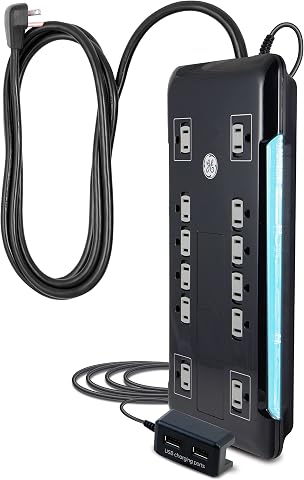
This surge protector features 12 outlets, including two USB ports for charging devices. It has an 8-foot extension cord, space-saving design, and surge protection with a 4320 joule rating, ensuring safety and reliability for home or office use.
Pros:
- Multiple outlets and USB ports for versatile charging
- Long extension cord for flexible placement
- High surge protection rating for safety
Cons:
- Limited to 120V electrical system
- No mention of smart or energy-saving features
Best for: setups that can use its listed USB ports and outlet layout
Not ideal for: equipment plans that require unlisted connections or specifications
Bottom line: Match the connection layout to your devices before choosing a location.
Cable Raceway Kit
A wall raceway can guide exposed wires along a wall, creating a more orderly path between equipment and a display or outlet. This kit is described as paintable and white, with a stated length of 1260 inches. Before planning a route, measure the wall path and note corners, doorways, and other obstacles. Route planning helps you estimate how much material the layout needs.
One common mistake is assuming a long listed length automatically covers every route: turns and detours affect the amount needed, and the product name does not give details about the number or shape of included fittings. Check the kit contents and compare them with your wall layout. Also verify that the raceway can accommodate the cables you intend to hide. For a paintable finish, consider the wall surface and the order of installation and painting, following product directions. Keep cables accessible where they connect to equipment, and avoid creating tight bends. Measure the full path and check compatibility before committing to a route.
What to look for:
- Measure the full wall route, including detours and corners.
- Check included fittings against the turns in your planned path.
- Verify the raceway dimensions suit the cables you want to conceal.
- Plan access to cable ends and follow directions for painting.
1260in Cord Hider Kit for Wall Wires, Paintable Cable Raceway, White

This cord hider kit includes 1260 inches of paintable, easy-to-install cable covers designed to conceal wires along walls. The set features various connectors and accessories for a seamless and safe wire management solution, suitable for homes with kids and pets.
Pros:
- Easy to install without drilling or screws
- Paintable to match wall color for aesthetic integration
- Includes various connectors for flexible routing
Cons:
- Not suitable for textured walls with tape
- Requires cutting for shorter lengths
- Adhesion quality may vary on different wall surfaces
Best for: wall routes that suit the kit’s dimensions and included fittings
Not ideal for: routes needing fittings or cable capacity the kit does not provide
Bottom line: Check the route, fittings, and cable fit before installation.
Reusable Cable Ties
Reusable ties bundle cables together while leaving room to open the bundle when the setup changes. The VELCRO Brand ONE-WRAP ties are listed as 8 inches by 1/2 inch, black, and supplied in a 100-pack. This can be a useful slot for grouping cords behind equipment or along a desk. Reusable bundling supports adjustments without relying on a permanent fastening approach.
A common mistake is wrapping too tightly or combining cables that need to separate for troubleshooting or movement. Check whether the stated 8-inch length suits the circumference of your bundle, and leave enough room for plugs, connectors, and bends. The listed width is 1/2 inch; consider whether that format works for the cable group you have. Keep power and signal cables routed in a way that suits the equipment and its instructions. For a changing setup, group only cords that share a path and leave the ends identifiable. Right-sized bundles are easier to adjust and less likely to make access awkward. Store unused ties where they’re easy to find as the room evolves.
What to look for:
- Compare the 8-inch length with the circumference of each cable bundle.
- Check that the 1/2-inch width suits your cable group.
- Bundle only cords that share a route and may be managed together.
- Leave slack and keep connectors reachable for adjustments.
VELCRO Brand ONE-WRAP Cable Ties, 8in x 1/2in, Black, 100 Pack

These reusable VELCRO cable ties are designed for easy cord management, allowing you to bundle and organize wires quickly and securely. Suitable for indoor and outdoor use, they help eliminate clutter and tripping hazards while providing a damage-free, adjustable solution for home, office, or professional setups.
Pros:
- Reusable and adjustable for versatile use
- Easy to secure with pre-cut, slotted design
- Suitable for indoor and outdoor applications
- Effective for organizing multiple types of cables
Cons:
- May not be suitable for very heavy or large cables
- Limited to 8-inch length, less ideal for very long cords
Best for: cable groups that may need to be opened and rearranged
Not ideal for: bundles larger than the stated tie length can comfortably manage
Bottom line: Match tie length to each bundle and keep connections accessible.
If you’re organizing in stages, begin with the routes that affect placement and access: measure for the under-desk tray and wall raceway, then decide where a box or power strip can sit. Add clips and reusable ties once you know which paths and bundles you’ll keep. This measure-first order helps each choice fit the actual room.
You don’t need to solve every cable path at once. Start with the area that causes the most clutter, check fit and compatibility, and adjust the rest as your media room takes shape. A few well-planned connections can make the setup easier to use and maintain.
Halloween Picks
halloween
As an affiliate, we earn on qualifying purchases.