Creating an ideal home media and workspace environment requires thoughtful selection of gear that balances performance, comfort, and versatility. Whether you’re setting up a dedicated media room, a productive home office, or both, having the right equipment makes all the difference in your daily experience. This checklist is designed to guide you through the essential categories, highlighting key features to consider for each product.
Organized into clear sections, this guide covers everything from display devices to storage solutions, ensuring you don’t overlook any critical component. Use it as a reference during your shopping trips or online browsing, and feel confident in making informed decisions that align with your needs and space constraints.
Remember, the goal is to create a seamless, enjoyable environment—so prioritize quality and compatibility. Take note of your space size, preferred features, and budget to tailor these recommendations to your specific setup. Happy shopping!
Display Devices
The 4K OLED Touchscreen Portable Monitor 16 inch (PI-X9) with Stylus Support is a versatile choice for both media consumption and creative work. Its crisp 4K resolution and OLED technology deliver vibrant colors and deep blacks, enhancing your viewing experience. The touchscreen interface adds an extra layer of interactivity, whether you’re navigating menus or sketching with the included stylus. When selecting a portable monitor, consider compatibility with your devices, the weight and thickness for portability, and the quality of the touchscreen response.
Common mistakes include choosing a display that’s too small or incompatible with your existing hardware. Make sure to check the input options and ensure the monitor supports your devices’ connections. Also, verify if the stylus is responsive and comfortable for extended use. Proper sizing is crucial—16 inches strikes a balance between portability and immersive viewing, making it suitable for both work and entertainment.
What to look for:
- 4K OLED display technology
- Touchscreen responsiveness
- Compatible input ports (HDMI, USB-C)
- Lightweight and portable design
- Stylus support with pressure sensitivity
4K OLED Touchscreen Portable Monitor 16 inch (PI-X9) with Stylus Support
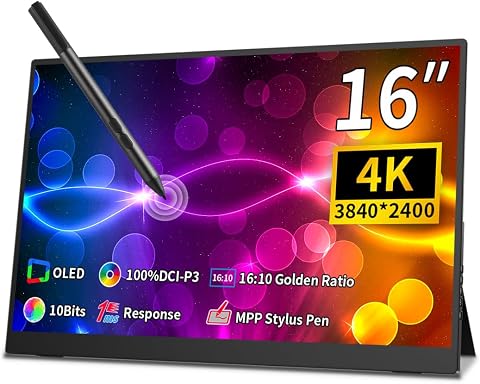
This 16-inch portable monitor features a 4K OLED display with vibrant colors, a 16:10 aspect ratio, and a capacitive 10-point touchscreen. It supports MPP stylus input, is lightweight for portability, and includes an adjustable stand and VESA compatibility, making it ideal for gaming, work, and creative tasks.
Pros:
- Vibrant 4K OLED display with rich colors and high detail
- Supports touch and stylus input for versatile use
- Lightweight and portable with adjustable stand
- Wide color gamut and eye care certification
Cons:
- Limited information on battery life or power source
- Potential compatibility issues with some operating systems
- No mention of built-in speakers or additional ports
Best for: On-the-go media and creative tasks
Not ideal for: Fixed or non-touch monitors
Bottom line: Choose a portable monitor that combines clarity, responsiveness, and compatibility for flexible use.

Klipsch Reference 5.2 Home Theater System, Bundle 2X R-625FA Floorstanding 2X R-12SW Subwoofer, R-52C Center, R-41M Bookshelf Speakers, and Yamaha RX-A2AB 7.2-Channel AV Receiver
- Immersive Home Theater Sound: Experience immersive sound for movie nights
- Powerful Dual Subwoofers: Dual 12-inch subwoofers deliver deep bass
- Clear Dialogue Clarity: Dedicated center channel enhances vocal clarity
As an affiliate, we earn on qualifying purchases.
Audio Equipment
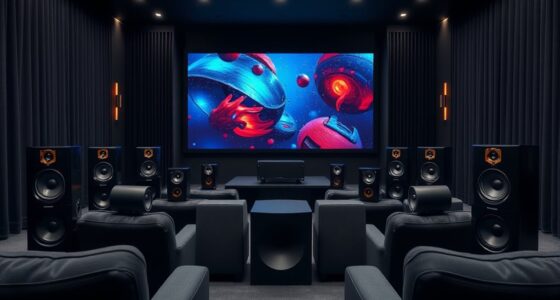
The Klipsch Reference 5.2 Home Theater System Bundle offers a comprehensive audio experience, perfect for immersive media and entertainment. This system delivers rich, detailed sound with clear dialogue, punchy bass, and expansive soundstage. When selecting home audio gear, consider the size of your room and the system’s power output to ensure optimal sound coverage. The bundle includes multiple speakers and a subwoofer, making setup straightforward and providing a cohesive sound profile.
Many buyers overlook the importance of speaker placement and room acoustics, which can significantly impact sound quality. Plan your layout to maximize sound distribution, and avoid placing speakers too close to walls or corners unless specified. Compatibility with your existing AV components is also key—ensure your receiver or source devices support the system’s connections. Proper calibration and positioning are vital for achieving the intended surround sound effect.
What to look for:
- Surround sound configuration (5.2)
- Compatibility with existing AV gear
- Power output suited for room size
- Clear, balanced audio across frequencies
- Ease of setup and calibration
Klipsch Reference 5.2 Home Theater System Bundle

This Klipsch 5.2 home theater system offers immersive audio with dual 12-inch subwoofers, a dedicated center channel, and Dolby Atmos floorstanding speakers for a realistic sound experience. It is ideal for movie nights, music listening, and home cinema setups, delivering high-quality audio fidelity.
Pros:
- Powerful dual 12-inch subwoofers deliver deep bass
- Immersive Dolby Atmos floorstanding speakers
- High-quality Klipsch audio fidelity
- Complete home theater bundle with receiver
Cons:
- Heavy and large setup requiring space
- Limited wireless connectivity options
- Potentially high price for premium components
Best for: Creating an immersive media environment
Not ideal for: Small or incompatible speaker setups
Bottom line: Invest in a system that offers balanced, high-quality sound for your media space.
Seating Solutions
The Steelcase Gesture Office Chair is renowned for its ergonomic design and adaptability, making it ideal for long work sessions or media viewing. Its adjustable features support various postures, reducing fatigue and promoting comfort during extended use. When selecting an office chair, consider your body dimensions, preferred sitting position, and the chair’s adjustability—seat height, armrests, lumbar support, and tilt mechanisms are key factors.
A common mistake is opting for a chair based solely on aesthetics rather than ergonomic support. Proper fit is essential—measure your height and weight, and test the chair’s comfort before purchasing. Wheels and a stable base enhance mobility, especially in a dynamic workspace. Remember, a well-chosen chair not only improves your posture but also boosts productivity and enjoyment during work or leisure.
What to look for:
- Adjustable height and armrests
- Lumbar support for lower back
- Responsive tilt mechanism
- Wheels for mobility
- Breathable, durable fabric or mesh
Steelcase Gesture Office Chair – Ergonomic Work Chair with Wheels for Carpet – C

The Steelcase Gesture Office Chair is designed for ergonomic comfort and adjustability, supporting long hours of work with features like 360-degree arms, a contoured back, and intuitive adjustments. It offers a full recline and lock options, making it suitable for various postures and preferences.
Pros:
- Highly adjustable for personalized comfort
- Contoured back supports natural spine shape
- Suitable for extended use and long hours
Cons:
- Premium price may be high for some users
- Heavy and may be difficult to move frequently
Best for: Long hours of work or media viewing
Not ideal for: Non-adjustable or poorly supported chairs
Bottom line: Prioritize comfort and adjustability for a healthier workspace.
Lighting Options
While no specific lighting product is listed, investing in layered lighting is crucial for creating a comfortable media and work environment. Use a combination of ambient, task, and accent lighting to reduce eye strain and set the right mood. Adjustable fixtures, such as dimmable lamps and smart bulbs, allow you to customize brightness and color temperature, enhancing both productivity and relaxation.
Common mistakes include over-illuminating the space or relying solely on harsh overhead lights. Position task lighting to reduce glare on screens, and consider indirect lighting options for a softer ambiance. Proper lighting not only improves visual clarity but also contributes to a more inviting and functional space, especially during evening hours or low-light conditions.
What to look for:
- Dimmable and adjustable brightness
- Warm color temperature options
- Positioned to reduce screen glare
- Energy-efficient LED fixtures
- Smart lighting compatibility
Connectivity Accessories
The NETGEAR Nighthawk Dual-Band WiFi 7 Router (RS200) – BE6500 is a powerful choice for ensuring seamless connectivity across your media and workspace devices. With support for the latest WiFi standards, it offers fast, reliable internet speeds essential for streaming, gaming, and remote work. When choosing a router, consider your home size, the number of connected devices, and the bandwidth requirements of your activities.
Many users underestimate the importance of a robust network, leading to buffering, lag, and frustration. Position your router centrally, away from obstructions, and ensure it supports dual-band or tri-band functionality to optimize network traffic. Compatibility with your modem and devices ensures smooth operation. Regular firmware updates and security features also help maintain a safe, high-performance network environment.
What to look for:
- WiFi 7 support for future-proofing
- Dual or tri-band capabilities
- Strong signal range for your space
- Ease of setup and management
- Security features like WPA3
NETGEAR Nighthawk Dual-Band WiFi 7 Router (RS200) – BE6500

The NETGEAR Nighthawk RS200 is a dual-band WiFi 7 router offering speeds up to 6.5Gbps, ideal for gaming, streaming, and video conferencing. It covers up to 2,500 sq.
Pros:
- Fast WiFi 7 speeds ideal for gaming and streaming
- Wide coverage area of up to 2,500 sq. ft.
- Supports multiple devices simultaneously
Cons:
- Requires a separate modem for internet access
- No built-in modem included
- May need a compatible modem for multi-gig internet plans
Best for: Ensuring fast, stable internet for media and work
Not ideal for: Outdated or limited-range routers
Bottom line: Choose a router that offers speed, coverage, and security for your connected setup.
Storage & Organization
The Media Storage Cabinet with Tempered Glass Door provides both stylish organization and practical storage for your media accessories. With three adjustable shelves, you can customize space for devices, controllers, or media collections, keeping your area tidy and accessible. When selecting storage furniture, consider the size of your collection, the need for visibility, and ease of access.
Common mistakes include overcrowding shelves or choosing furniture that doesn’t fit your space. Measure your available area and ensure the cabinet’s dimensions suit your needs. The tempered glass door adds a sleek look while protecting your items from dust. Good organization prevents clutter, improves the overall aesthetic, and makes it easier to find what you need quickly. Think about cable management options as well, to keep cords tidy and out of sight.
What to look for:
- Adjustable shelves for versatility
- Durable, tempered glass doors
- Adequate internal storage capacity
- Cable management features
- Fits your space and aesthetic
Media Storage Cabinet with Tempered Glass Door, 3 Adjustable Shelves, Cable Mana

This media storage cabinet features three adjustable shelves, a tempered glass door, and cable management to organize audio and gaming equipment. Made of durable eco-friendly materials, it offers a stylish and functional solution for home entertainment setups.
Pros:
- Adjustable shelves for customizable storage
- Stylish tempered glass door with impact resistance
- Effective cable management for a tidy setup
- Durable construction with eco-friendly materials
Cons:
- Limited to specific device sizes due to dimensions
- Assembly may require time and effort
- Black color may not match all decor styles
Best for: Organizing media and accessories neatly
Not ideal for: Overly small or bulky storage furniture
Bottom line: Select storage solutions that balance style, capacity, and accessibility.
Starting with a budget-conscious approach can help you prioritize essential components first, then expand as your needs grow. Focus on versatile, high-impact gear that enhances your media and workspace experience without overwhelming your space or budget.
Remember, the best setups are tailored to your personal habits and space constraints. Take your time to compare features, read reviews, and visualize how each piece fits into your environment. With thoughtful choices, you’ll create a functional and inviting space that supports both productivity and relaxation.