For most exhibitions, I’d start with the Panasonic PT-VMZ71: its 7,000-lumen output and WUXGA resolution suit bright galleries and detailed presentations. The Epson PowerLite L690SU is a stronger fit when a short throw helps avoid visitor shadows, while the BenQ LK936ST offers 4K detail for installations built around fine imagery. The central tradeoff is not simply brightness versus resolution: room light, projection distance, image size, and installation limits all affect what visitors actually see. This roundup also includes a hologram fan, a different kind of display that works for compact visual effects rather than room-scale projection. Read on for the full comparison and guidance on choosing for your exhibition space.

Get business pricing on your home office setup
- Business-only prices and quantity discounts
- Tax-exempt purchasing
- Multiple users, one account, clear invoices
Complete the kit


Key Takeaways
- The Panasonic PT-VMZ71 leads for bright, flexible venues in this lineup, combining the highest listed brightness with WUXGA resolution; its size and installation requirements may be more than a small exhibit needs.
- Short-throw placement is a practical advantage, not just a specification. The Epson PowerLite L690SU and BenQ LK936ST can help keep equipment closer to a wall and reduce visitor shadows, though placement still depends on the room and screen size.
- Resolution should match the content. The BenQ LK936ST and ViewSonic LS740-4K target detailed 4K imagery, while WXGA options such as the ViewSonic LS740W make more sense when large text and fine visual detail are not the exhibit’s focus.
- Several picks use laser light sources, but they serve different installation needs. The Epson Pro EX11000 and EX9270 offer wireless features, while the Panasonic and short-throw models emphasize venue installation and projection flexibility.
- The Missyou hologram fan is a specialist effect, not a substitute for a projector. Its compact floating-image presentation suits a focused display; the other eight products are better suited to projecting content onto walls or screens.
| Panasonic PT-VMZ71 WUXGA LCD Laser Projector, 7000 Lumens, Black |  | Best for Bright Exhibition Halls | Resolution: WUXGA (1920 x 1200) | Brightness: 7,000 lumens | Light source: Laser | VIEW ON AMAZON | See Our Full Breakdown |
| ViewSonic LS740W WXGA Laser Projector, 5500 Lumens, 1280×800 Wide Display |  | Best for Large, Text-Led Displays | Native resolution: 1280 x 800 | Brightness: 6,000 lumens | Contrast ratio: 3,000,000:1 | VIEW ON AMAZON | See Our Full Breakdown |
| ViewSonic LS740-4K 4K UHD Laser Projector, 5000 Lumens, Home Theater, HDMI |  | Best for High-Detail Exhibition Content | Native resolution: 3840 x 2160 | Brightness: 5,000 lumens | Contrast ratio: 3,000,000:1 | VIEW ON AMAZON | See Our Full Breakdown |
| Epson Pro EX11000 3-Chip 3LCD Full HD 1080p Wireless Laser Projector |  | Best for Flexible Pop-Up Exhibits | Native resolution: 1920 x 1080 | Brightness: 4,600 lumens | Light source: Laser; rated for 20,000 hours | VIEW ON AMAZON | See Our Full Breakdown |
| Epson Pro EX9270 Wireless 1080p 3-Chip 3LCD Business Projector |  | Best for Wireless Content Sharing | Native resolution: 1920 x 1080 | Brightness: 4,100 lumens | Display type: LCD | VIEW ON AMAZON | See Our Full Breakdown |
| 3D Hologram Fan, Missyou 25.6″ 3D Hologram Projector with Remote, Bluetooth, Splicing, HD LED Display, Video Library |  | Best for Attention-Grabbing Booth Displays | Display size: 25.6 inches | Display resolution: 2000 × 1444 pixels | Display type: LED | VIEW ON AMAZON | See Our Full Breakdown |
| Epson PowerLite L690SU 6,200-Lumen Short Throw WUXGA 3LCD Laser Projector |  | Best for Bright, Space-Constrained Exhibition Rooms | Brightness: 6200 lumens | Native resolution: 1920 × 1200 | Display resolution: 1920 × 1080 | VIEW ON AMAZON | See Our Full Breakdown |
| BenQ LK936ST 4K Ultra HD Short-Throw Laser DLP Projector |  | Best for High-Detail Short-Throw Projection | Native resolution: 3840 × 2160 | Brightness: 5100 lumens | Projection technology: DLP | VIEW ON AMAZON | See Our Full Breakdown |
| Panasonic PT-FRQ60 DLP Projector – 4K UHD, 16:9, Ceiling & Floor Mountable, White |  | Best for Permanent Large-Venue Installations | Resolution: 3840 × 2160 (4K UHD) | Aspect ratio: 16:9 | Brightness: 6000 lumens | VIEW ON AMAZON | See Our Full Breakdown |
| projectors for exhibition | Brightness | Contrast ratio | Native resolution | Maximum image size |
|---|---|---|---|---|
| Panasonic PT-VMZ71 WUXGA LCD L | 7,000 lumens | 3,000,000:1 | — | — |
| ViewSonic LS740W WXGA Laser Pr | 6,000 lumens | 3,000,000:1 | 1280 x 800 | 300 inches |
| ViewSonic LS740-4K 4K UHD Lase | 5,000 lumens | 3,000,000:1 | 3840 x 2160 | 300 inches |
| Epson Pro EX11000 3-Chip 3LCD | 4,600 lumens | Up to 100,000:1 | 1920 x 1080 | 310 inches |
| Epson Pro EX9270 Wireless 1080 | 4,100 lumens | 16,000:1 | 1920 x 1080 | 304 inches |
| 3D Hologram Fan | — | — | — | — |
| Epson PowerLite L690SU 6,200-L | 6200 lumens | — | 1920 × 1200 | 400 inches |
| BenQ LK936ST 4K Ultra HD Short | 5100 lumens | 3,000,000:1 | 3840 × 2160 | 120 inches |
| Panasonic PT-FRQ60 DLP Project | 6000 lumens | 20,000:1 | — | — |
More Details on Our Top Picks
Panasonic PT-VMZ71 WUXGA LCD Laser Projector, 7000 Lumens, Black
For exhibitions where daylight or gallery lighting cannot be fully controlled, the PT-VMZ71’s 7,000 lumens give it the strongest brightness advantage in this group. Its WUXGA resolution offers more vertical detail than the WXGA ViewSonic LS740W, making labels, charts, and presentation slides easier to read at scale. Flexible projection adjustments also help when the projector must aim at an angled surface rather than a standard screen.
The tradeoff is that this is a 15-pound installation-focused unit, not the convenient choice for frequent room changes. The Epson Pro EX11000 is a more portable alternative with built-in Wi-Fi and a speaker, while the Panasonic favors brightness and resolution over those conveniences. I’d choose it for a fixed, bright exhibition space, but skip it for compact pop-ups or audiences expecting detailed 4K imagery.
Pros:- 7,000 lumens suit spaces where ambient light is difficult to reduce.
- WUXGA resolution provides more vertical detail than the ViewSonic LS740W’s WXGA format.
- Flexible adjustments support projection onto angled surfaces.
- Wireless connectivity supports convenient content sharing.
Cons:- At 15 pounds, it is less convenient to transport and reposition than the Epson Pro EX11000.
- The listed resolution is WUXGA rather than 4K UHD.
- Built-in speakers are not specified, so audio may require separate equipment.
Best for: Exhibition teams installing a projector in a large, well-lit hall where high brightness and WUXGA detail matter more than portability.
Not ideal for: Small pop-up exhibitors who must carry and reposition equipment often, or displays that need native 4K detail.
- Resolution:WUXGA (1920 x 1200)
- Brightness:7,000 lumens
- Light source:Laser
- Contrast ratio:3,000,000:1
- Weight:15 pounds
- Dimensions:16 x 14 x 5 inches
Our verdict“Choose the PT-VMZ71 for a bright, fixed exhibition venue that needs strong output and WUXGA detail, not a lightweight 4K setup.”
ViewSonic LS740W WXGA Laser Projector, 5500 Lumens, 1280×800 Wide Display
The LS740W is a practical fit for exhibitions built around large diagrams, schedules, and presentation slides rather than fine image detail. Its 6,000-lumen brightness and support for images up to 300 inches help content remain visible across a spacious room, while the 20,000-hour laser life suits installations that run regularly. Compared with the Epson Pro EX9270, it gives up Full HD resolution but offers more stated brightness and a longer-lasting laser light source.
That lower 1280 x 800 native resolution is the main compromise: small labels and detailed artwork will look less crisp than on the Epson or the 4K ViewSonic LS740-4K. Its zoom, keystone correction, and 360-degree projection support flexible installation, though the listing points toward ceiling mounting for a clean permanent setup. I’d shortlist it for big, text-led venues, not image-critical exhibits.
Pros:- 6,000 lumens help content remain visible in bright rooms.
- Laser light source is rated for 20,000 hours of operation.
- Supports image sizes up to 300 inches for large-venue viewing.
- 1.3x zoom, keystone correction, and 360-degree projection help accommodate varied installations.
Cons:- Native resolution of 1280 x 800 is less detailed than the Full HD Epson Pro EX9270.
- Its listed ceiling-mount form factor is less convenient for temporary displays.
- The listed power consumption is 210 watts.
Best for: Exhibition operators showing large slides, signage, or diagrams in an auditorium or classroom-style venue with a permanent mounting plan.
Not ideal for: Curators displaying intricate artwork, fine text, or high-resolution video who need Full HD or 4K detail.
- Native resolution:1280 x 800
- Brightness:6,000 lumens
- Contrast ratio:3,000,000:1
- Light source:Laser; rated for 20,000 hours
- Maximum image size:300 inches
- Connectivity:HDMI, USB, 3.5mm audio
- Projection features:1.3x zoom, keystone correction, 360-degree projection
- Power consumption:210 watts
Our verdict“Pick the LS740W for a large, bright exhibition with straightforward content, but choose a Full HD or 4K model for fine detail.”
ViewSonic LS740-4K 4K UHD Laser Projector, 5000 Lumens, Home Theater, HDMI
When an exhibition depends on fine artwork, close-up imagery, or detailed video, the LS740-4K brings native 4K UHD resolution that the WUXGA Panasonic PT-VMZ71 and WXGA LS740W cannot match. Its 5,000 lumens offer useful brightness for many indoor settings, and 1.6x optical zoom gives installers more flexibility in matching the image to a room. Portrait mode and 360-degree projection add options for unusual layouts and vertical-format displays.
Those strengths come with a clear boundary: the brighter PT-VMZ71 is better suited to venues with persistent strong ambient light, while this ViewSonic prioritizes image detail. The listing describes it as stationary and ceiling-mounted, so it is a weaker fit for temporary exhibits or frequent repositioning. Its setup features may also take more technical planning than the wireless Epson Pro EX11000. I’d choose it for carefully installed, detail-rich displays rather than quick-turn exhibits.
Pros:- Native 4K UHD resolution preserves fine detail in artwork and video.
- 5,000 lumens support projection in ambient light.
- 1.6x optical zoom provides useful placement flexibility.
- Portrait mode and 360-degree projection suit nonstandard display layouts.
Cons:- Less bright than the 7,000-lumen Panasonic PT-VMZ71 for heavily lit venues.
- Stationary, ceiling-mount design is less suited to temporary installations.
- Advanced positioning options may require more setup expertise.
Best for: Museums and galleries presenting detailed artwork or 4K video in a controlled or moderately lit space with a planned installation.
Not ideal for: Exhibitors who need a portable, quick-to-deploy unit or maximum brightness for a strongly lit hall.
- Native resolution:3840 x 2160
- Brightness:5,000 lumens
- Contrast ratio:3,000,000:1
- Light source life:20,000 hours
- Maximum image size:300 inches
- Zoom:1.6x optical
- Installation features:360-degree projection, portrait mode, horizontal and vertical keystone
- Connectivity:HDMI, USB, 3.5mm jack
Our verdict“Choose the LS740-4K when exhibition image detail matters more than maximum brightness or easy portability.”
Epson Pro EX11000 3-Chip 3LCD Full HD 1080p Wireless Laser Projector
The Pro EX11000 makes the most sense when an exhibition needs Full HD visuals without a complicated permanent setup. Its 4,600 lumens can handle many well-lit presentation spaces, while built-in Wi-Fi and a speaker reduce the extra gear needed for a short-term display. Compared with the Epson Pro EX9270, it offers a laser light source rated for 20,000 hours rather than the EX9270’s listed 5,500-hour light-source life, making it the stronger fit for repeat use.
It does not reach the Panasonic PT-VMZ71’s 7,000-lumen output, and its Full HD resolution trails the 4K ViewSonic LS740-4K for intricate imagery. The listed close throw distance may help where projector placement is constrained, but the supplied data does not give enough room-sizing detail to assume it will suit every large screen. I’d favor this Epson for traveling exhibits that need wireless sharing and onboard audio, not maximum brightness or 4K fidelity.
Pros:- Full HD 1080p resolution suits clear presentations and video.
- Built-in Wi-Fi and speaker reduce reliance on separate equipment.
- Laser light source is rated for 20,000 hours.
- Lightweight design is more manageable for mobile exhibit teams than the 15-pound Panasonic PT-VMZ71.
Cons:- 4,600 lumens is below the output listed for the Panasonic PT-VMZ71 and ViewSonic LS740W.
- Full HD resolution cannot match the 4K detail of the ViewSonic LS740-4K.
- The listed short throw range may limit placement options for some large-screen layouts.
Best for: Small exhibition teams running recurring pop-up presentations who want Full HD, wireless sharing, and built-in audio in one unit.
Not ideal for: Venues with very strong ambient light or exhibits where native 4K detail is a core requirement.
- Native resolution:1920 x 1080
- Brightness:4,600 lumens
- Light source:Laser; rated for 20,000 hours
- Maximum image size:310 inches
- Contrast ratio:Up to 100,000:1
- Connectivity:Ethernet, HDMI, USB, VGA, Wi-Fi
- Built-in speaker:Yes
- Weight:Lightweight
Our verdict“Choose the Pro EX11000 for repeat pop-up exhibits that benefit from wireless sharing and built-in audio, rather than maximum brightness or 4K detail.”
Epson Pro EX9270 Wireless 1080p 3-Chip 3LCD Business Projector
For exhibitions where several presenters need to share slides or media from personal devices, the Pro EX9270’s built-in Wi-Fi, Apple AirPlay, and Miracast make content handoffs its clearest advantage. Full HD resolution is a better match for detailed presentation material than the WXGA ViewSonic LS740W, and the lightweight portable form is appealing for teams that move between rooms. It also includes a built-in speaker, which can simplify a modest presentation setup.
The tradeoffs matter for longer-running exhibits: its listed 5,500-hour light-source life is shorter than the Epson Pro EX11000’s 20,000-hour rating, and the EX9270 draws 349 watts. At 4,100 lumens, it also gives up brightness to the EX11000 and the higher-output Panasonic PT-VMZ71. I’d select it for flexible, device-led presentations, but not as my first choice for a continuously operated installation or a brightly lit hall.
Pros:- AirPlay and Miracast support convenient wireless sharing from compatible devices.
- Full HD 1080p resolution is sharper than the WXGA ViewSonic LS740W.
- Portable, lightweight form helps with room-to-room setup.
- Built-in Wi-Fi and speaker can reduce setup accessories.
Cons:- Listed light-source life of 5,500 hours is shorter than the Epson Pro EX11000’s 20,000-hour rating.
- Brightness of 4,100 lumens is lower than the Panasonic PT-VMZ71 and ViewSonic LS740W.
- Listed power consumption is 349 watts.
Best for: Exhibitors who regularly accept content from visitors, speakers, or staff using AirPlay or Miracast and need a portable Full HD projector.
Not ideal for: Operators planning long daily runtimes, seeking a laser light source, or projecting in a venue that calls for the highest brightness in this group.
- Native resolution:1920 x 1080
- Brightness:4,100 lumens
- Display type:LCD
- Contrast ratio:16,000:1
- Light source life:5,500 hours
- Maximum image size:304 inches
- Connectivity:HDMI, USB, Wi-Fi
- Wireless sharing:Apple AirPlay and Miracast
- Built-in speaker:Yes
Our verdict“Choose the EX9270 for portable, wireless Full HD presentations, but favor the EX11000 for longer-term use or the PT-VMZ71 for brighter rooms.”
3D Hologram Fan, Missyou 25.6″ 3D Hologram Projector with Remote, Bluetooth, Splicing, HD LED Display, Video Library
The Missyou takes a different route from the conventional projectors in this roundup: its 25.6-inch LED fan creates floating-style 3D graphics rather than filling a wall with a rectangular image. That makes it a distinctive fit for a trade-show booth or display where stopping passersby matters more than showing detailed footage across a large surface. Its 1500+ video library, app and remote controls lower the effort of changing content, while multi-unit splicing can build a larger visual installation. Compared with the Epson PowerLite L690SU, it is a specialized attention-getter, not a substitute for projecting presentation slides or large-format images. The tradeoffs are its unspecified maximum image size and reliance on Wi-Fi and Bluetooth for full functionality; plan placement and connectivity before the event.
Pros:- Distinctive 3D LED effects can draw attention in busy exhibition spaces.
- A library of more than 1500 videos gives teams ready-made content to start with.
- App and remote controls simplify content management.
- Multi-unit splicing supports larger coordinated visual displays.
Cons:- Maximum image size is not specified, limiting planning for a defined viewing area.
- Full functionality depends on Wi-Fi and Bluetooth setup.
- The 96-watt power draw may be a consideration for installations using multiple units.
Best for: Exhibitors and retail teams seeking a compact, animated focal point for a booth, window, or product display.
Not ideal for: Museums or exhibitors needing legible large-format text, detailed still images, or a documented projection size; its hologram effect is specialized and image dimensions are not specified.
- Display size:25.6 inches
- Display resolution:2000 × 1444 pixels
- Display type:LED
- LED count:672 high-brightness LED beads
- Connectivity:Bluetooth, Wi-Fi
- Power:96 watts
- Operating life:5000 hours
- Included video library:More than 1500 videos
Our verdict“Choose the Missyou for a compact animated booth feature, not for replacing a conventional projector on large exhibition screens.”
Epson PowerLite L690SU 6,200-Lumen Short Throw WUXGA 3LCD Laser Projector
For exhibitions where visitors may enter a brightly lit room and the projector has to sit close to the display surface, the Epson PowerLite L690SU pairs 6200 lumens with short-throw placement. Its WUXGA native resolution gives presentations and exhibit graphics more vertical detail than standard Full HD, while the stated image size of up to 400 inches leaves room for large installations. Compared with the Missyou hologram fan, this is the practical choice for conventional wall or screen projection; compared with the BenQ LK936ST, it gives up native 4K detail in favor of higher listed brightness and a larger stated maximum image size. Laser operation rated to 30,000 hours reduces routine light-source maintenance, but installation still calls for planning: the unit’s lens and mounting options may require a technical setup, and its resolution is not 4K.
Pros:- 6200 lumens help images remain visible in rooms that are not fully darkened.
- Short-throw capability suits venues with limited projector-to-screen distance.
- WUXGA native resolution provides more vertical detail than Full HD.
- A 30,000-hour laser light-source life can reduce maintenance interruptions.
Cons:- Native resolution is below the 4K output of the BenQ LK936ST and Panasonic PT-FRQ60.
- Advanced installation flexibility can make setup more involved.
- The listed maximum throw distance is 22.7 feet, which may restrict some long-room layouts.
Best for: Exhibition teams projecting large presentations or graphics in ambient light, especially where the projector must be placed relatively close to the screen.
Not ideal for: Installations whose priority is native 4K detail or a simple plug-and-play setup without technical support.
- Brightness:6200 lumens
- Native resolution:1920 × 1200
- Display resolution:1920 × 1080
- Light source:Laser
- Maximum image size:400 inches
- Minimum throw distance:5.8 feet
- Maximum throw distance:22.7 feet
- Light-source operating life:30,000 hours
- Warranty:2 years
Our verdict“Pick the L690SU for bright, large-scale exhibition projection when placement flexibility and laser life matter more than native 4K resolution.”
BenQ LK936ST 4K Ultra HD Short-Throw Laser DLP Projector
The BenQ LK936ST is the sharp-detail pick for exhibits that rely on fine artwork, maps, product textures, or small text. Its native 4K UHD resolution gives it a clear resolution advantage over the WUXGA Epson PowerLite L690SU, while the short-throw ratio helps keep the projector closer to the display and out of visitor traffic. HDBaseT and dual HDMI provide useful connection options for fixed professional installations. Its 5100-lumen output is substantial, though below the Epson’s 6200 lumens and the Panasonic PT-FRQ60’s 6000; bright ambient light may favor those alternatives. The stated maximum image size is 120 inches, so this is not the pick for the biggest venue screens. At 19 pounds, it is also better treated as installed equipment than as a projector to carry between exhibition spaces.
Pros:- Native 3840 × 2160 resolution renders fine exhibit details sharply.
- Short-throw ratio supports close placement and can reduce shadows from visitors.
- HDBaseT and dual HDMI support professional installation and source connections.
- Laser light source is rated for 20,000 hours.
Cons:- 5100 lumens is lower than the Epson PowerLite L690SU and Panasonic PT-FRQ60.
- Maximum image size is listed as 120 inches, limiting very large exhibition screens.
- At 19 pounds, it is less convenient to move between temporary installations.
Best for: Exhibition designers who need native 4K detail on a moderate-size screen and can position the projector near the display.
Not ideal for: Large-venue operators needing the highest listed brightness, an image larger than 120 inches, or a lightweight unit for frequent relocation.
- Native resolution:3840 × 2160
- Brightness:5100 lumens
- Projection technology:DLP
- Contrast ratio:3,000,000:1
- Light-source operating life:20,000 hours
- Maximum image size:120 inches
- Lens throw ratio:0.81–0.89
- Connectivity:Dual HDMI 2.0b, DisplayPort, HDBaseT
- Weight:19 pounds
Our verdict“Choose the BenQ when native 4K detail and close projector placement matter more than maximum image size or the brightest output.”
Panasonic PT-FRQ60 DLP Projector – 4K UHD, 16:9, Ceiling & Floor Mountable, White
The Panasonic PT-FRQ60 suits exhibition halls that need a fixed, high-output 4K installation and several mounting choices. Its 6000-lumen brightness sits between the brighter Epson PowerLite L690SU and the BenQ LK936ST, while its 4K UHD resolution offers substantially more detail than the Epson’s WUXGA native resolution. Ceiling, floor, and rear mounting give venue planners options for rooms with unusual sightlines or projection paths. The stated lamp life reaches 24,000 hours in economy mode, though the listing gives a shorter 20,000-hour figure in normal mode. This flexibility comes with a clear cost in portability: at 47.1 pounds, it is far heavier than the BenQ and better suited to a dedicated installation. The product data also does not specify a maximum image size or throw distance, so confirm room geometry before specifying it.
Pros:- 4K UHD resolution supports detailed exhibition visuals.
- 6000 lumens suit professional spaces that need substantial image brightness.
- Ceiling, floor, and rear mounting offer flexibility for fixed venue layouts.
- Lamp life is listed at up to 24,000 hours in economy mode.
Cons:- At 47.1 pounds, it is much less portable than the BenQ LK936ST.
- Maximum image size and throw distance are not specified in the provided data.
- Professional mounting and installation may require experienced technical support.
Best for: Venue operators and exhibition installers planning a permanent 4K projection system with ceiling, floor, or rear-mount requirements.
Not ideal for: Small teams needing a portable projector or buyers who need confirmed image-size and throw-distance figures before designing the installation.
- Resolution:3840 × 2160 (4K UHD)
- Aspect ratio:16:9
- Brightness:6000 lumens
- Contrast ratio:20,000:1
- Lamp life, normal mode:20,000 hours
- Lamp life, economy mode:24,000 hours
- Mounting options:Ceiling, floor, rear
- Weight:47.1 pounds
Our verdict“Choose the PT-FRQ60 for a fixed exhibition venue that needs 4K, strong brightness, and multiple mounting options, not for mobile setups.”
How We Picked
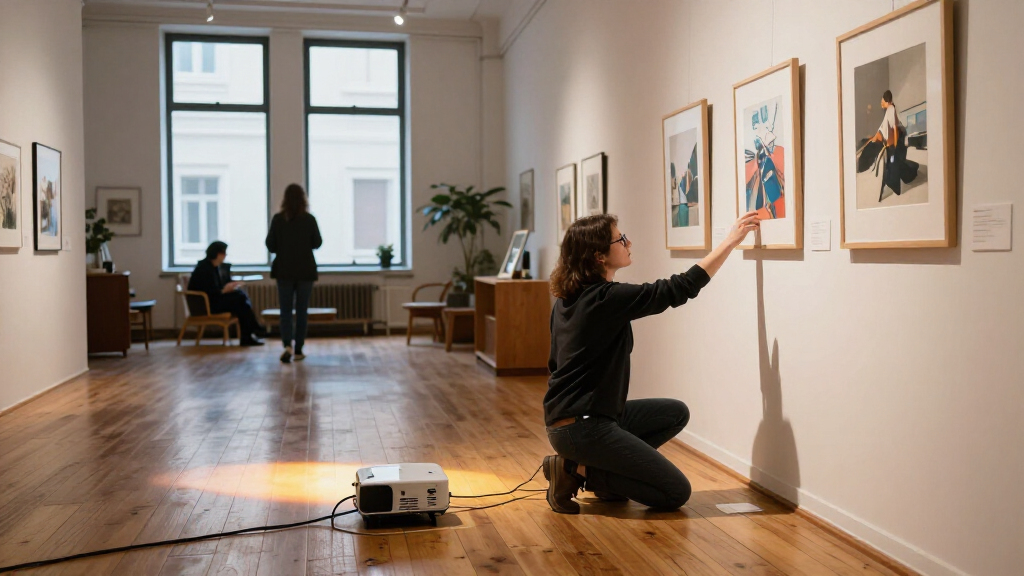
I compared these nine products around exhibition-specific needs: visible image quality in real venues, resolution for text and artwork, listed brightness, throw and mounting options, setup flexibility, and the likely demands of repeated public use. A feature matters only when it changes the installation or the visitor’s view: for example, short throw can reduce obstruction in a tight space, while wireless capability may simplify content delivery but does not replace a planned signal path or reliable venue network.
The order favors models with a clear fit across common exhibition conditions, then specialist strengths. The Panasonic PT-VMZ71 ranks first for its combination of brightness and WUXGA detail; short-throw and 4K models follow for more particular room layouts or high-detail content. Business-oriented and lower-resolution models can still be sensible where simplicity, content type, or setup matters more than maximum image detail. The hologram fan ranks as a separate display category because its effect and viewing scale differ from conventional projection. I have not treated listed specifications as a guarantee of performance in every room; ambient light, screen surface, lens placement, and content all affect results.
| projectors for exhibition | Connectivity |
|---|---|
| Panasonic PT-VMZ71 WUXGA LCD L | — |
| ViewSonic LS740W WXGA Laser Pr | HDMI, USB, 3.5mm audio |
| ViewSonic LS740-4K 4K UHD Lase | HDMI, USB, 3.5mm jack |
| Epson Pro EX11000 3-Chip 3LCD | Ethernet, HDMI, USB, VGA, Wi-Fi |
| Epson Pro EX9270 Wireless 1080 | HDMI, USB, Wi-Fi |
| 3D Hologram Fan | Bluetooth, Wi-Fi |
| Epson PowerLite L690SU 6,200-L | — |
| BenQ LK936ST 4K Ultra HD Short | Dual HDMI 2.0b, DisplayPort, HDBaseT |
| Panasonic PT-FRQ60 DLP Project | — |
Factors to Consider When Choosing Projectors For Exhibitions
Choosing an exhibition projector starts with the space and the visitor experience, not the longest feature list. I’d settle the installation plan, content format, and room lighting before comparing models, since each can rule out an otherwise capable option.
Match Brightness to the Room and Image Size
Brightness needs rise with ambient light and projected image size, but a higher lumen figure alone cannot predict the result. Light from windows, track lighting, or nearby exhibits can wash out dark areas and reduce contrast, even if white elements remain visible. Before buying, check whether the venue can dim lights or control daylight during operating hours. A larger image also spreads the projector’s light over more area, so the same projector may look less vivid at a wider size. Avoid choosing solely by the brightest specification if the exhibit is small and controlled; the larger unit can bring extra cost, noise, or installation demands without improving the visitor experience.
Measure Throw Distance Before Choosing a Lens Type
Measure from the intended projector position to the screen or wall, then confirm that the model can produce your target image size from that distance. Short-throw models can reduce shadows when visitors pass close to the display and can help where ceiling or floor space is limited. They do not automatically solve every placement problem: a very wide image, an unusual mounting height, or people standing directly in front of the lens can still cause obstruction. Standard-throw models may offer more practical placement in a larger room with a clear projection path. Leave adjustment room for focus, alignment, and access to the unit rather than designing a mount around a theoretical minimum distance.
Choose Resolution for the Actual Exhibit Content
Resolution matters most when visitors need to read small labels, inspect fine artwork, or see detailed maps and diagrams. WUXGA and 1080p provide useful detail for many presentations, while 4K can better serve imagery intended for close viewing or intricate visuals. A higher resolution will not rescue a low-resolution source file, and viewers standing far from the image may not notice the difference. Check the resolution of the media player and source content as well as the projector, since the whole signal chain affects the displayed image. If the exhibition uses mainly large shapes, motion, or bold text, spending more for 4K may be less useful than improving placement or controlling room light.
Plan Installation, Access, and Daily Operation
Exhibition equipment often has to run on a schedule and remain out of visitors’ way, so mounting and service access deserve attention before purchase. Confirm ceiling load, available power, cable routes, ventilation clearance, and whether staff can reach the unit safely for routine checks. A floor-mounted setup can simplify temporary installations but may create trip hazards or invite tampering unless it is secured. Wireless features can reduce some cabling, yet a wired backup is useful when a presentation must start reliably or the venue network is crowded. Ask who will restart the system, change content, and troubleshoot focus after installation; a complicated setup can become a recurring staff burden.
Account for Content, Aspect Ratio, and Multiple Displays
Make sure the projector’s native format works with the content and screen design, particularly if the exhibit uses archival footage, panoramic imagery, or custom layouts. Aspect-ratio mismatches can create bars or cropping, changing how the artwork appears and how much screen area is used. For multi-projector work, alignment, synchronized playback, and consistent color can matter more than a single unit’s headline resolution. Test the actual source files at the intended image size before opening to visitors, including subtitles and small interface elements. Treat a hologram fan as a separate visual device: it creates a compact floating-image effect, not a broad wall image, and its viewing conditions differ from conventional projection.
Spend More Only When the Installation Benefits
A more capable projector is worth the added investment when it solves a real constraint: short throw for a narrow gallery, extra brightness for an illuminated room, or higher resolution for detail visitors inspect closely. If the venue is dim, the image is modest in size, and content is simple, a business-oriented model may meet the brief without paying for unused capabilities. Compare ownership needs too, including expected operating hours, cleaning access, replacement parts, warranty coverage, and the labor involved in moving or recalibrating equipment. For temporary exhibits, transport and quick setup may matter more than a permanent-install feature. Set aside time and budget for a test installation; small changes in screen surface or placement can affect the image more than a step up in specifications.
Frequently Asked Questions
Is the brightest projector always the best choice for a gallery?
No. Brightness helps when the venue is illuminated or the image must be large, but it does not by itself produce strong contrast or accurate-looking artwork. A dim room may benefit more from careful placement, a suitable screen surface, and content adjusted for projection. Consider whether the venue can control light during open hours, then match brightness to the image size and viewing distance. The PT-VMZ71 is the brightest listed option here, but a smaller or lower-brightness model may be a better fit for a controlled room.
When should I choose a short-throw projector for an exhibition?
Choose short throw when the projector has to sit close to the display surface, when ceiling space is limited, or when a conventional placement would put visitors between the lens and image. It can reduce the shadow problem in a busy gallery, but it does not remove the need to plan mounting height and walking paths. Confirm the throw range against the exact image size and position rather than relying on the label alone. The Epson PowerLite L690SU and BenQ LK936ST are the short-throw options in this roundup, with different resolution strengths.
Do I need 4K for projected artwork and exhibition text?
Not for every exhibit. 4K is most useful when the image contains fine detail, visitors stand close, or the projection surface is large enough for added resolution to be apparent. For ordinary presentations and many text-led displays, WUXGA or 1080p can provide ample detail when the source material is clear. Check that your playback device and files can supply a suitable signal before paying for higher resolution. In this lineup, the BenQ LK936ST and ViewSonic LS740-4K are the 4K choices, while several other models may better suit brighter or more installation-focused needs.
Can I use a hologram fan instead of a conventional projector?
Usually not as a direct replacement. The Missyou hologram fan is intended for a compact floating-image effect, while conventional projectors create larger images on walls or screens. A fan may work as a focused attraction or a small exhibit element, but it will not serve the same purpose as projecting a video across a gallery wall. Check sightlines, visitor distance, ambient light, and any venue rules for moving display equipment before using one in a public space. Choose it for the effect itself, not as a substitute for wide-area projection.
What should I test before installing a projector in a public exhibition?
Test the complete setup with the actual source device, media files, mounting position, and room lighting. Check focus and legibility from several visitor distances, including for subtitles, small labels, and high-contrast details. Run the system for the expected daily schedule and confirm that staff can restore playback after a power interruption or source change. Inspect cable routing, ventilation, security, and access for routine maintenance. A test run can reveal a throw-distance or content-format mismatch before it affects the exhibition.
Conclusion
For a broad range of illuminated exhibition spaces, I’d choose the Panasonic PT-VMZ71 as best overall for its high listed brightness and WUXGA detail. The ViewSonic LS740W is my best value-minded pick when WXGA resolution suits the content and large-format detail is not the priority; buyers should check that its resolution meets their text and artwork needs. For a premium detailed installation, the BenQ LK936ST stands out with 4K and short-throw positioning, while the Epson PowerLite L690SU is a strong match for buyers who need short throw and WUXGA rather than 4K. Beginners who want a familiar business-projector approach can look at the Epson Pro EX9270, provided its installation and image requirements fit the venue. For a specific visual effect rather than a wall-sized image, choose the Missyou hologram fan; for fine 4K detail across a larger projection, compare the Panasonic PT-FRQ60 and ViewSonic LS740-4K against your placement plan. My final choice would come down to the room first: measure, check light, and match the projector to the content before committing.