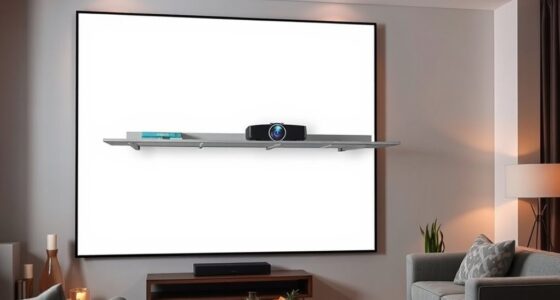
Among native 4K projectors under $3,000, I rank the AWOL Aetherion Pro as the best overall choice for buyers who want an ultra-short-throw setup, while the ViewSonic LS901-4K stands out for a brighter, more traditional installation and the JMGO N1S Ultra for triple-laser color. The category’s main tradeoff is not resolution alone: room layout, usable brightness, setup flexibility, and smart-TV features can matter just as much. Some models are easier to place near a wall, while others suit a ceiling-mounted or dedicated theater setup better. I compare those differences across all six picks so you can match the projector to your room and priorities. Read on for the full breakdown and buying advice.

Get business pricing on your home office setup
- Business-only prices and quantity discounts
- Tax-exempt purchasing
- Multiple users, one account, clear invoices
Complete the kit


Key Takeaways
- The AWOL Aetherion Pro is the most flexible all-around pick in this group for buyers who want an ultra-short-throw layout with Google TV rather than a ceiling-mounted projector.
- The ViewSonic LS901-4K and Optoma UHZ36 favor conventional installations, making room placement and projection distance a bigger part of the decision than built-in streaming.
- The two JMGO models make triple-laser color a defining feature; compare their setup and feature differences rather than treating them as interchangeable options.
- The U1 PRO combines native 4K and Google TV with a stated 1,700 ANSI lumens, but buyers should weigh its all-in-one convenience against the brighter laser-focused alternatives.
- Resolution does not settle the ranking by itself: throw distance, light control, setup flexibility, and the features you will actually use shape which model is the better fit.
| AWOL Aetherion Pro 4K Ultra Short Throw Projector with Google TV |  | Best Ultra Short Throw | Resolution: 4K (3840 × 2160) | Brightness: 2600 ISO lumens | Native contrast: 6000:1 | VIEW ON AMAZON | See Our Full Breakdown |
| U1 PRO Native 4K UHD Google TV Projector 1700 ANSI Lumens |  | Best for Beginners | Resolution: 3840 × 2160 pixels | Brightness: 1700 ANSI lumens | Contrast ratio: 5000:1 | VIEW ON AMAZON | See Our Full Breakdown |
| ViewSonic LS901-4K 4K UHD Laser Projector |  | Best for Bright Rooms and Gaming | Resolution: 4K UHD (3840 × 2160) | Brightness: 5500 ANSI lumens | Refresh rate: 240Hz | VIEW ON AMAZON | See Our Full Breakdown |
| Optoma UHZ36 4K UHD Laser HDR Home Theater Projector – Black |  | Best for Filmmaker Mode | Resolution: 4K UHD | HDR support: Supported; formats not specified | Light source: Laser | VIEW ON AMAZON | See Our Full Breakdown |
| JMGO N1S Ultra 4K Triple Laser Projector | 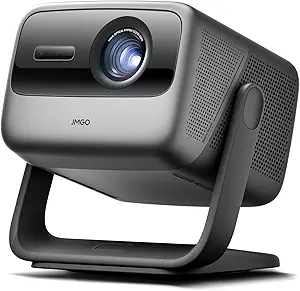 | Best for Color and Flexible Placement | Resolution: 4K | Brightness: 2800 ISO lumens | Light source: Triple laser (RGB) | VIEW ON AMAZON | See Our Full Breakdown |
| JMGO N1S Ultimate Triple Laser 4K Projector |  | Best for Flexible Placement | Resolution: 3840 x 2160 (4K) | Brightness: 3300 ISO lumens | Light source: RGB triple laser | VIEW ON AMAZON | See Our Full Breakdown |
| native 4k projectors for under 3000 | Resolution | Brightness | Light source | Operating system |
|---|---|---|---|---|
| AWOL Aetherion Pro 4K Ultra Sh | 4K (3840 × 2160) | 2600 ISO lumens | — | Google TV |
| U1 PRO Native 4K UHD Google TV | 3840 × 2160 pixels | 1700 ANSI lumens | — | — |
| ViewSonic LS901-4K 4K UHD Lase | 4K UHD (3840 × 2160) | 5500 ANSI lumens | Laser | — |
| Optoma UHZ36 4K UHD Laser HDR | 4K UHD | Not specified in supplied product data | Laser | — |
| JMGO N1S Ultra 4K Triple Laser | 4K | 2800 ISO lumens | Triple laser (RGB) | Google TV |
| JMGO N1S Ultimate Triple Laser | 3840 x 2160 (4K) | 3300 ISO lumens | RGB triple laser | Google TV 3.0 |
More Details on Our Top Picks
AWOL Aetherion Pro 4K Ultra Short Throw Projector with Google TV
The Aetherion Pro is the clearest fit for buyers who want a large, native 4K image without placing a projector across the room. Its ultra-short-throw design can produce a screen up to 200 inches, while the stated 2600 ISO lumens and 6000:1 native contrast point to a stronger mix of brightness and dark-scene detail than the more conventional U1 PRO. Google TV and Dolby Vision also make it a self-contained movie setup. For gaming, the listed 1 ms latency is a standout, though the ViewSonic LS901-4K offers a much higher stated refresh rate. The tradeoff is practical: this is a large unit that needs a suitable surface and precise placement near the screen. It also makes less sense for rooms where a standard-throw tabletop projector is easier to position.
Pros:- Ultra-short-throw placement supports a large image without a long room depth
- Listed 6000:1 native contrast and broad HDR format support suit movie viewing
- Google TV provides built-in streaming access
- Listed 1 ms latency and anti-rainbow optics appeal to gaming and viewing comfort
Cons:- Large chassis requires dedicated placement space
- UST installation can demand careful positioning to align the image
- The listed brightness may not suit bright rooms as well as the ViewSonic LS901-4K’s much higher lumen rating
Best for: Home-theater buyers who need a very large image from a short throw distance and want streaming and gaming features built in.
Not ideal for: People with limited shelf or cabinet space, or buyers who want an easy-to-move standard-throw projector.
- Resolution:4K (3840 × 2160)
- Brightness:2600 ISO lumens
- Native contrast:6000:1
- Throw type:Ultra short throw
- Maximum screen size:Up to 200 inches
- Latency:1 ms
- HDR support:Dolby Vision, HDR10+, HDR10, HLG
- Operating system:Google TV
Our verdict“Choose the Aetherion Pro if you want native 4K and a huge screen from a short distance, and have room for its substantial UST chassis.”
U1 PRO Native 4K UHD Google TV Projector 1700 ANSI Lumens
The U1 PRO is the most approachable conventional setup in this group: its automated focus and keystone correction reduce the fiddling that can make projector ownership frustrating, and Google TV puts streaming apps on the projector itself. Its 1700 ANSI lumens are below the Aetherion Pro and JMGO N1S Ultra ratings, so this is better suited to a dim room than daytime viewing. The 150-inch image limit also trails the Aetherion Pro’s stated 200-inch capability. In return, the U1 PRO offers a tabletop form factor, a listed all-glass lens, and dual 16W speakers, making it a straightforward choice for casual movie nights without a separate streaming box. Buyers who prioritize brightness or high-end gaming should look instead at the ViewSonic LS901-4K.
Pros:- Automated focus and keystone correction simplify setup
- Google TV and listed streaming apps reduce reliance on external devices
- All-glass optical lens is specified for the projection system
- Dual 16W speakers provide built-in audio for casual viewing
Cons:- 1700 ANSI lumens call for a relatively dark viewing environment
- Maximum listed image size of 150 inches is smaller than the Aetherion Pro’s
- Listed 200-watt power draw may matter for buyers focused on energy use
Best for: First-time projector buyers setting up a tabletop movie room or occasional outdoor screening in a controllably dim space.
Not ideal for: Viewers who watch with lights on, need an image larger than 150 inches, or want the brightest option for a large room.
- Resolution:3840 × 2160 pixels
- Brightness:1700 ANSI lumens
- Contrast ratio:5000:1
- Display type:LCD
- Maximum image size:150 inches
- Maximum throw distance:15 feet
- Built-in speakers:Dual 16W Hi-Fi speakers
- Connectivity:HDMI, USB, Bluetooth, Wi-Fi, 3.5 mm jack
Our verdict“Pick the U1 PRO for an easy, self-contained starter setup in a darkened room rather than for bright-room projection or oversized screens.”
ViewSonic LS901-4K 4K UHD Laser Projector
The LS901-4K is the lineup’s specialist for spaces where lower-brightness models may struggle. Its 5500 ANSI lumens far exceed the listed ratings of the U1 PRO and Aetherion Pro, making it the stronger candidate for large rooms with some ambient light. The 240Hz refresh rate and 4.2 ms input lag also give gamers a more clearly specified high-refresh option than the Aetherion Pro, whose listed latency is lower but whose refresh rate is not provided. A native 21:9 aspect ratio, optical zoom, and lens shift favor a planned theater or flexible installation rather than quick tabletop use. The tradeoff is a maximum listed 150-inch screen size, smaller than the Aetherion Pro’s, and its gaming and installation features may be more than a general movie viewer needs.
Pros:- 5500 ANSI lumens give it the strongest stated brightness in this group
- 240Hz refresh rate and 4.2 ms input lag suit high-refresh gaming
- Native 21:9 aspect ratio supports a wide cinematic image
- 1.7× optical zoom and lens shift provide installation flexibility
Cons:- 150-inch maximum screen size is below the Aetherion Pro’s stated 200 inches
- No built-in streaming platform is listed
- Specialized gaming and installation features may be unnecessary for casual movie viewing
Best for: Gamers and home-theater owners with a large, partly lit room who need high stated brightness and installation flexibility.
Not ideal for: Buyers seeking a compact, simple streaming projector or a screen larger than the listed 150-inch maximum.
- Resolution:4K UHD (3840 × 2160)
- Brightness:5500 ANSI lumens
- Refresh rate:240Hz
- Input lag:4.2 ms
- Native aspect ratio:21:9
- Light source:Laser
- Maximum screen size:150 inches
- Optical zoom:1.7×
Our verdict“Choose the ViewSonic LS901-4K for a bright, flexible installation and high-refresh gaming, not for a simple plug-and-play streaming setup.”
Optoma UHZ36 4K UHD Laser HDR Home Theater Projector – Black
The Optoma UHZ36 earns a place here for a specific movie-first feature: Filmmaker Mode, which is intended to preserve the director’s presentation, paired with 4K UHD, HDR support, and a laser light source. The available product data, however, is far thinner than for the other models. There is no listed brightness, contrast, throw ratio, screen-size limit, gaming performance, or built-in streaming platform, so I can’t confidently match it to a bright room or a particular installation. That makes it harder to recommend than the Aetherion Pro, which lists extensive HDR formats and Google TV, or the ViewSonic LS901-4K, whose brightness and installation details are specified. The UHZ36 is a narrower pick for buyers who value its stated picture modes and can verify fit and setup details before choosing.
Pros:- 4K UHD resolution is stated
- HDR support is listed for compatible content
- Laser light source is specified
- Filmmaker Mode targets director-intended presentation
Cons:- No brightness or contrast figures are provided in the supplied product data
- Throw distance, zoom, and maximum screen size are not specified
- No built-in streaming platform or gaming performance details are listed
Best for: Movie-focused buyers who specifically want Filmmaker Mode and can confirm the projector’s brightness, throw, and installation requirements before purchase.
Not ideal for: Shoppers comparing room brightness, gaming responsiveness, screen size, or streaming features from published specifications.
- Resolution:4K UHD
- HDR support:Supported; formats not specified
- Light source:Laser
- Picture mode:Filmmaker Mode
- Brightness:Not specified in supplied product data
- Contrast:Not specified in supplied product data
Our verdict“Consider the UHZ36 for its stated filmmaker-focused features only if its missing brightness and installation details meet your room’s needs.”
JMGO N1S Ultra 4K Triple Laser Projector
The N1S Ultra combines a triple RGB laser light source and stated ΔE<1 color accuracy with an integrated gimbal, giving it a distinct role among these native 4K options. The gimbal, autofocus, and keystone correction make repositioning simpler than with the fixed UST Aetherion Pro, while Google TV and Chromecast support help it serve as a standalone entertainment hub. Its stated 2800 ISO lumens sit above the U1 PRO’s 1700 ANSI lumens, though those different lumen standards are not a direct brightness comparison. The main image-quality caveat is the listed 1600:1 FOFO contrast ratio; buyers focused on specified native contrast may prefer the Aetherion Pro’s 6000:1 figure. It is best for controlled-light viewing, where its color-focused design can take priority over bright-room performance.
Pros:- Triple RGB laser source and stated ΔE<1 color accuracy emphasize vivid, accurate color
- Integrated gimbal, autofocus, and keystone correction ease image alignment
- Google TV and Chromecast support provide built-in streaming and casting options
- 20W dual speakers with Dolby Digital Plus provide onboard audio
Cons:- Controlled lighting is recommended for best contrast
- Listed 1600:1 FOFO contrast is below the Aetherion Pro’s stated native contrast ratio
- The 2800 ISO lumen figure should not be directly compared with ANSI lumen ratings
Best for: Color-conscious movie viewers who want a repositionable projector with automatic alignment and built-in Google TV.
Not ideal for: People who need strong performance in a bright room or who prioritize a high listed contrast ratio for dark-scene viewing.
- Resolution:4K
- Brightness:2800 ISO lumens
- Light source:Triple laser (RGB)
- Contrast ratio:1600:1 FOFO
- Color accuracy:ΔE<1
- Operating system:Google TV
- Audio:20W dual speakers, Dolby Digital Plus
- Positioning and setup:Gimbal stand, 3D TOF sensor, autofocus, keystone correction
Our verdict“Choose the N1S Ultra for color-focused viewing and easy repositioning in a dim room, rather than for the strongest stated contrast or bright-room use.”
JMGO N1S Ultimate Triple Laser 4K Projector
The JMGO N1S Ultimate pairs 3300 ISO lumens with RGB triple-laser color, making it a flexible choice for rooms that are not always fully dark. Its 360° gimbal lets me redirect the image between a wall, ceiling, or screen without relying on a fixed mount, while Google TV 3.0 puts streaming apps on the projector itself. Compared with the JMGO N1S Ultra, this model’s listed brightness and built-in 20W subwoofer make it a more room-flexible all-in-one option; the ViewSonic LS901-4K is a better fit for buyers prioritizing a dedicated installation. The tradeoff is that 1600:1 contrast still favors a dark or controlled room for convincing blacks, and its 25.1-foot maximum throw distance may not suit very large spaces. Its 30-inch-to-300-inch image range also leaves room to adapt as setups change.
Pros:- 3300 ISO lumens support viewing in rooms with some ambient light
- RGB triple-laser light source and 110% Rec. 2020 gamut offer a wide color range
- 360° gimbal supports flexible tabletop, tripod, floor, or ceiling placement
- Google TV 3.0 and 20W subwoofer reduce reliance on separate streaming and audio gear
Cons:- 1600:1 contrast is a limitation for dark-scene performance in a theater-focused setup
- Maximum 25.1-foot throw distance restricts placement in some large rooms
- The product data does not establish a specific native panel resolution, so buyers seeking confirmed native 4K should verify that detail
Best for: Buyers who want a portable, bright 4K projector with flexible placement and built-in streaming for use across different rooms.
Not ideal for: Dedicated home-theater buyers focused on deep blacks, or owners of very large rooms that require a throw distance beyond 25.1 feet.
- Resolution:3840 x 2160 (4K)
- Brightness:3300 ISO lumens
- Light source:RGB triple laser
- Contrast ratio:1600:1
- Color gamut:110% Rec. 2020
- Operating system:Google TV 3.0
- Audio:20W subwoofer; Dolby Digital Plus and DTS-HD Master Audio
- Image size range:60 to 300 inches
- Light source life:30,000 hours
Our verdict“Choose the N1S Ultimate for bright, adaptable projection with built-in streaming, but verify its native-resolution details if native 4K is a firm requirement.”

How We Picked
I ranked these six projectors around the needs behind the phrase native 4K under $3,000: genuine 4K resolution, room-fit flexibility, practical brightness, picture technology, and day-to-day usability. I also considered whether a model brings useful extras, such as Google TV, an ultra-short-throw design, or a triple-laser light source, and whether those features suit a typical buyer’s setup. A projector’s specification matters most when it changes where it can go or how it performs in the intended room.
The ranking favors a strong balance of picture capability and installation convenience, then gives distinct positions to models built for specific needs. The AWOL leads for its all-around ultra-short-throw proposition; the ViewSonic, Optoma, and JMGO options are differentiated by installation style and feature emphasis, while the U1 PRO earns attention for combining native 4K with Google TV. I treat the JMGO N1S Ultra and N1S Ultimate as separate choices, but buyers should verify the exact feature and package differences before purchase. No projector is a universal winner: room dimensions, ambient light, screen choice, and the exact model configuration can change the best pick.
| native 4k projectors for under 3000 | Operating system | Light source |
|---|---|---|
| AWOL Aetherion Pro 4K Ultra Sh | Google TV | — |
| U1 PRO Native 4K UHD Google TV | — | — |
| ViewSonic LS901-4K 4K UHD Lase | — | Laser |
| Optoma UHZ36 4K UHD Laser HDR | — | Laser |
| JMGO N1S Ultra 4K Triple Laser | Google TV | Triple laser (RGB) |
| JMGO N1S Ultimate Triple Laser | Google TV 3.0 | RGB triple laser |
Factors to Consider When Choosing Native 4k Projectors For Under 3000
Before choosing a model, I would start with the room and installation rather than the headline resolution. These factors can prevent a mismatch that no picture feature can fix.
Match Throw Distance to Your Room
Throw distance determines how far the projector must sit from the screen to create the image size you want. An ultra-short-throw design can sit close to the wall, which may suit a living room where a ceiling mount or long cable run is impractical. Conventional projectors such as the ViewSonic and Optoma may work better when you have a planned ceiling position or a shelf with enough distance. Measure from the lens position to the screen, not simply from the back wall to the couch. Also check the lens offset and mounting limits, since a projector may not land at the screen height you expect. A common mistake is buying for resolution first and discovering that the room cannot accommodate the required placement.
Treat Brightness as a Room-Matching Spec
Brightness affects how well a projected image holds up against room light, but a manufacturer’s figure is not a guarantee of identical results across models. A dark theater can make contrast and black levels more noticeable, while a multipurpose room often puts more weight on brightness and screen choice. For the U1 PRO, the stated 1,700 ANSI lumens gives buyers a reference point, but it should be judged alongside the room and intended image size. Larger screens spread the available light across more area, so an image that seems bright at one size may look less vivid when enlarged. Blackout curtains can improve perceived picture quality without requiring a different projector. Avoid assuming that any 4K model will produce a strong image in direct daylight.
Check Whether Native 4K Is the Feature You Need Most
Native 4K describes the projector’s imaging resolution, but it does not describe the whole viewing experience. Source quality, focus across the screen, screen material, contrast, and seating distance also affect how much detail you can see. If your main sources are compressed streams or lower-resolution video, the visible difference may be smaller than it would be with high-quality 4K content. I would compare the projector’s optical and installation needs as closely as its resolution claim. A model with the right placement and a well-sized screen can be a better match than a less convenient projector chosen for one specification. Check the manufacturer’s precise resolution language and product documentation before treating similarly named models as equivalent.
Decide How Much Smart-TV Convenience Matters
Integrated platforms such as Google TV can reduce the need for a separate streaming box and simplify everyday use. That convenience is most useful when the projector is a living-room display shared by several people. Buyers who already use a receiver, game console, or streaming device may care more about inputs and system compatibility than the built-in interface. App availability and software support can change, so confirm that the services you use are supported on the exact version being sold. External streaming hardware can be replaced separately, while a built-in platform is tied to the projector. Choose smart features for ease of use, not as a substitute for checking the picture and installation fit.
Weigh Laser and Triple-Laser Benefits Against Your Priorities
Laser light sources can appeal to buyers looking for a modern projector design, while the JMGO N1S Ultra and N1S Ultimate add triple-laser color as a central point of distinction. That feature may matter more to viewers who prioritize color presentation than to someone focused mainly on room placement or built-in streaming. Different laser implementations do not make two projectors identical, and model names alone are not enough to establish which has the features you want. Check the manufacturer’s specifications for color modes, supported formats, and any relevant operating limits. Also confirm the warranty and service terms for the light source. Pay for a particular laser configuration only when it supports the way you plan to watch.
Budget for the Screen, Mount, and Installation
The projector is only one part of a projection setup. A suitable screen can improve the image in a bright room, while a mount, cables, or professional installation can add cost and effort. Ultra-short-throw projectors may need a screen designed for their steep projection angle, and an uneven surface can make alignment more difficult. Conventional models can require a ceiling mount or careful positioning to avoid keystone correction that affects the image. Before choosing between the AWOL and the longer-throw ViewSonic or Optoma options, sketch the room and list the extra equipment each layout needs. Comparing the complete setup helps explain which projector is the better value for your home.
Frequently Asked Questions
How can I confirm that a projector is truly native 4K?
Check the manufacturer’s official specifications for the imaging device’s native resolution, rather than relying on a product title that says only “4K.” Some projectors accept a 4K signal but use a lower-resolution imaging device with processing to display it. Look for an explicit native-resolution statement in the technical documentation for the exact model and regional version. If the listing is unclear, ask the seller or manufacturer before buying. This matters most if native 4K is the reason you are narrowing your search to these models.
Is an ultra-short-throw projector a better choice for a living room?
It can be, especially when you cannot mount a projector behind the seating area or route cables across the room. An ultra-short-throw model sits close to the screen, but it still needs a suitable surface, careful alignment, and enough clear space around the unit. A standard screen may not suit every ultra-short-throw setup, so check screen compatibility before choosing one. If you have a fixed ceiling-mount position and ample throw distance, a conventional model may be simpler. Measure the room and compare the required image size with each projector’s placement specifications.
Will a native 4K projector work well in a bright room?
Native 4K resolution does not by itself make an image visible in a bright room. Ambient light can wash out contrast and color, especially on a large screen, so window coverings and screen choice can matter as much as the projector. Start by identifying when you will watch and how much daylight reaches the screen wall. If you cannot darken the room, prioritize a model and screen setup suited to those conditions instead of choosing by resolution alone. For evening viewing in a controlled room, picture contrast and image size may become more important than fighting daylight.
Should I choose Google TV built into the projector or use a separate streaming device?
Built-in Google TV can make setup tidier and gives shared living-room users a straightforward way to access streaming apps. A separate device may be a better fit if you already use one, want to keep streaming hardware easy to replace, or need an app that the projector’s platform does not support. Check current app availability and compatibility for the exact projector before relying on its built-in system. Also consider whether your audio setup routes through a receiver or sound system, since that can affect how you connect sources. The right choice depends on convenience and your existing home theater gear, not resolution.
How should I choose between the JMGO N1S Ultra and N1S Ultimate?
Start by comparing the official specification sheets and included accessories for the exact versions available to you. The shared N1S name and triple-laser positioning do not establish that every feature, connection, or package detail is the same. Focus on differences that affect your use, such as supported video formats, placement options, audio connections, software, and warranty terms. If the listed differences do not change your setup, the model with the better fit for your room and preferred features is the sensible choice. Confirm the full model identifier before ordering so you do not compare mismatched regional or bundle versions.
Conclusion
For the broadest mix of convenience and native 4K appeal, I would start with the AWOL Aetherion Pro as the best overall pick, especially for a living room that suits ultra-short-throw placement. The U1 PRO is the best value-minded choice for buyers who want native 4K and Google TV in one unit, while the JMGO N1S Ultimate is my premium-leaning option for shoppers drawn to triple-laser projection and willing to check its exact feature set. For beginners, I would favor the model whose placement and streaming setup are easiest to manage in their room, with the AWOL or U1 PRO worth comparing first. Choose the ViewSonic LS901-4K for a more conventional installation, the Optoma UHZ36 if its laser home-theater configuration fits your setup, or the JMGO N1S Ultra if its specific package suits your priorities. My final advice is to measure the room and verify the exact specifications before deciding; those checks can matter more than small differences on a product page.
Fall Picks

eufy Security Essential 7-Piece Alarm System with HomeBase Mini
As an affiliate, we earn on qualifying purchases.