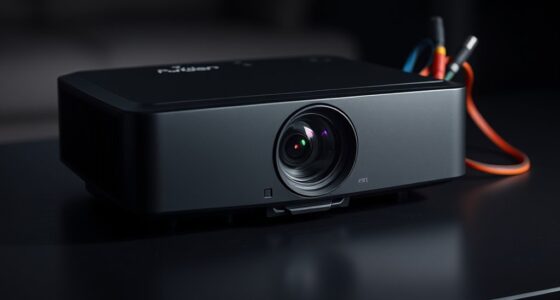

If you notice shadowy or dark patches on your screen, it’s likely caused by a backlight failure or internal display issues. These dark spots often result from faulty LEDs, damaged connections, or aging components affecting illumination. Sometimes, ghosting or pixel response problems can make patches seem more prominent. To fix this, check connections and consider replacing the backlight assembly. Keep exploring further, and you’ll discover detailed steps to diagnose and resolve these screen issues effectively.
Key Takeaways
- Dark patches often indicate backlight failures or faulty LEDs within the display assembly.
- Check for loose or damaged connections to the backlight or optical components.
- Ghosting effects can intensify dark patches, caused by aging pixels or slow response times.
- Diagnosing whether the issue stems from hardware (backlight) or image processing helps determine repair steps.
- Professional repair to replace backlight assemblies or LEDs is recommended for persistent dark patches.

If you notice shadowy or dark patches appearing on your screen, it’s a sign that something isn’t quite right with your display. These patches often indicate issues with the screen backlight or other internal components that affect how images are illuminated and displayed. One common culprit is a problem with the screen backlight itself, which can cause uneven lighting across the screen. When the backlight isn’t functioning properly, parts of your display may appear dimmer or darker, leading to those unsettling shadowy patches. Sometimes, these patches are accompanied by image ghosting—where faint, lingering images from previous frames persist on the screen. This ghosting can make the dark patches seem even more pronounced and distracting, especially during fast-moving scenes or when viewing static images for extended periods.
Understanding the role of the screen backlight is vital. It’s responsible for illuminating the LCD or LED panel behind your display. If the backlight malfunctions—due to faulty LEDs, damaged connections, or aging components—you’ll notice inconsistent brightness, and dark patches will become more prominent. These patches may shift or change size as the backlight flickers or fluctuates, making it clear that the issue lies within the lighting system rather than the image itself. Addressing this often involves checking the connections, replacing faulty LEDs, or in some cases, replacing the entire backlight assembly, which can be a delicate process best handled by professionals.
Backlight issues cause uneven brightness; check connections and consider professional repair for replacement.
In addition to hardware issues, image ghosting can contribute to the appearance of dark patches. Ghosting occurs when pixels do not refresh quickly enough, leaving behind faint traces of previous images. This effect can be exacerbated by poor response times or aging pixels that no longer switch states effectively. When ghosting is severe, dark shadows or patches can seem to “stick” to the screen, particularly around high-contrast areas. This not only distorts your viewing experience but also makes identifying the true source of the dark patches more difficult.
Furthermore, understanding Frictional Unemployment can offer insights into how industries adapt to technological challenges and repair issues like display problems. Recognizing whether the dark patches are caused by backlight failure, ghosting, or a combination of both is the first step toward resolving the issue. By understanding the underlying causes, you can better decide whether a simple adjustment or a more involved repair is needed to restore your screen’s clarity and brightness.
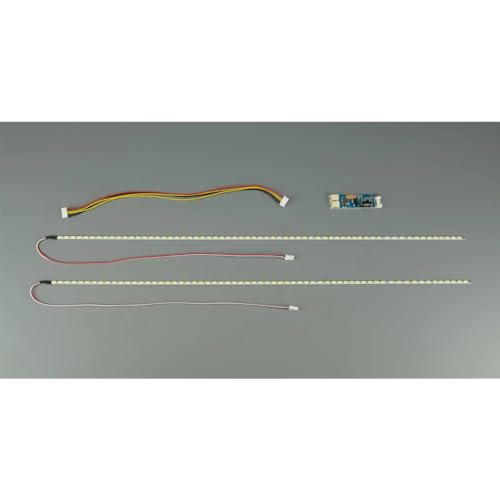
PLAZMO Universal Backlight for 10.4"- 24" LCD or LED Complete Kit
Backlight replacement for LCD Panel
As an affiliate, we earn on qualifying purchases.
As an affiliate, we earn on qualifying purchases.
Frequently Asked Questions
Can Shadow Patches Appear Randomly or Only After Specific Events?
Shadow patches can appear randomly or after specific events, depending on factors like screen calibration and hardware interference. If calibration is off, you might notice shadows showing up unexpectedly. Hardware interference from nearby electronic devices can also cause irregular shadow patches. To fix this, check your screen calibration settings and move potential sources of interference away. Ensuring proper calibration and minimizing interference helps prevent random shadow patches and improves overall display quality.
Do All LCD Screens Develop Optical Block Issues Over Time?
About 80% of LCD screens experience material degradation or manufacturing defects that can lead to optical block issues over time. While not every screen will develop these problems, many do as components wear or degrade. Factors like poor manufacturing quality or prolonged use accelerate this process. You should regularly check your screen and consider professional repair if you notice persistent shadow patches, as they’re often signs of developing optical block issues.
Are Shadow Patches More Common in Certain Types of Screens or Brands?
Shadow patches are more common in screens from certain brands known for lower manufacturing standards. You’ll notice these issues more on budget or less reliable brands, where quality control isn’t as strict. Higher-quality brands with better manufacturing processes tend to have fewer optical block problems. So, if you want to avoid shadow patches, choose brands with a reputation for reliability and superior screen manufacturing.
Can Environmental Factors Cause or Worsen Shadow or Dark Patches?
Environmental factors definitely can cause or worsen shadow or dark patches. Lighting interference can create reflections that mimic shadows, while dust accumulation on the screen or inside the device can obscure parts of the display, intensifying dark patches. You should check for external light sources and keep your screen clean and dust-free. By minimizing lighting interference and regularly cleaning your device, you can reduce the chances of these patches worsening.
Is Professional Repair Necessary, or Can I Fix Optical Block Issues Myself?
You can attempt a DIY repair if you’re comfortable with delicate electronics, but optical block issues often require professional service for proper fixing. While some fixes like cleaning or adjusting components might be manageable, you risk further damage without proper tools or expertise. For best results and to avoid voiding warranties, it’s advisable to seek professional repair, especially if you’re unsure about handling delicate parts or if previous attempts haven’t worked.
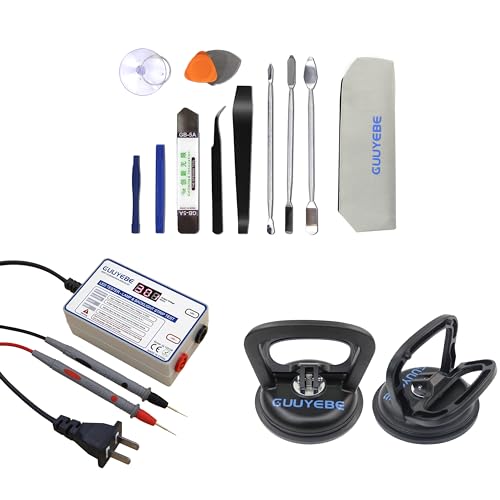
GuuYebe Television Replacement Parts Tools Kit with Heavy Duty Suction Cup and LED Tester and Trim Removal Tool for TV LCD LED Backlight Strip Screen Repair Tool
GuuYebe Television Replacement Parts Tools Kit Applications: TV Repair Tools help to repair the LED backlight strip must-have…
As an affiliate, we earn on qualifying purchases.
As an affiliate, we earn on qualifying purchases.
Conclusion
In the end, those shadowy patches are like uninvited clouds dimming your screen’s brightness. By understanding optical block issues and following the right steps, you can clear the fog and restore your display’s clarity. Think of it as shining a flashlight through a stained glass window—once you fix the cracks, the vibrant colors shine through again. Don’t let dark patches cast a shadow on your viewing experience; take action and enjoy a brighter, clearer screen.

LCDOLED Replacement for HP Envy x360 2-in-1 15-fh0xxx 15-fh 15-fh0000 15-fh0013dx 15-fh0023dx 15-fh0097nr FHD 1080P IPS LCD Display Touch Screen Digitizer Assembly Bezel with Board (Non-OLED Type)
1. Bezel Color: Black;Laptop Model: Replacement for HP ENVY x360 2-in-1 15-fh 15-fh0000 15-fh0xxx 15-fh0013dx 15-fh0023dx 15-fh0097nr Non-OLED…
As an affiliate, we earn on qualifying purchases.
As an affiliate, we earn on qualifying purchases.

Maylit ICRGB TV LED Backlight, App Control LED Lights for 20-36in TV/Monitor, Music Sync Color Changing TV LED Strip Lights for Home Decor, USB Powered Gaming Accessories Lights for Bedroom Room Decor
Enhanced ICRGB TV Backlight Experience: Elevate your TV viewing with Maylit ICRGB TV lights, featuring dazzling multi-color display…
As an affiliate, we earn on qualifying purchases.
As an affiliate, we earn on qualifying purchases.