If you want a true HDR experience, you’ll need a special screen that can accurately reproduce a wide color gamut, like DCI-P3 or Adobe RGB. Regular displays might not display vibrant, rich colors or handle HDR content properly. A monitor designed for HDR guarantees accurate colors, better contrast, and overall sharper images. If you keep exploring, you’ll find how choosing the right display can make a huge difference in your viewing and creative tasks.
Key Takeaways
- HDR content requires screens with wide color gamuts like DCI-P3 or Adobe RGB for accurate reproduction.
- Special HDR displays often feature higher brightness and better calibration options for true color accuracy.
- Standard screens may lack sufficient color coverage and calibration tools needed for accurate HDR viewing.
- Professional tasks like photo editing demand color-accurate, calibrated monitors for precise results.
- Investing in a dedicated HDR-compatible, color-accurate screen enhances visual quality and viewing experience.

Have you ever been frustrated by screens that display colors inaccurately? It’s a common experience, especially when you’re working on color-sensitive projects or trying to enjoy vibrant media. Fortunately, achieving accurate colors isn’t just about buying the right monitor; it involves understanding how calibration tools and color gamut coverage play an essential role in ensuring your screen shows true-to-life hues. Calibration tools are indispensable for fine-tuning your display’s output, allowing you to adjust brightness, contrast, and color balance precisely. These tools help you eliminate color casts and guarantee consistency across different devices. When you calibrate your monitor properly, you gain confidence that what you see on screen closely matches the original content, whether you’re editing photos, designing graphics, or watching movies. Additionally, display calibration is crucial for maintaining color accuracy over time, as screens can drift from their calibrated settings. Color gamut coverage, on the other hand, determines the range of colors your monitor can reproduce. If your screen has limited color gamut coverage, it can’t display the full spectrum of colors present in HDR content, resulting in dull or washed-out images. For HDR, in particular, a display needs a wide color gamut—such as DCI-P3 or Adobe RGB—to accurately render the rich, vibrant colors that HDR offers. Without sufficient color gamut coverage, you won’t experience the true brilliance HDR promises, and your viewing experience may feel lackluster or artificial. Choosing a display with high color gamut coverage and investing in proper calibration tools makes a noticeable difference. These features ensure that your screen can handle the depth and richness required for HDR content, making images pop with life and accuracy. For professional work, such as photo editing or video production, this becomes even more indispensable. You need to see every detail and nuance, which is only possible with a monitor that covers a broad color gamut and can be calibrated to display colors precisely. If you’re aiming for a true HDR experience, it’s worth considering whether your current monitor meets these standards. Not all screens are created equal, and many consumer-grade displays fall short in color gamut coverage or lack calibration options. Upgrading to a monitor designed for HDR, equipped with comprehensive calibration tools, ensures you get the most accurate colors possible. Ultimately, the right combination of calibration and color coverage empowers you to enjoy content as it was meant to be seen, with vibrant, true-to-life colors that elevate your viewing or creative experience.
HDR color accurate monitor
As an affiliate, we earn on qualifying purchases.
As an affiliate, we earn on qualifying purchases.
Frequently Asked Questions
Can I Use a Regular Screen for HDR Content?
You can use a regular screen for HDR content, but your experience will fluctuate. Budget monitors and gaming screens with basic HDR support may not deliver the full brightness, contrast, and color range you need for true HDR visuals. For the best experience, investing in a display specifically designed for HDR ensures vibrant, accurate colors and richer detail, especially if you’re into gaming or content creation.
Does Screen Size Affect Color Accuracy?
Yes, screen size can affect color accuracy, especially if your display has limited color gamut or narrow viewing angles. Larger screens may reveal color inconsistencies or reduced brightness at the edges, impacting your viewing experience. To maintain ideal color accuracy regardless of size, choose a screen with a wide color gamut and good viewing angles. This ensures consistent, accurate colors across the entire display, no matter how big it is.
Are Expensive Screens Always Better for HDR?
Are expensive screens always better for HDR? Not necessarily. While high-end models often feature better brightness, contrast, and color accuracy, you can find budget monitors that deliver impressive HDR performance with professional calibration. Don’t assume price equals perfection—research specs carefully. Sometimes, a well-calibrated budget monitor can surprise you, providing vibrant HDR visuals without breaking the bank. The key is understanding what features matter most for your HDR experience.
How Does Ambient Lighting Impact HDR Viewing?
Ambient light considerably impacts your HDR viewing experience by affecting contrast and color accuracy. In a bright viewing environment, excessive ambient light can wash out HDR content, making details less vivid. To enjoy ideal HDR performance, you should control ambient light, such as dimming lights or reducing reflections. Creating a darker, controlled environment helps your screen deliver the full depth, brightness, and color richness that HDR is designed to provide.
Is Calibration Necessary for HDR Color Accuracy?
HDR calibration is essential for achieving ideal color accuracy on your screen. Without proper calibration, you might not see the full range of colors and brightness HDR offers. It ensures that your display accurately reproduces content as intended, enhancing your viewing experience. By calibrating your screen, you align colors and contrast levels, making HDR visuals more vibrant and true to life, so investing in calibration is definitely worthwhile for the best results.
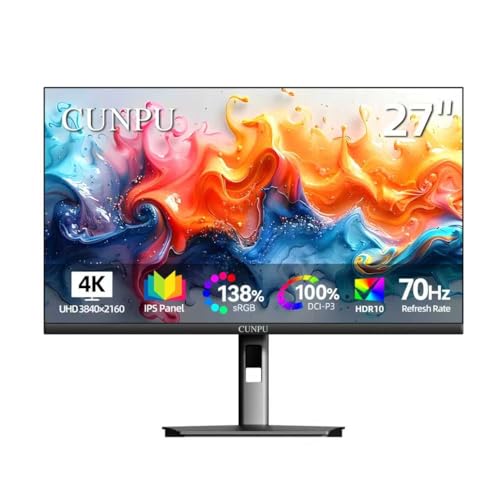
CUNPU 27 Inch 4K 70Hz Monitor, UHD (3840 * 2160) IPS Ultra-Slim Bezel Monitor for Photo Video Editing, ΔE < 2, 100% DCI-P3, 1.07B+ Colors, PIP-PBP, Adaptive Sync, DP/HDMI, Black
SUPERIOR 4K IMAGE QUALITY: The CUNPU 4K monitor boasts a 27-inch display with four times the pixel density…
As an affiliate, we earn on qualifying purchases.
As an affiliate, we earn on qualifying purchases.
Conclusion
While a color-accurate screen ensures stunning visuals and true-to-life colors, it’s not always necessary for HDR. Think of it as the difference between a painter’s palette and a high-definition camera—both capture beauty, but one isn’t always indispensable for the other. If your goal is professional-grade color accuracy, invest in a specialized display. Otherwise, for casual viewing or gaming, a standard HDR screen can still deliver impressive visuals without breaking the bank.
calibrated computer monitor for HDR
As an affiliate, we earn on qualifying purchases.
As an affiliate, we earn on qualifying purchases.
wide color gamut display DCI-P3
As an affiliate, we earn on qualifying purchases.
As an affiliate, we earn on qualifying purchases.